
快捷菜单
常用功能一站直达
更多功能请点顶栏「快捷菜单」
完整部署-eo边缘函数+cnb私有库
上面是快速尝鲜,现在开始开始完整部署下这款博客。
有任何不懂问题,先多看几次手把手文档,自己是否哪里配置有遗漏或配置错了,还有不明白,可以随时群里找我解答哈😊。(如何进群,看后面关于我,加我微信,我拉你进微信交流群哦😂)
注意下:
本次OneBlog的部署方式是:(cnb+eo+eo边缘函数)
自己私有项目仓库存在cnb私有仓库,cnb流水线把构建好的静态内容给推送到cnb公开库,然后利用eo边缘函数对cnb公开库进行反代,同时eo给自己主站域名做cdn加速访问。
这个访问速度体验相当nice,比eop发布一次速度快多了。(eop方式部署,每次从cnb构建好的静态产物往eop推送,特别慢,得好几分钟)
这个访问方式也比cnb+cos访问丝滑多了,因为如果cnb静态产物存到cos的话,每个月还会收取费用(大概2-4块),hold不住哈哈哈。
具体详细过程见下文:
更细的手把手步骤,见专题文档:
https://onedayxyy.cn/topics/oneblog/
见《》文档。
见《》文档。
(1)创建并获取cnb api token(这里主要得拥有一些充足的权限⚠️)
来到自己cnb仓库,点击头像-个人设置-访问令牌-添加访问令牌:
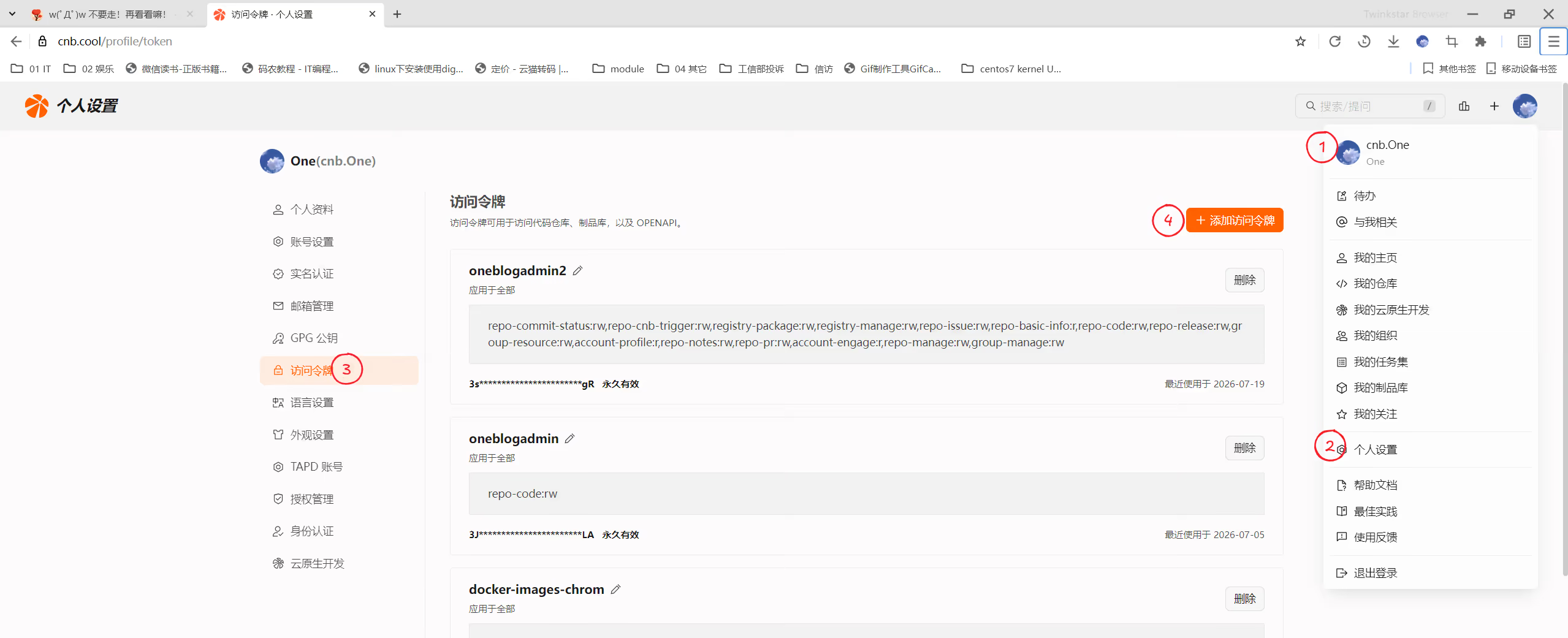
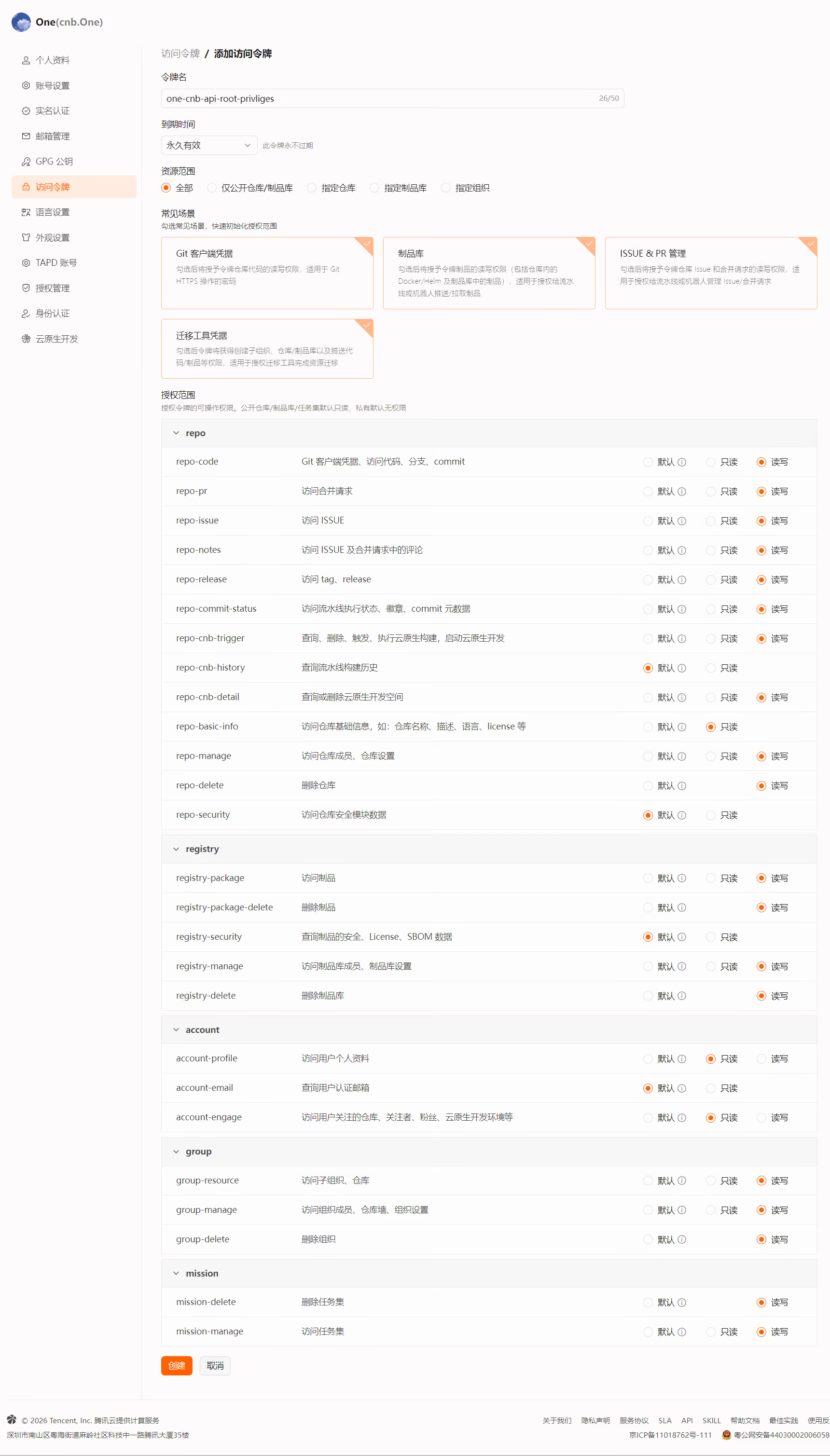
命名为one-cnb-api-root-privliges,
到期时间:永久有限,
资源范围:全部,
常用场景:勾选全部,
授权范围:凡是有读写的,都修改为读写。(这里我们一次性给于最大权限哦哈哈)
完成后,点击创建:
点击创建后,就会弹出新生成的cnb api token:
我们切记保存好这个秘钥:
1one-cnb-api-root-privliges
2令牌名:one-cnb-api-root-privliges
3Git Username:cnb
4Token:fxxxxxxxxxxxxxxxxxxxxxxxxxEPD  #这里已脱敏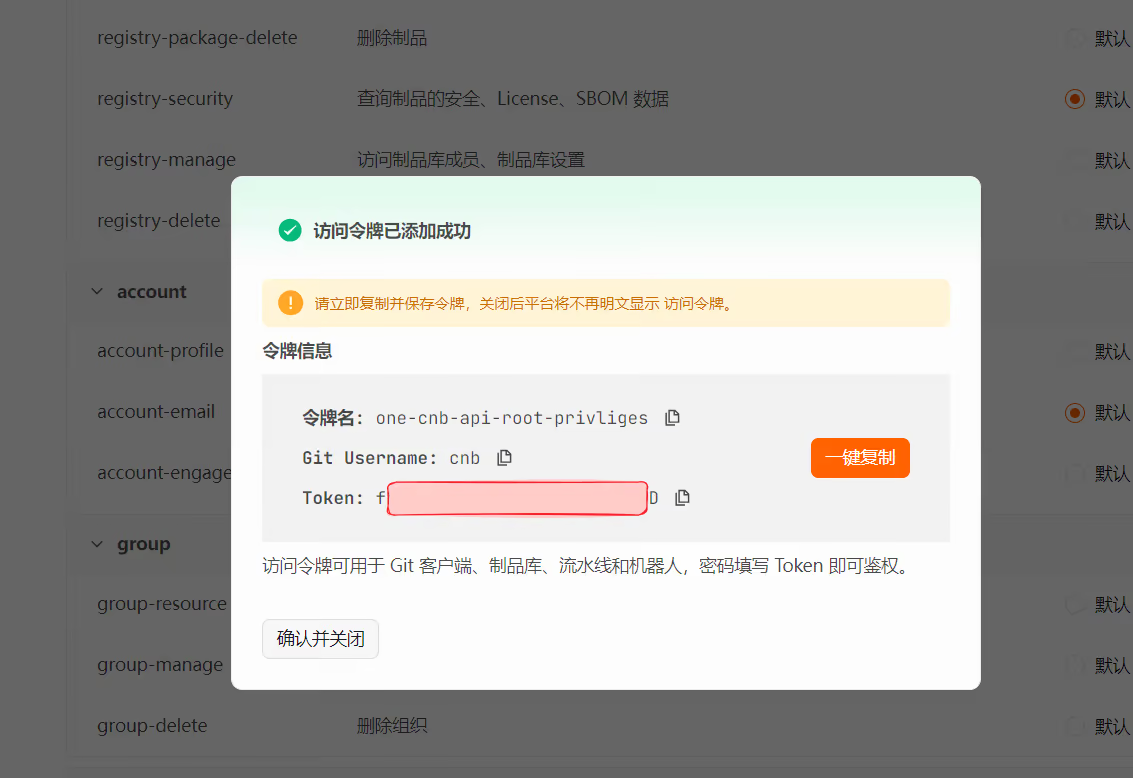
(2)创建cnb secret仓库
https://cnb.cool/onedayxyy/secret
在secret仓库里创建envs.yml文件,然后写入自己要用的秘钥变量名称及数值即可:
1#七牛云(这里用自己前面获取到的信息填写即可)
2QINIU_AK: 1Exxxxxxxxxxxxxxxxxxxxxxxx_B
3QINIU_SK: lxxxxxxxxxxxxxxxxxxxxxxsM4
4QINIU_BUCKET: onedayxyyrzdist
5
6
7#cnb token(这里用自己前面获取到的信息填写即可)
8GIT_cnb_USERNAME: cnb
9GIT_cnb_ACCESS_TOKEN: 4xxxxxxxxxxxxxxxxxxxxxxxC
填写完成后提交,我们后续的cnb ci里会用到的。
克隆cnb仓库(克隆,然后推送后,会直接触发cnb构建,然后在makers上就会创建相应的项目了)
1(1)在自己cnb仓库提前创建好一个空仓库(命名随意)本次就叫做 oneblogpublic
2
3
4(2)在自己电脑上克隆好仓库,并推送
5cd /d/
6git clone https://cnb.cool/onedayxyy/oneblogpublic
我们先本地运行下,尝尝鲜:😂😂😂
来到/d/oneimgpublic目录:
直接点击start-blog-frontend.bat,就会自动运行起博客哦!
http://localhost:9090/
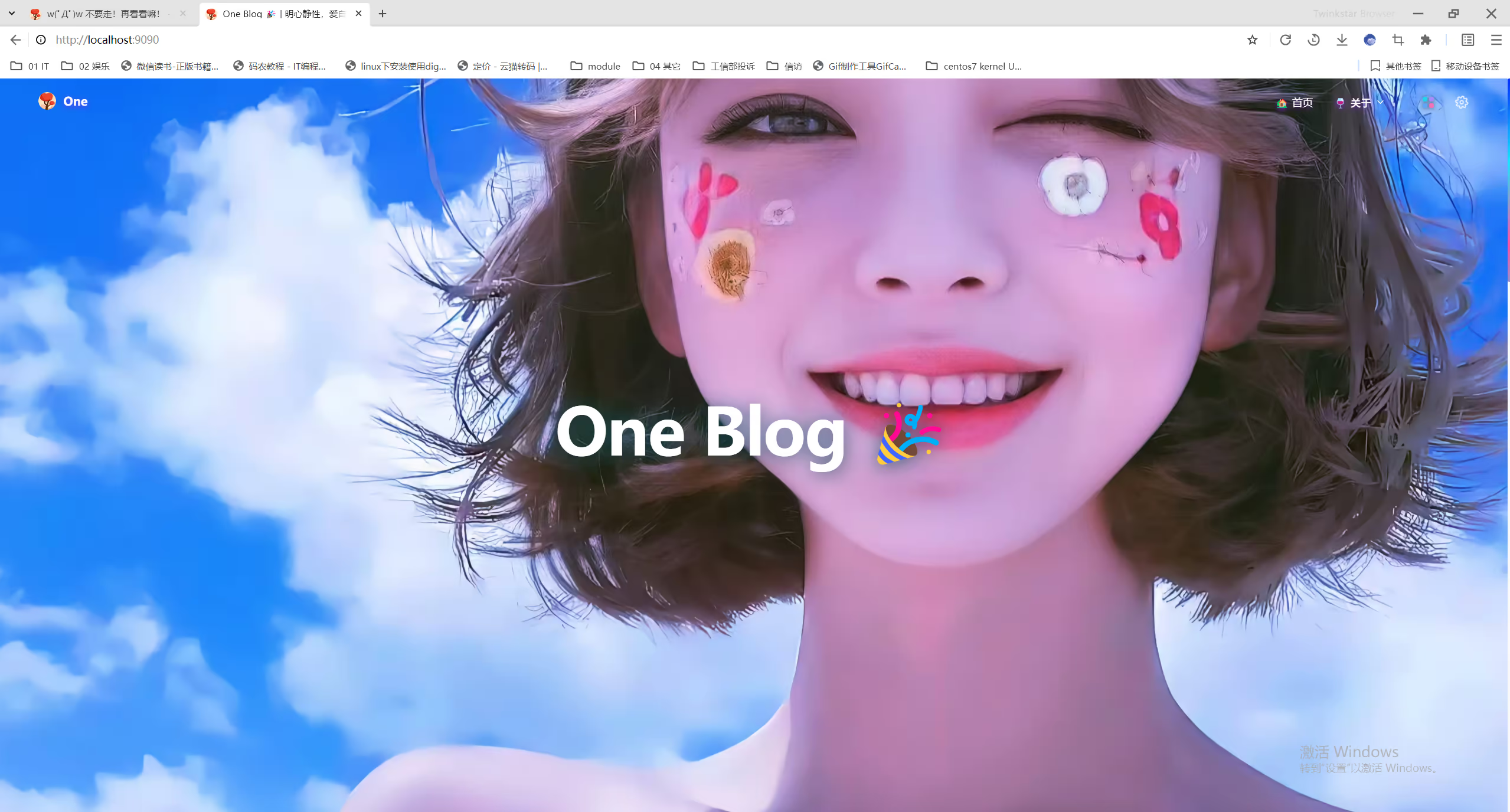
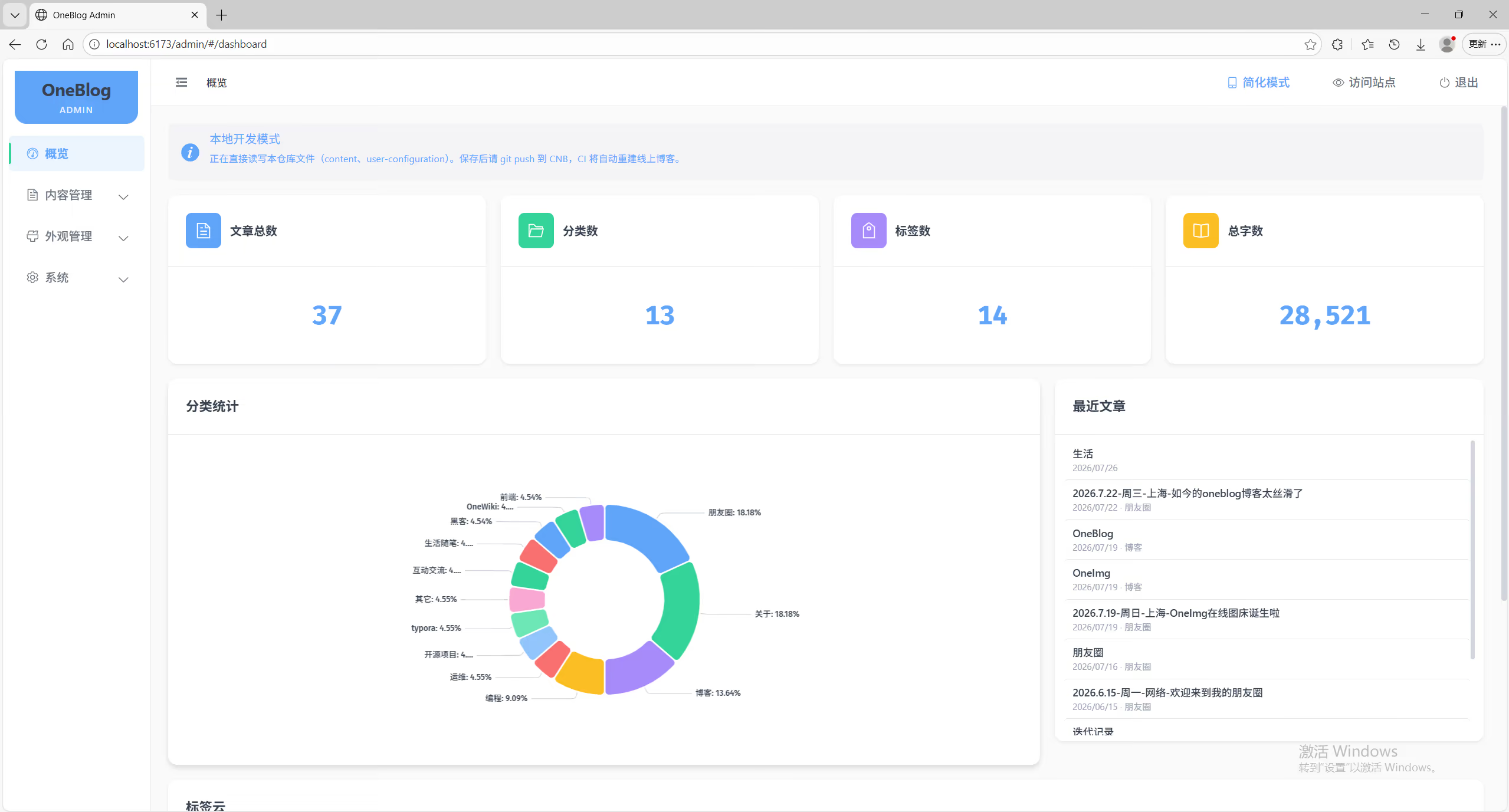
再直接点击start-blog-admin.bat,就会自动运行起博客后台哦!
http://localhost:6173/admin/
(1)创建KV命名空间
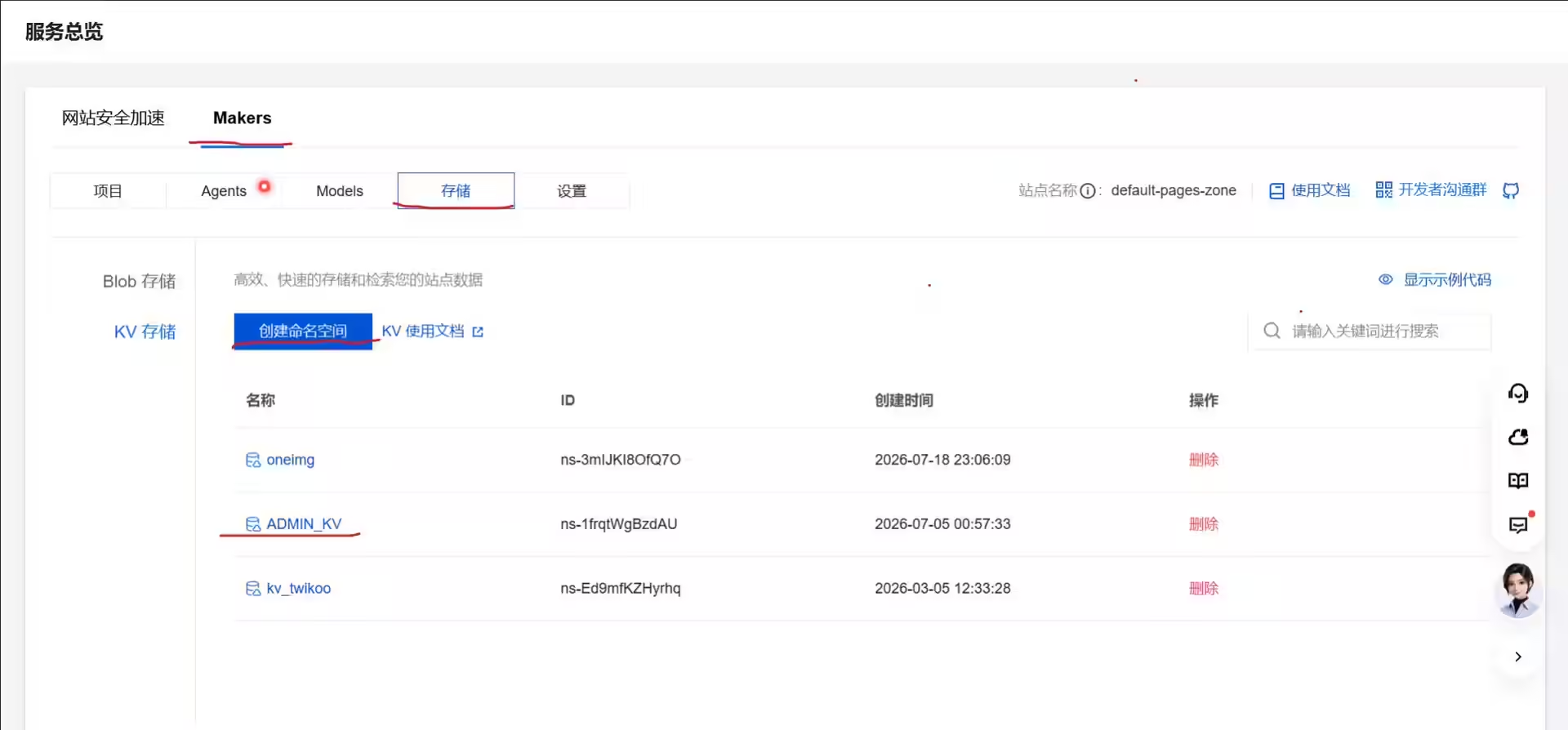
来到Makers-存储-kv存储,点击创建命名空间,
本次我这里创建一个叫ADMIN_KV的命名空间:
然后需要创建如下一些变量,并自定好对应的值:⚠️⚠️⚠️(这里需要注意,不要出错)
1# 后台登录密码
2ADMIN_PASSWORD=change_me
3
4# JWT 签名密钥(建议: openssl rand -base64 32)
5JWT_SECRET=change_me_to_a_long_random_string
6
7CNB_TOKEN=xxxxxxxxxxxxxxxx
xxx截图。。。
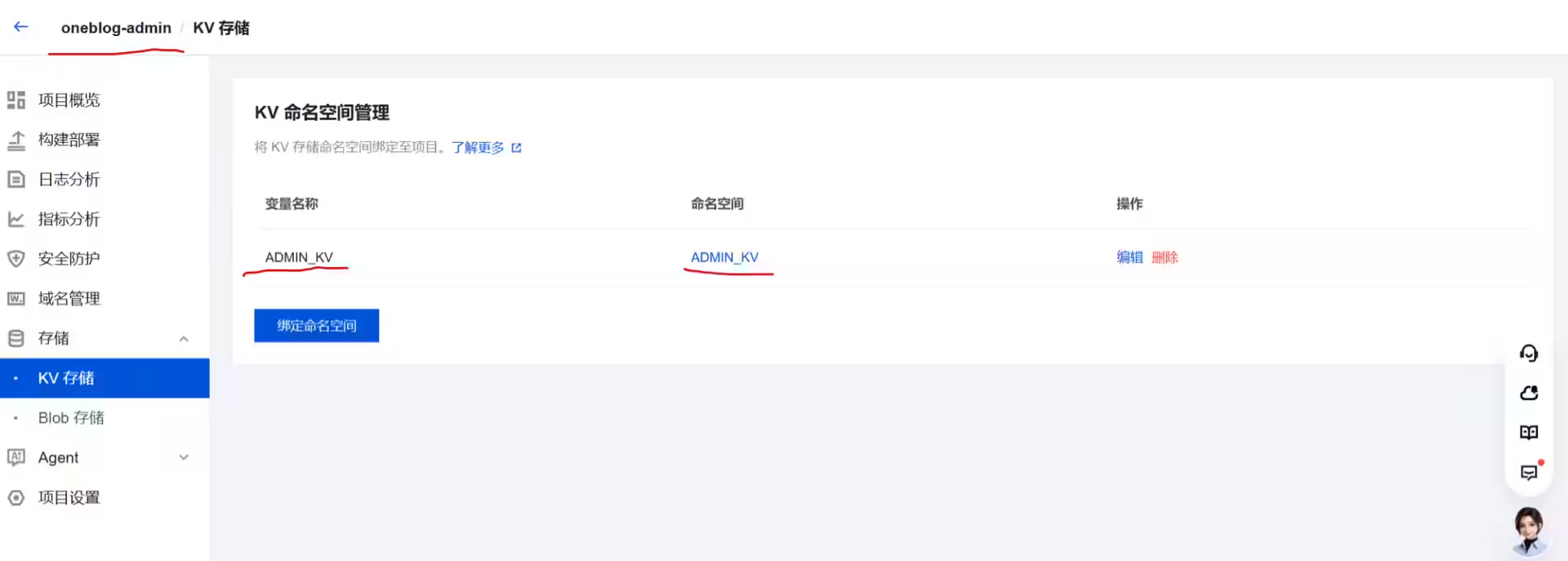
(2)与Makers项目做好绑定
来到刚才自动创建好的oneblog-adminmakers项目里:
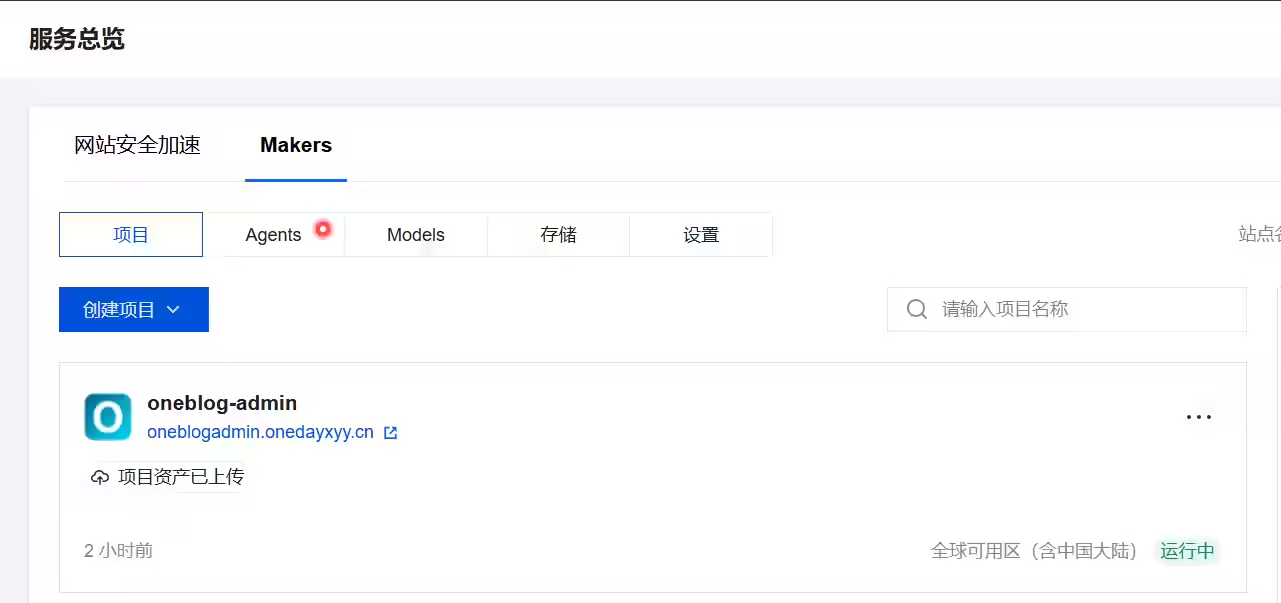
来到KV存储,点击绑定命名空间:
这里新建的变量名称一定要是ADMIN_KV,然后绑定我们前面创建的ADMIN_KV命名空间
需要配置2个地方!
(1)编辑边缘函数


1/**
2 * EdgeOne 边缘函数:从 CNB 公开产物库拉取静态站
3 *
4 * 用法:复制到腾讯云 EdgeOne 控制台 → 站点 → 边缘函数(整文件覆盖)
5 *
6 * 相对旧版改进:
7 * 1. HTML/CSS/JS 等文本资源做 gzip(缓冲后再压,避免流式 CompressionStream 在 EO 静默失败)
8 * 2. 指纹静态资源长缓存;HTML 短缓存
9 * 3. 响应头 X-EO-Compress 便于确认压缩是否生效
10 * 4. 找不到页面时回退到产物库中的 404.html(Hugo 自定义 404)
11 * 5. 维护模式:轮询 Admin 公开状态;开启时对所有请求返回 503 维护页
12 */
13addEventListener('fetch', (event) => {
14 event.respondWith(handleRequest(event.request));
15});
16
17const BASE = 'https://cnb.cool/onedayxyy/hugo-teek-public-dist/-/git/raw/dist';
18const MAINTENANCE_STATUS_URL = 'https://oneblogadmin.onedayxyy.cn/api/maintenance-status';
19const MAINTENANCE_CACHE_TTL_MS = 5000;
20const MAINTENANCE_FETCH_TIMEOUT_MS = 2500;
21
22async function handleRequest(request) {
23 const url = new URL(request.url);
24 let pathname = url.pathname;
25
26 const maintenance = await getMaintenanceStatus();
27 // 维护模式下仍放行站点图标,避免标签页变成空白文档图标
28 if (maintenance && maintenance.enabled && !isFaviconPath(pathname)) {
29 return buildMaintenanceResponse(maintenance);
30 }
31
32 if (pathname !== '/' && !pathname.endsWith('/') && !isFile(pathname)) {
33 const redirectUrl = new URL(request.url);
34 redirectUrl.pathname = pathname + '/';
35 return Response.redirect(redirectUrl.toString(), 301);
36 }
37
38 let uri = pathname;
39 if (uri.startsWith('/')) uri = uri.slice(1);
40 if (!uri || uri === '') uri = 'index.html';
41 if (uri.endsWith('/')) uri = uri + 'index.html';
42
43 let target = `${BASE}/${uri}`;
44 let resp = await fetchOrigin(target);
45
46 if (!resp.ok && !isFile(uri)) {
47 const indexUri = uri.endsWith('/') ? uri + 'index.html' : uri + '/index.html';
48 target = `${BASE}/${indexUri}`;
49 resp = await fetchOrigin(target);
50 if (resp.ok) uri = indexUri;
51 }
52
53 if (!resp.ok || !resp.body) {
54 // 回退到 Hugo 构建的自定义 404 页,避免纯文本 "Page Not Found"
55 const notFound = await fetchOrigin(`${BASE}/404.html`);
56 if (notFound.ok && notFound.body) {
57 const rawBuf = await notFound.arrayBuffer();
58 const contentType = 'text/html; charset=utf-8';
59 const headers = new Headers();
60 headers.set('Content-Type', contentType);
61 headers.set('Cache-Control', 'public, max-age=60, must-revalidate');
62 headers.set('Content-Length', String(rawBuf.byteLength));
63 const uncompressed = new Response(rawBuf, {
64 status: 404,
65 headers,
66 });
67 return maybeGzip(request, uncompressed, '404.html', rawBuf, contentType);
68 }
69
70 return new Response('Page Not Found', {
71 status: 404,
72 headers: { 'Content-Type': 'text/html; charset=utf-8' },
73 });
74 }
75
76 const contentType =
77 getContentType(uri) || resp.headers.get('content-type') || 'text/html; charset=utf-8';
78
79 // 大体积 CSS/JS(如 main.css ~1MB)若整包 arrayBuffer + gzip,EO 易直接 545。
80 // 指纹静态资源改为直通,交给平台智能压缩。
81 const originLen = Number(resp.headers.get('content-length') || 0);
82 if (shouldPassthrough(uri, contentType, originLen)) {
83 const headers = new Headers();
84 headers.set('Content-Type', contentType);
85 headers.set('Cache-Control', cacheControlFor(uri));
86 if (originLen > 0) headers.set('Content-Length', String(originLen));
87 headers.set('X-EO-Compress', 'passthrough');
88 return new Response(resp.body, { status: resp.status, headers });
89 }
90
91 // 先读入缓冲:EO 上对流式 pipeThrough(CompressionStream) 经常不生效
92 let rawBuf;
93 try {
94 rawBuf = await resp.arrayBuffer();
95 } catch (e) {
96 const headers = new Headers();
97 headers.set('Content-Type', contentType);
98 headers.set('Cache-Control', cacheControlFor(uri));
99 headers.set('X-EO-Compress', 'passthrough-read-fail');
100 const retry = await fetchOrigin(target);
101 return new Response(retry.body, { status: retry.status, headers });
102 }
103
104 // 读完后发现超大:不再 gzip,避免边缘函数 OOM/545
105 if (rawBuf.byteLength > PASS_THROUGH_MAX_BYTES) {
106 const headers = new Headers();
107 headers.set('Content-Type', contentType);
108 headers.set('Cache-Control', cacheControlFor(uri));
109 headers.set('Content-Length', String(rawBuf.byteLength));
110 headers.set('X-EO-Compress', 'skip-large');
111 return new Response(rawBuf, { status: resp.status, headers });
112 }
113
114 const headers = new Headers();
115 headers.set('Content-Type', contentType);
116 headers.set('Cache-Control', cacheControlFor(uri));
117 headers.set('Content-Length', String(rawBuf.byteLength));
118
119 const uncompressed = new Response(rawBuf, {
120 status: resp.status,
121 headers,
122 });
123
124 return maybeGzip(request, uncompressed, uri, rawBuf, contentType);
125}
126
127/** 超过该体积不再做边缘 gzip 缓冲(main.css 约 1MB) */
128const PASS_THROUGH_MAX_BYTES = 400 * 1024;
129
130function shouldPassthrough(uri, contentType, contentLength) {
131 if (contentLength > PASS_THROUGH_MAX_BYTES) return true;
132 // 指纹 CSS/JS 体积常偏大,优先直通
133 if (/\.min\.[a-f0-9]{8,}\.(?:css|js)(?:$|\?)/i.test(uri)) {
134 if (contentLength === 0) return true; // 未知长度时也不冒险缓冲
135 if (contentLength > 200 * 1024) return true;
136 }
137 return false;
138}
139
140function fetchOrigin(target) {
141 return fetch(target, {
142 headers: {
143 'User-Agent': 'curl/8.0.0',
144 Accept: '*/*',
145 'Accept-Encoding': 'identity',
146 },
147 });
148}
149
150function isFile(path) {
151 return /\.[^/]+$/.test(path);
152}
153
154function isFaviconPath(pathname) {
155 const p = String(pathname || '').toLowerCase();
156 return (
157 p === '/favicon.ico' ||
158 p === '/favicon.png' ||
159 p === '/favicon.svg' ||
160 p === '/apple-touch-icon.png' ||
161 p === '/apple-touch-icon-precomposed.png' ||
162 p.endsWith('/favicon.ico')
163 );
164}
165
166function getContentType(uri) {
167 const map = {
168 html: 'text/html; charset=utf-8',
169 css: 'text/css; charset=utf-8',
170 js: 'application/javascript; charset=utf-8',
171 mjs: 'application/javascript; charset=utf-8',
172 json: 'application/json; charset=utf-8',
173 png: 'image/png',
174 jpg: 'image/jpeg',
175 jpeg: 'image/jpeg',
176 gif: 'image/gif',
177 svg: 'image/svg+xml',
178 webp: 'image/webp',
179 avif: 'image/avif',
180 ico: 'image/x-icon',
181 woff: 'font/woff',
182 woff2: 'font/woff2',
183 txt: 'text/plain; charset=utf-8',
184 xml: 'application/xml; charset=utf-8',
185 map: 'application/json',
186 };
187 if (!isFile(uri)) return 'text/html; charset=utf-8';
188 const ext = uri.split('.').pop().toLowerCase();
189 return map[ext];
190}
191
192function cacheControlFor(uri) {
193 if (/\.(?:css|js|mjs|woff2?|png|jpe?g|gif|webp|avif|svg|ico)(?:$|\?)/i.test(uri)) {
194 return 'public, max-age=31536000, immutable';
195 }
196 return 'public, max-age=60, must-revalidate';
197}
198
199function isCompressible(uri, contentType) {
200 if (/\.(?:png|jpe?g|gif|webp|avif|woff2?|mp4|webm|gz|br)(?:$|\?)/i.test(uri)) {
201 return false;
202 }
203 const type = contentType || '';
204 return /text\/|javascript|json|xml|svg/.test(type);
205}
206
207async function compressGzip(rawBuf) {
208 if (typeof CompressionStream === 'undefined') {
209 return { ok: false, reason: 'no-compression-stream' };
210 }
211 try {
212 const cs = new CompressionStream('gzip');
213 const writer = cs.writable.getWriter();
214 await writer.write(new Uint8Array(rawBuf));
215 await writer.close();
216 const compressed = await new Response(cs.readable).arrayBuffer();
217 if (!compressed || compressed.byteLength < 2) {
218 return { ok: false, reason: 'empty-output' };
219 }
220 // gzip magic 1F 8B
221 const u8 = new Uint8Array(compressed);
222 if (u8[0] !== 0x1f || u8[1] !== 0x8b) {
223 return { ok: false, reason: 'bad-magic' };
224 }
225 return { ok: true, buf: compressed };
226 } catch (e) {
227 return { ok: false, reason: 'err:' + (e && e.message ? String(e.message).slice(0, 80) : 'unknown') };
228 }
229}
230
231async function maybeGzip(request, response, uri, rawBuf, contentType) {
232 const accept = (request.headers.get('Accept-Encoding') || '').toLowerCase();
233 // EdgeOne 常会剥掉/改写传入边缘函数的 Accept-Encoding,导致误判 skip-client。
234 // 现代浏览器都支持 gzip:仅当明确只要 identity 时才跳过。
235 const identityOnly =
236 accept === 'identity' ||
237 (/identity/.test(accept) && !/gzip|\*|br/.test(accept));
238 if (identityOnly) {
239 const h = new Headers(response.headers);
240 h.set('X-EO-Compress', 'skip-identity');
241 return new Response(rawBuf, { status: response.status, headers: h });
242 }
243 if (!isCompressible(uri, contentType)) {
244 const h = new Headers(response.headers);
245 h.set('X-EO-Compress', 'skip-type');
246 return new Response(rawBuf, { status: response.status, headers: h });
247 }
248
249 const result = await compressGzip(rawBuf);
250 if (!result.ok) {
251 const h = new Headers(response.headers);
252 h.set('X-EO-Compress', result.reason || 'fail');
253 // 不设 Vary,尽量让 EO「智能压缩」有机会接管
254 return new Response(rawBuf, { status: response.status, headers: h });
255 }
256
257 const headers = new Headers(response.headers);
258 headers.set('Content-Encoding', 'gzip');
259 headers.set('Content-Length', String(result.buf.byteLength));
260 headers.set('Vary', 'Accept-Encoding');
261 headers.set(
262 'X-EO-Compress',
263 'gzip-ok;ae=' + (accept ? accept.slice(0, 40) : 'missing')
264 );
265 return new Response(result.buf, { status: response.status, headers });
266}
267
268// ==================== 站点维护模式 ====================
269// fail-open:状态接口失败/超时则照常提供站点,避免 Admin 故障锁死主站。
270
271let maintenanceMemoryCache = { at: 0, data: null };
272
273async function getMaintenanceStatus() {
274 const now = Date.now();
275 if (
276 maintenanceMemoryCache.data &&
277 now - maintenanceMemoryCache.at < MAINTENANCE_CACHE_TTL_MS
278 ) {
279 return maintenanceMemoryCache.data;
280 }
281
282 try {
283 if (typeof caches !== 'undefined' && caches.default) {
284 const cache = caches.default;
285 const cacheReq = new Request(MAINTENANCE_STATUS_URL, { method: 'GET' });
286 const cached = await cache.match(cacheReq);
287 if (cached) {
288 const data = await cached.json();
289 maintenanceMemoryCache = { at: now, data };
290 return data;
291 }
292 }
293 } catch (_) {
294 /* ignore cache read */
295 }
296
297 const controller = typeof AbortController !== 'undefined' ? new AbortController() : null;
298 const timer = controller
299 ? setTimeout(() => controller.abort(), MAINTENANCE_FETCH_TIMEOUT_MS)
300 : null;
301
302 try {
303 const resp = await fetch(MAINTENANCE_STATUS_URL, {
304 method: 'GET',
305 headers: { Accept: 'application/json', 'Cache-Control': 'no-cache' },
306 signal: controller ? controller.signal : undefined,
307 });
308 if (!resp.ok) return null;
309 const data = await resp.json();
310 maintenanceMemoryCache = { at: now, data };
311
312 try {
313 if (typeof caches !== 'undefined' && caches.default) {
314 const cache = caches.default;
315 const cacheResp = new Response(JSON.stringify(data), {
316 headers: {
317 'Content-Type': 'application/json',
318 'Cache-Control': 'max-age=5',
319 },
320 });
321 await cache.put(MAINTENANCE_STATUS_URL, cacheResp);
322 }
323 } catch (_) {
324 /* ignore cache write */
325 }
326
327 return data;
328 } catch (_) {
329 return null;
330 } finally {
331 if (timer) clearTimeout(timer);
332 }
333}
334
335function escapeHtml(str) {
336 return String(str || '')
337 .replace(/&/g, '&')
338 .replace(/</g, '<')
339 .replace(/>/g, '>')
340 .replace(/"/g, '"')
341 .replace(/'/g, ''');
342}
343
344function buildMaintenanceHtml(status) {
345 const title = escapeHtml(status.title || '站点维护中');
346 const message = escapeHtml(status.message || '正在升级,马上回来。');
347 const until = status.until ? escapeHtml(status.until) : '';
348 const untilBlock = until
349 ? `<p class="until"><span>预计恢复</span><strong>${until}</strong></p>`
350 : '';
351
352 return `<!DOCTYPE html>
353<html lang="zh-CN">
354<head>
355 <meta charset="utf-8">
356 <meta name="viewport" content="width=device-width, initial-scale=1">
357 <meta name="robots" content="noindex">
358 <title>${title} · One Blog</title>
359 <link rel="icon" type="image/webp" href="https://oneimg.onedayxyy.cn/images/site-icons/xyy-logo_58fed615.avif?w=150&h=150&fit=crop&fm=webp&q=80">
360 <link rel="apple-touch-icon" href="https://oneimg.onedayxyy.cn/images/site-icons/xyy-logo_58fed615.avif?w=180&h=180&fit=crop&fm=webp&q=80">
361 <link rel="preconnect" href="https://fonts.googleapis.com">
362 <link rel="preconnect" href="https://fonts.gstatic.com" crossorigin>
363 <link href="https://fonts.googleapis.com/css2?family=Fraunces:opsz,wght@9..144,600;9..144,700&family=Noto+Sans+SC:wght@400;500;700&display=swap" rel="stylesheet">
364 <style>
365 :root {
366 --ink: #1a2e2a;
367 --muted: #5a6f68;
368 --accent: #2f8f73;
369 --accent-soft: #7bc4a8;
370 --paper: #f6f3eb;
371 --glow: #d8efe4;
372 }
373 * { box-sizing: border-box; }
374 html, body { height: 100%; margin: 0; }
375 body {
376 min-height: 100%;
377 display: grid;
378 place-items: center;
379 padding: 28px 20px;
380 color: var(--ink);
381 font-family: "Noto Sans SC", "PingFang SC", "Microsoft YaHei", sans-serif;
382 background:
383 radial-gradient(ellipse 80% 55% at 18% 12%, #dff3ea 0%, transparent 55%),
384 radial-gradient(ellipse 70% 50% at 88% 88%, #efe4c8 0%, transparent 50%),
385 radial-gradient(ellipse 50% 40% at 70% 20%, #cfe8de 0%, transparent 45%),
386 linear-gradient(165deg, #eef6f2 0%, var(--paper) 48%, #ebe4d6 100%);
387 overflow: hidden;
388 position: relative;
389 }
390 .blob {
391 position: absolute;
392 border-radius: 50%;
393 filter: blur(48px);
394 opacity: .55;
395 pointer-events: none;
396 animation: drift 14s ease-in-out infinite;
397 }
398 .blob-a {
399 width: 340px; height: 340px;
400 left: -80px; top: -40px;
401 background: #9fd9c2;
402 }
403 .blob-b {
404 width: 280px; height: 280px;
405 right: -60px; bottom: -30px;
406 background: #e8d5a3;
407 animation-delay: -5s;
408 animation-duration: 18s;
409 }
410 .blob-c {
411 width: 180px; height: 180px;
412 left: 42%; top: 62%;
413 background: #b7e0d2;
414 animation-delay: -9s;
415 animation-duration: 16s;
416 }
417 .grain {
418 position: absolute;
419 inset: 0;
420 pointer-events: none;
421 opacity: .04;
422 background-image: url("data:image/svg+xml,%3Csvg viewBox='0 0 200 200' xmlns='http://www.w3.org/2000/svg'%3E%3Cfilter id='n'%3E%3CfeTurbulence type='fractalNoise' baseFrequency='.85' numOctaves='4' stitchTiles='stitch'/%3E%3C/filter%3E%3Crect width='100%25' height='100%25' filter='url(%23n)'/%3E%3C/svg%3E");
423 }
424 .stage {
425 position: relative;
426 z-index: 1;
427 width: min(520px, 100%);
428 text-align: center;
429 animation: enter .8s cubic-bezier(.22,1,.36,1) both;
430 }
431 .visual {
432 width: 168px;
433 height: 168px;
434 margin: 0 auto 28px;
435 position: relative;
436 animation: float 5.5s ease-in-out infinite;
437 }
438 .visual svg { width: 100%; height: 100%; display: block; filter: drop-shadow(0 18px 28px rgba(47,143,115,.18)); }
439 .ring {
440 position: absolute;
441 inset: -10px;
442 border-radius: 50%;
443 border: 1.5px dashed rgba(47,143,115,.28);
444 animation: spin 28s linear infinite;
445 }
446 .brand {
447 font-family: Fraunces, "Noto Serif SC", Georgia, serif;
448 font-size: clamp(34px, 7vw, 48px);
449 font-weight: 700;
450 letter-spacing: -.02em;
451 line-height: 1;
452 margin: 0 0 8px;
453 color: var(--ink);
454 }
455 .brand em {
456 font-style: normal;
457 background: linear-gradient(120deg, var(--accent), #4aa888 45%, #c4a35a);
458 -webkit-background-clip: text;
459 background-clip: text;
460 color: transparent;
461 }
462 .domain {
463 margin: 0 0 28px;
464 font-size: 13px;
465 letter-spacing: .16em;
466 text-transform: uppercase;
467 color: var(--muted);
468 font-weight: 500;
469 }
470 h1 {
471 margin: 0 0 12px;
472 font-size: clamp(24px, 4.5vw, 32px);
473 font-weight: 700;
474 letter-spacing: .02em;
475 }
476 .message {
477 margin: 0 auto;
478 max-width: 34em;
479 font-size: 16px;
480 line-height: 1.75;
481 color: var(--muted);
482 white-space: pre-wrap;
483 font-weight: 400;
484 }
485 .progress {
486 width: min(220px, 70%);
487 height: 4px;
488 margin: 28px auto 0;
489 border-radius: 999px;
490 background: rgba(47,143,115,.12);
491 overflow: hidden;
492 }
493 .progress > i {
494 display: block;
495 height: 100%;
496 width: 42%;
497 border-radius: inherit;
498 background: linear-gradient(90deg, var(--accent-soft), var(--accent), #c4a35a);
499 animation: slide 2.4s ease-in-out infinite;
500 }
501 .until {
502 display: inline-flex;
503 align-items: center;
504 gap: 10px;
505 margin: 22px 0 0;
506 padding: 8px 14px;
507 border-radius: 999px;
508 background: rgba(255,255,255,.55);
509 border: 1px solid rgba(47,143,115,.16);
510 font-size: 13px;
511 color: var(--muted);
512 backdrop-filter: blur(8px);
513 }
514 .until span { opacity: .75; }
515 .until strong { color: var(--ink); font-weight: 600; }
516 .hint {
517 margin: 26px 0 0;
518 font-size: 12px;
519 color: rgba(90,111,104,.72);
520 }
521 @keyframes enter {
522 from { opacity: 0; transform: translateY(18px) scale(.98); }
523 to { opacity: 1; transform: none; }
524 }
525 @keyframes float {
526 0%, 100% { transform: translateY(0); }
527 50% { transform: translateY(-10px); }
528 }
529 @keyframes drift {
530 0%, 100% { transform: translate(0, 0) scale(1); }
531 50% { transform: translate(24px, -18px) scale(1.08); }
532 }
533 @keyframes spin { to { transform: rotate(360deg); } }
534 @keyframes slide {
535 0% { transform: translateX(-120%); }
536 100% { transform: translateX(280%); }
537 }
538 @media (prefers-reduced-motion: reduce) {
539 .blob, .visual, .ring, .progress > i, .stage { animation: none !important; }
540 }
541 </style>
542</head>
543<body>
544 <div class="blob blob-a" aria-hidden="true"></div>
545 <div class="blob blob-b" aria-hidden="true"></div>
546 <div class="blob blob-c" aria-hidden="true"></div>
547 <div class="grain" aria-hidden="true"></div>
548 <main class="stage">
549 <div class="visual" aria-hidden="true">
550 <div class="ring"></div>
551 <svg viewBox="0 0 168 168" fill="none" xmlns="http://www.w3.org/2000/svg">
552 <defs>
553 <linearGradient id="g1" x1="28" y1="24" x2="140" y2="148" gradientUnits="userSpaceOnUse">
554 <stop stop-color="#E8F7F1"/>
555 <stop offset="1" stop-color="#B7E0D2"/>
556 </linearGradient>
557 <linearGradient id="g2" x1="56" y1="62" x2="118" y2="118" gradientUnits="userSpaceOnUse">
558 <stop stop-color="#2F8F73"/>
559 <stop offset="1" stop-color="#C4A35A"/>
560 </linearGradient>
561 </defs>
562 <circle cx="84" cy="84" r="72" fill="url(#g1)"/>
563 <circle cx="84" cy="84" r="54" fill="#F8FBF9" fill-opacity=".72"/>
564 <path d="M58 92c8-18 22-28 36-28s28 10 36 28" stroke="url(#g2)" stroke-width="5" stroke-linecap="round"/>
565 <path d="M70 78c4-8 10-12 14-12s10 4 14 12" stroke="#2F8F73" stroke-width="4" stroke-linecap="round" opacity=".55"/>
566 <circle cx="84" cy="104" r="7" fill="#2F8F73"/>
567 <path d="M84 111v18" stroke="#2F8F73" stroke-width="4" stroke-linecap="round"/>
568 <path d="M74 126h20" stroke="#C4A35A" stroke-width="4" stroke-linecap="round"/>
569 <circle cx="118" cy="58" r="5" fill="#C4A35A" opacity=".8"/>
570 <circle cx="52" cy="64" r="3.5" fill="#2F8F73" opacity=".45"/>
571 </svg>
572 </div>
573 <p class="brand">One <em>Blog</em></p>
574 <p class="domain">onedayxyy.cn</p>
575 <h1>${title}</h1>
576 <p class="message">${message}</p>
577 <div class="progress" aria-hidden="true"><i></i></div>
578 ${untilBlock}
579 <p class="hint">若仍看到旧页面,请强制刷新或使用无痕窗口</p>
580 </main>
581</body>
582</html>`;
583}
584
585function buildMaintenanceResponse(status) {
586 const html = buildMaintenanceHtml(status);
587 return new Response(html, {
588 status: 503,
589 headers: {
590 'Content-Type': 'text/html; charset=utf-8',
591 'Cache-Control': 'no-store, no-cache, must-revalidate',
592 Pragma: 'no-cache',
593 'Retry-After': '300',
594 'X-OneBlog-Maintenance': '1',
595 },
596 });
597}将这里的const BASE路径替换为你自己的内容:(其它不用改变)
https://cnb.cool/onedayxyy/hugo-teek-public-dist/-/git/raw/dist
https://cnb.cool/onedayxyy/hugo-teek-public-dist 为你hugo-teek构建产物dist的仓库地址,分支为
dist。

记录下本次的函数地址:(后面添加域名管理时要用到)
hugo-teek-private-edge-foun-zone-3dsj112iir36-1253868517.eo-edgefunctions.com
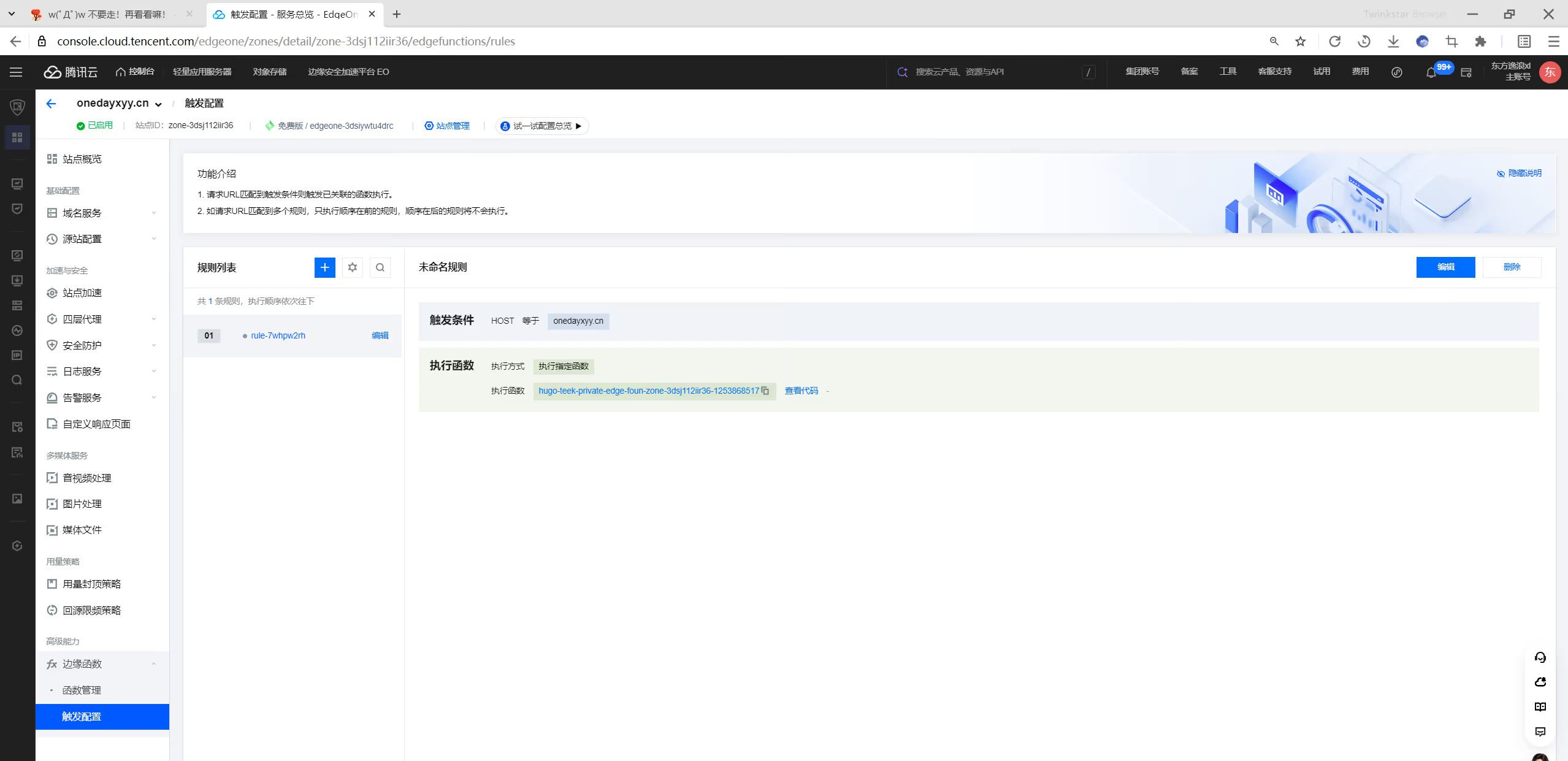
(2)新增触发规则
在这里新增一条触发规则:
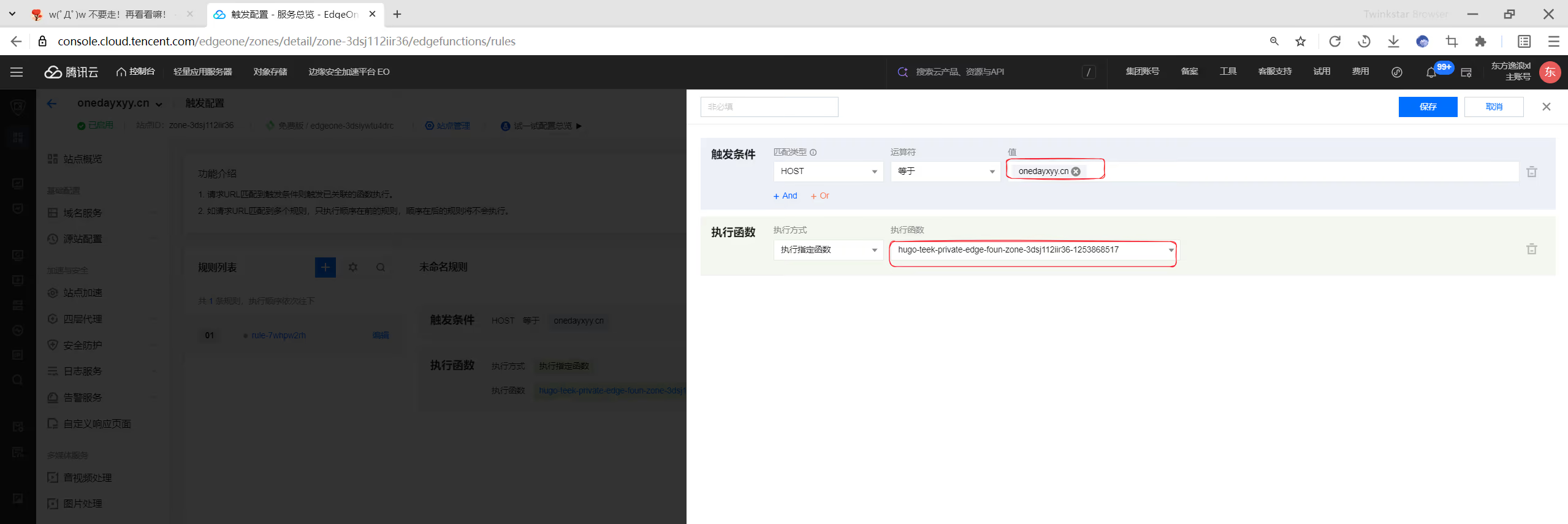
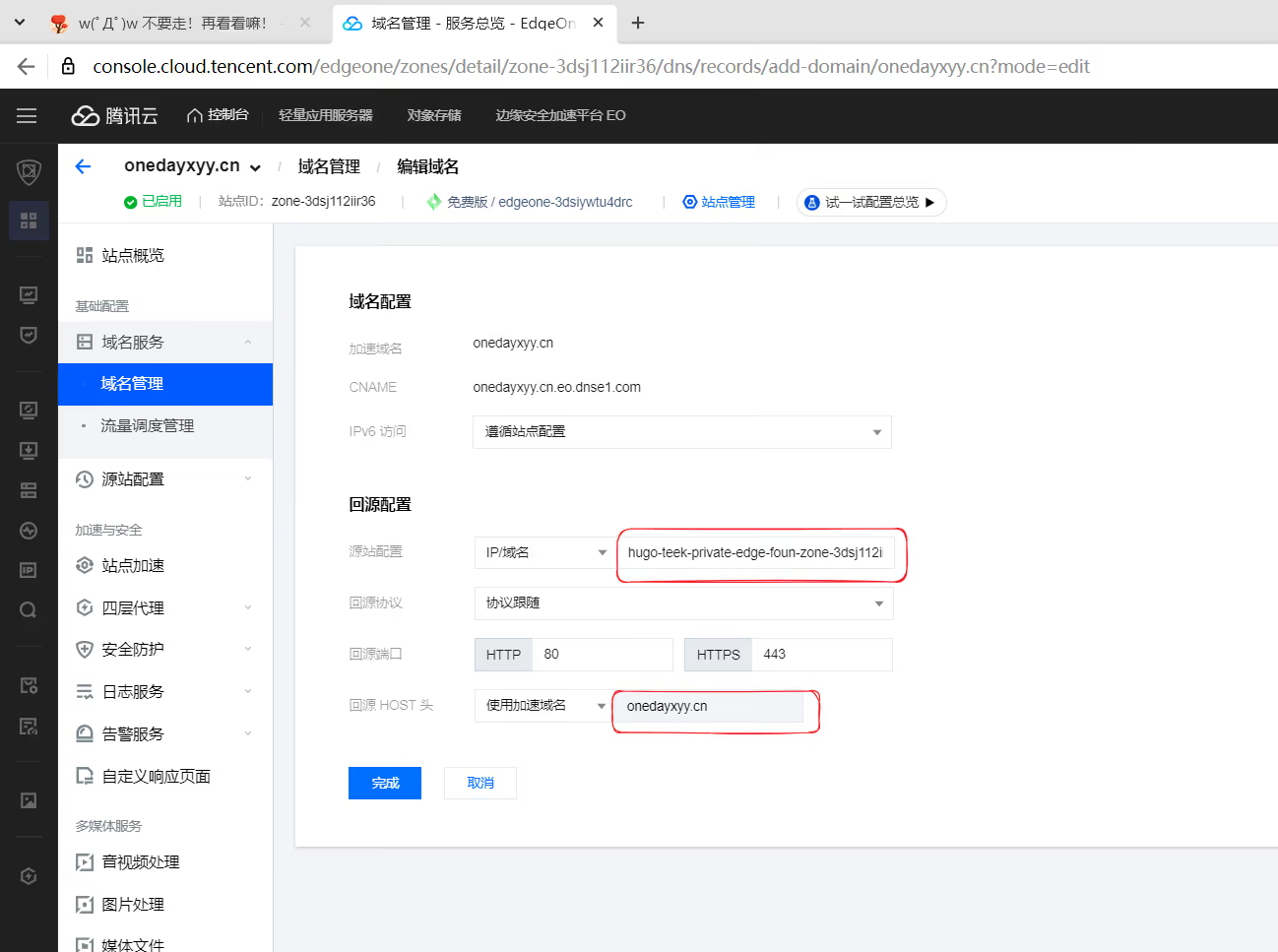
(1)配置域名
这里做好eo的域名配置:
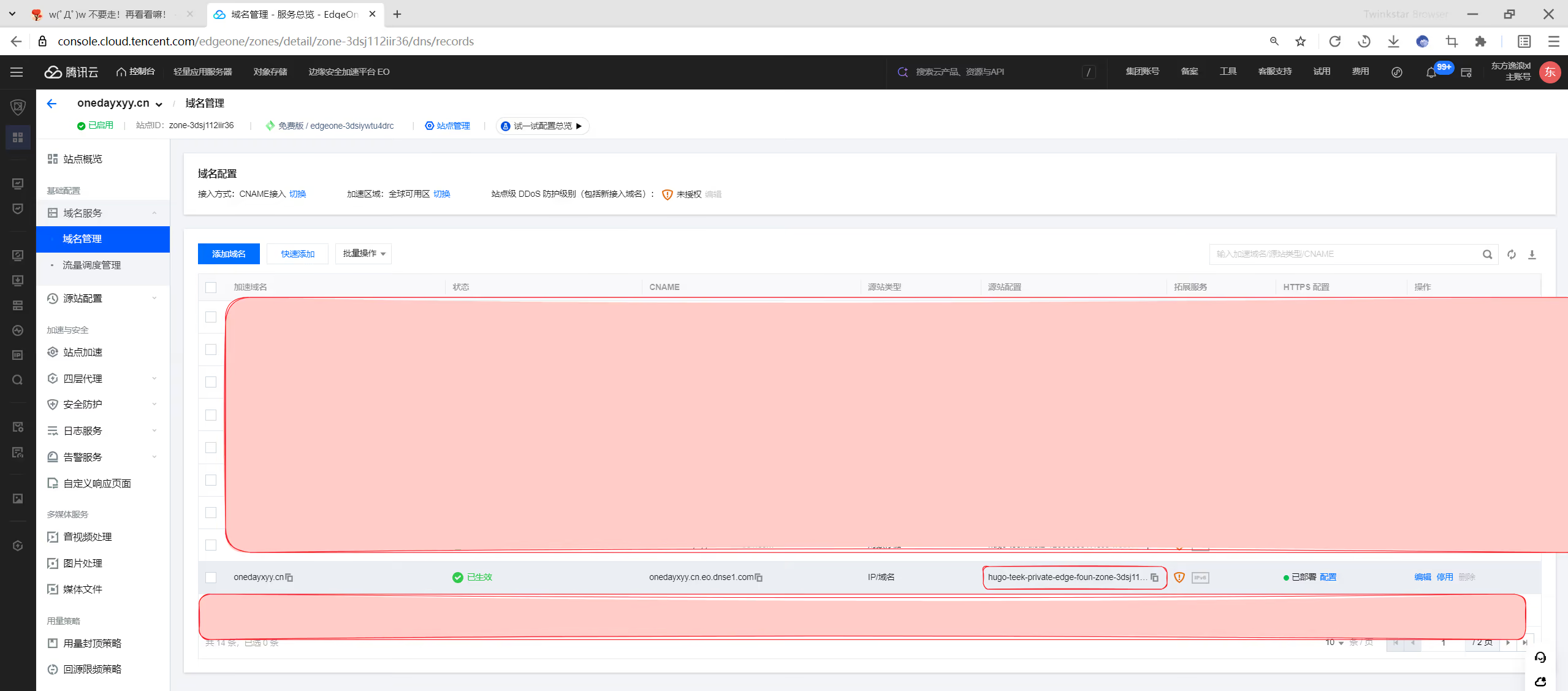
hugo-teek-private-edge-foun-zone-3dsj112iir36-1253868517.eo-edgefunctions.com
这里就填写刚生成的那个函数地址,记得把https://去掉
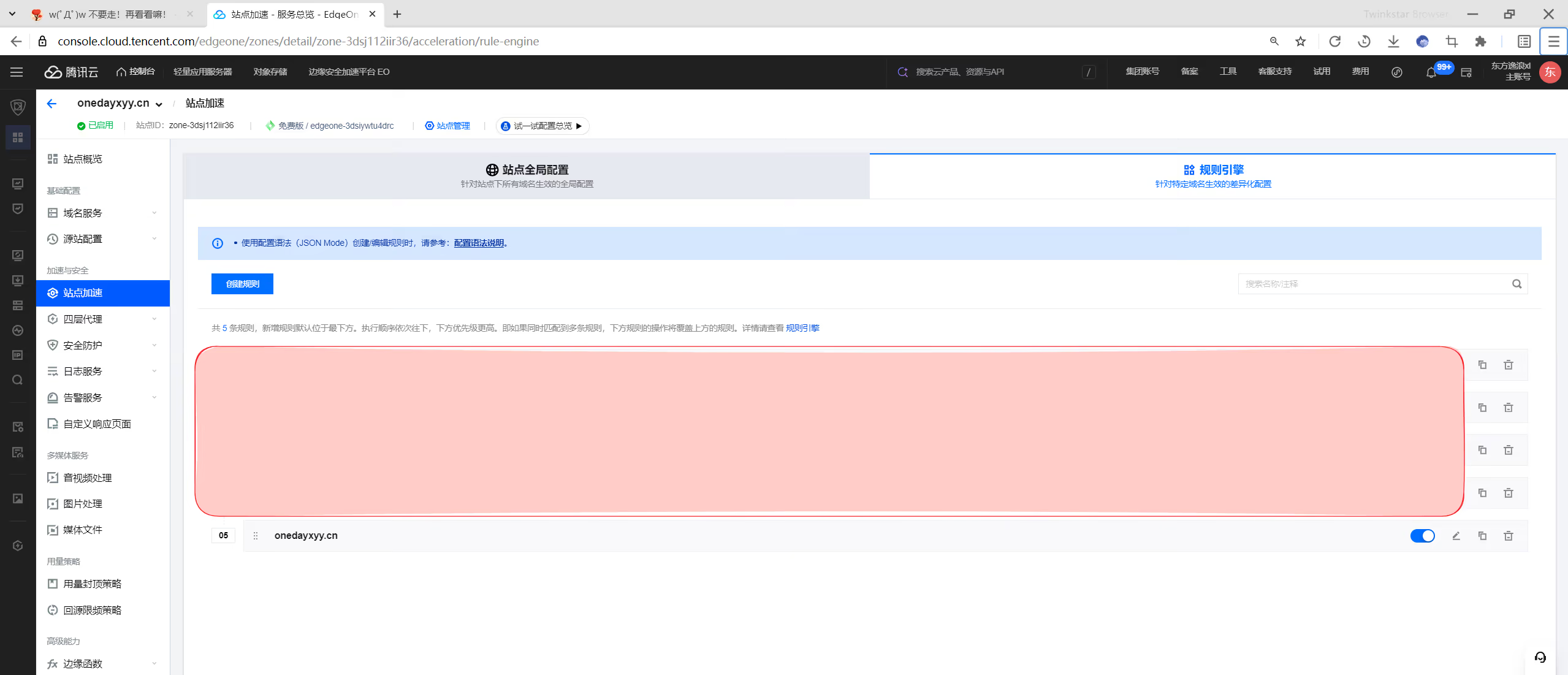
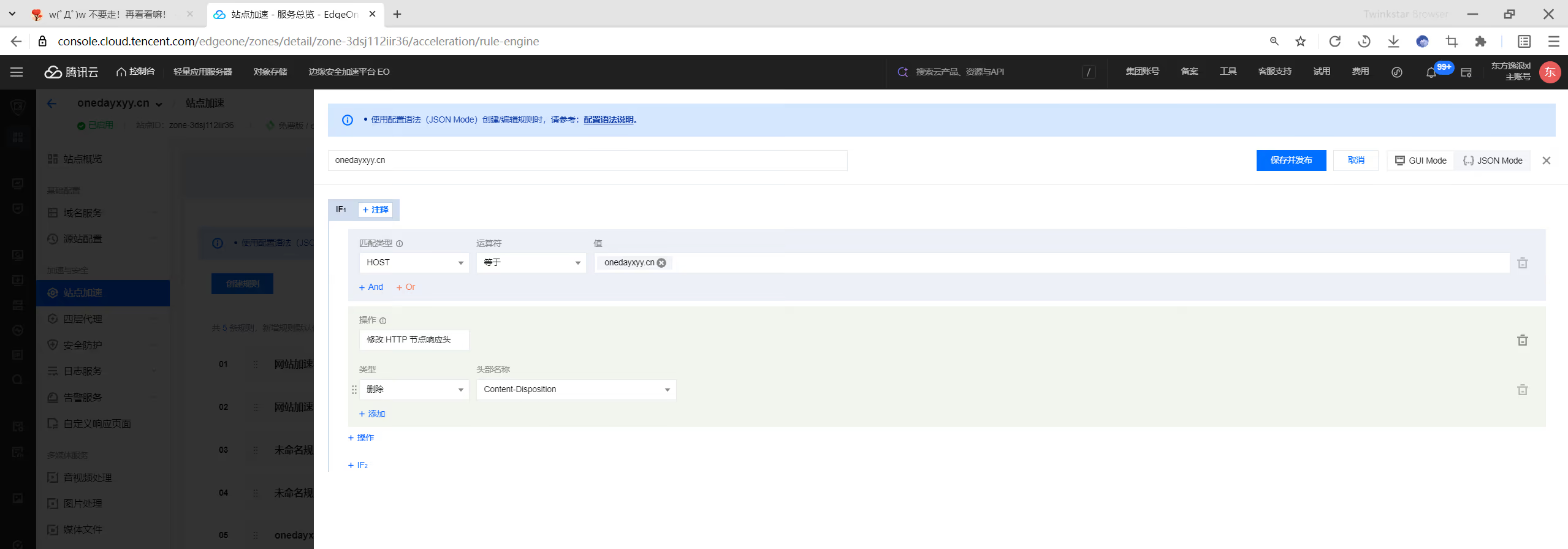
(2)然后新增一条配置规则:
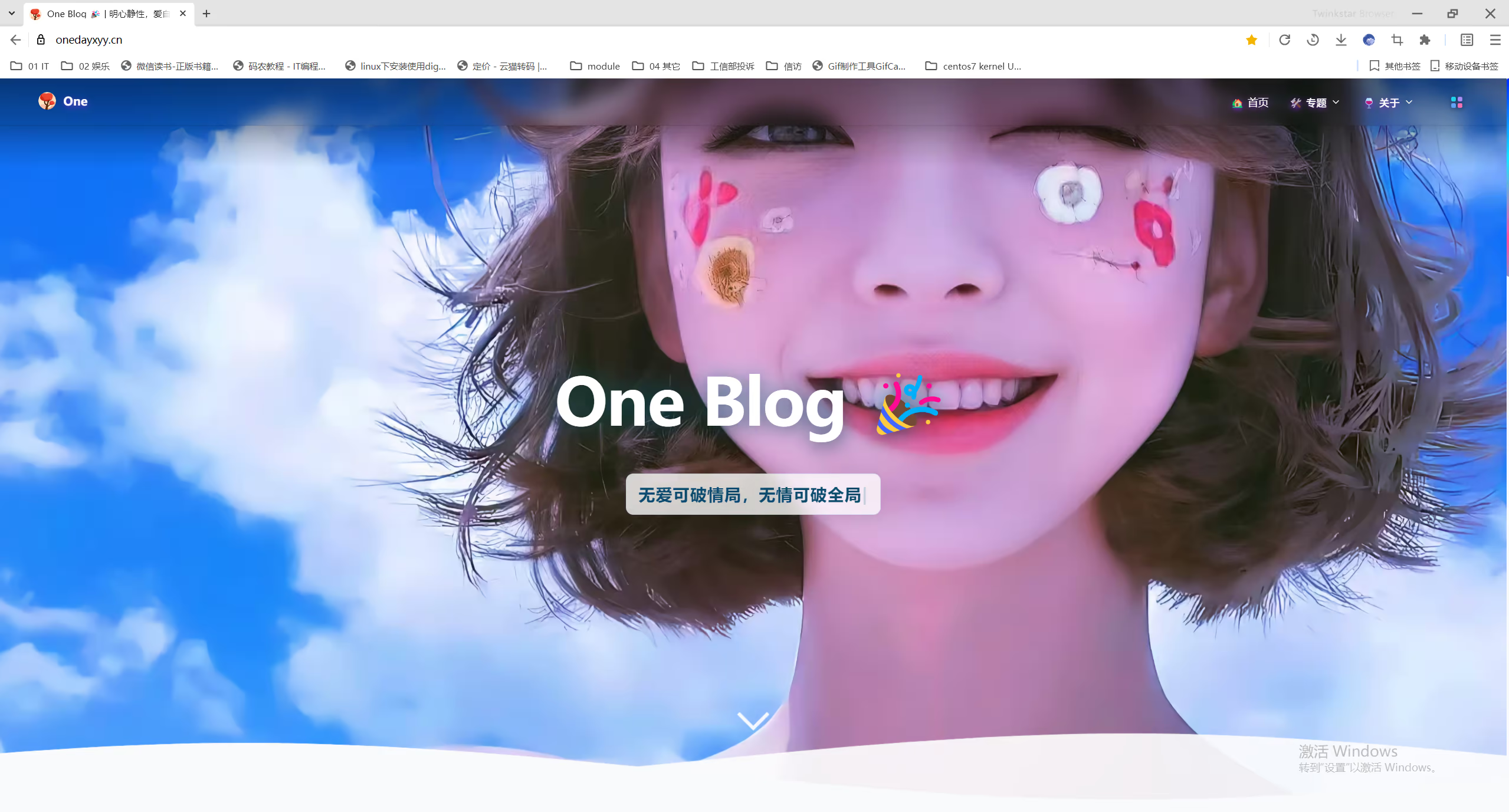
推送本地仓库,触发ci流水线,待ci结束后,登录图床后台,验证服务:
 1cd /d/oneimgpublic
 2
 3rm -rf .git ##记得先删除之前的.git
 4
 5git init .
 6git remote add origin https://cnb.cool/onedayxyy/oneblogpublic
 7git add -A
 8git commit -m"first commit"
 9git push --set-upstream origin master
10# git push线上效果:
https://oneimgadmin.onedayxyy.cn/
赞赏 · 公众号

One的公众号
爱折腾博客的小白
