
快捷菜单
常用功能一站直达
更多功能请点顶栏「快捷菜单」

[[toc]]
[toc]
之前Hyde倒腾的博客 首页欢迎语 体验很不错,但是接口不能用了。这不,Hyde大佬又解决了这个功能,那么我们的宇宙最美博客也必须得安排上哦。👏
次功能来自前端大佬《Hyde》的《公告卡片》文章,感谢大佬手把手的文章。💖💖💖

新增一个好看的欢迎语效果哦:
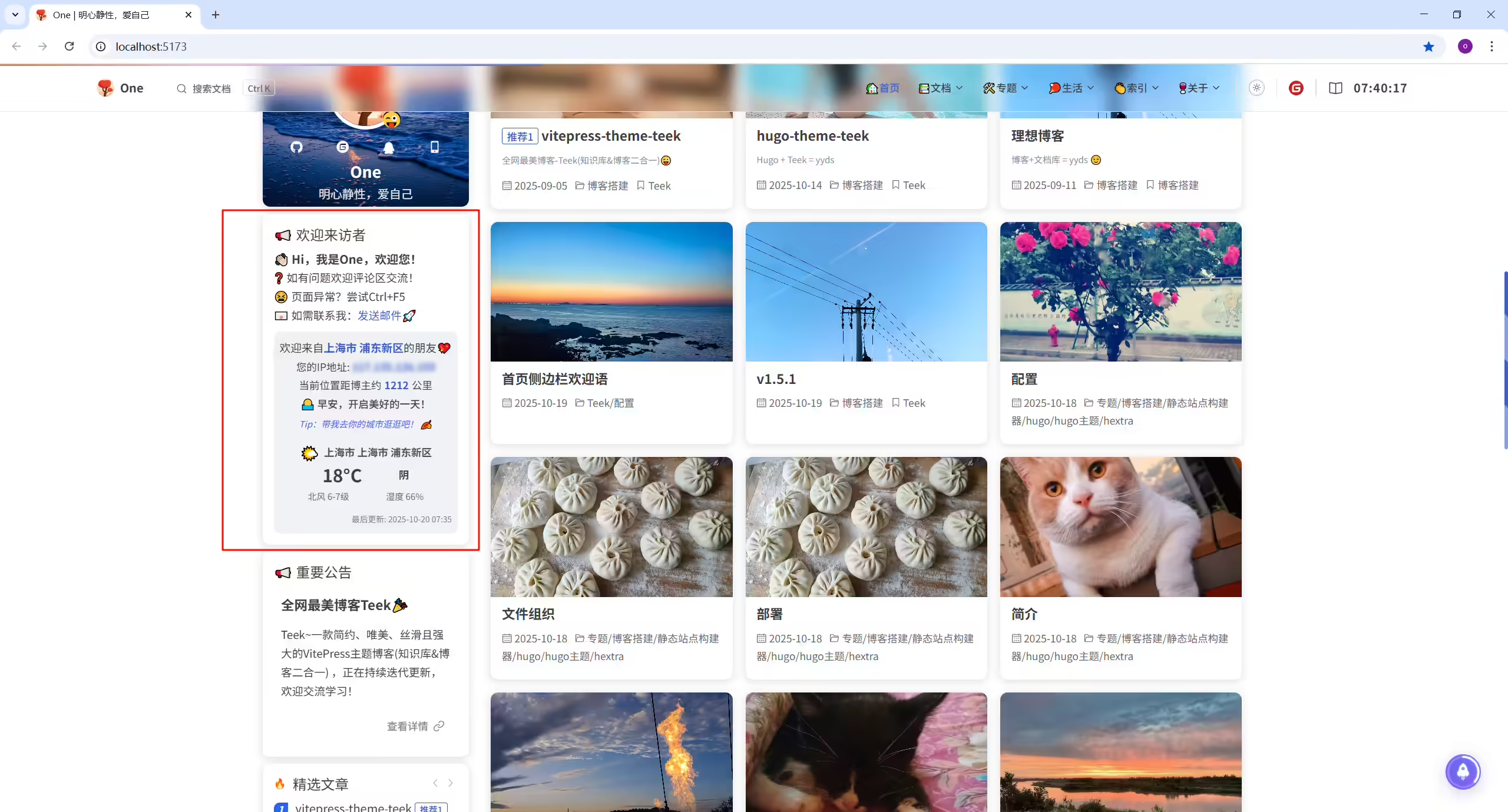
(1)新增docs\.vitepress\theme\components\WelcomeCard.vue文件
警告
API_KEY (这里只需要替换3处 代码即可,搜索修改点字段即可) 1<template>
2 <TkPageCard :title="noticeContent.title">
3 <div class="announcement-card">
4 <!-- 公告内容 -->
5 <div class="announcement-content">
6 <span class="announcement-title">
7 {{ noticeContent.subtitle }}
8 </span>
9
10 <span class="announcement-text">
11 {{ noticeContent.content }}
12 </span>
13 <span class="announcement-text">
14 {{ noticeContent.error }}
15 </span>
16 <span class="announcement-text" v-html="noticeContent.email"> </span>
17 </div>
18
19 <!-- IP位置信息 -->
20 <div class="ip-section" v-if="ipData">
21 <div class="ip-header">
22 <span class="ip-location"
23 >欢迎来自<span class="red-text"> {{ getLocationText() }} </span
24 >的朋友💖</span
25 >
26 </div>
27 <div class="ip-info">
28 <div class="ip-details">
29 您的IP地址:
30 <span class="ip-address" :title="ipData.ip">{{ ipData.ip }}</span>
31 </div>
32 <div class="distance-info" v-if="distance">
33 当前位置距博主约<span class="distance-value">{{ distance }}</span
34 >公里
35 </div>
36 <div class="greeting-section" v-if="ipData">
37 <span class="greeting-text">{{ getGreetingText() }}</span>
38 <span class="greeting-tip">Tip:带我去你的城市逛逛吧! 🍂</span>
39 </div>
40 </div>
41 </div>
42
43 <!-- 天气信息 -->
44 <div class="weather-section" v-if="weatherData">
45 <div class="weather-header">
46 <span class="weather-icon">🌤️</span>
47 <span class="weather-location"
48 >{{ weatherData.province }} {{ weatherData.city }}
49 {{ weatherData.district }}</span
50 >
51 </div>
52 <div class="weather-info">
53 <div class="weather-main">
54 <span class="weather-temp">{{ weatherData.temperature }}°C</span>
55 <span class="weather-desc">{{ weatherData.weather }}</span>
56 </div>
57 <div class="weather-details">
58 <span
59 >{{ weatherData.wind_direction }}
60 {{ weatherData.wind_power }}</span
61 >
62 <span>湿度 {{ weatherData.humidity }}%</span>
63 </div>
64 </div>
65 <div class="weather-update">
66 最后更新: {{ weatherData.update_time }}
67 </div>
68 </div>
69 </div>
70 </TkPageCard>
71</template>
72
73<script setup lang="ts">
74import { TkPageCard } from "vitepress-theme-teek";
75import { ref, onMounted } from "vue";
76
77// IP数据类型
78interface IPData {
79 ip: string;
80 country: string;
81 prov: string;
82 city: string;
83 district: string;
84 adcode: number;
85 lat: number;
86 lng: number;
87}
88
89// 天气数据类型
90interface WeatherData {
91 province: string;
92 city: string;
93 district: string;
94 update_time: string;
95 weather: string;
96 temperature: number;
97 wind_direction: string;
98 wind_power: string;
99 humidity: number;
100}
101
102// 公告内容类型
103interface NoticeContent {
104 title: string;
105 subtitle: string;
106 content: string;
107 error: string;
108 email: string;
109}
110
111// 响应式数据
112const ipData = ref<IPData | null>(null);
113const weatherData = ref<WeatherData | null>(null);
114const distance = ref<string>("");
115
116// 公告内容
117const noticeContent: NoticeContent = {
118 title: "📢 欢迎来访者",
119 subtitle: "👋🏻 Hi,我是One,欢迎您!",
120 content: "❓ 如有问题欢迎评论区交流!",
121 error: "😫 页面异常?尝试Ctrl+F5",
122 email:
123 '📧 如需联系我:<a href="mailto:2675263825@gmail.com" style="color: var(--vp-c-brand-1);">发送邮件🚀</a>',
124};
125
126// 获取IP数据
127const fetchIPData = async (): Promise<void> => {
128 try {
129 const API_URL =
130 //修改点1:
131 "https://api.nsmao.net/api/ip/query?key=td0O2FhnA8278CARZT8KlRHgKi"; //替换实际自己的API_KEY
132
133 const response = await fetch(API_URL);
134
135 if (!response.ok) {
136 throw new Error(`HTTP error! status: ${response.status}`);
137 }
138
139 const result = await response.json();
140
141 if (result.code === 200 && result.data) {
142 ipData.value = result.data;
143 // 计算距离
144 distance.value = calculateDistance();
145 } else {
146 throw new Error(result.msg || "IP数据获取失败");
147 }
148 } catch (error) {
149 console.error("获取IP数据失败:", error);
150 ipData.value = null;
151 }
152};
153
154// 获取天气数据
155const fetchWeatherData = async (): Promise<void> => {
156 try {
157 const API_URL =
158 //修改点2:
159 "https://api.nsmao.net/api/weather/query?key=td0O2FhnA8278CARZT8KlRHgKi"; //替换实际自己的API_KEY
160
161 const response = await fetch(API_URL);
162
163 if (!response.ok) {
164 throw new Error(`HTTP error! status: ${response.status}`);
165 }
166
167 const result = await response.json();
168
169 if (result.code === 200 && result.data) {
170 weatherData.value = result.data;
171 } else {
172 throw new Error(result.msg || "天气数据获取失败");
173 }
174 } catch (error) {
175 console.error("获取天气数据失败:", error);
176 weatherData.value = null;
177 }
178};
179
180// 组件挂载时获取IP和天气数据
181onMounted(() => {
182 fetchIPData();
183 fetchWeatherData();
184});
185
186// 获取位置显示文本
187const getLocationText = (): string => {
188 if (!ipData.value) return "";
189
190 const { country, prov, city, district } = ipData.value;
191
192 // 优先显示城市和区县
193 if (city && district) {
194 return `${city} ${district}`;
195 } else if (city) {
196 return city;
197 } else if (district) {
198 return district;
199 } else if (prov) {
200 return prov;
201 } else if (country) {
202 return country;
203 }
204
205 return "未知地区";
206};
207
208// 计算距离(广州经纬度:23.1216, 113.3372)
209const calculateDistance = (): string => {
210 if (!ipData.value || !ipData.value.lat || !ipData.value.lng) return "";
211
212 //修改点3:定位下自己所处位置的经纬度,然后写到这里。可以通过 https://www.lddgo.net/convert/position 百度地图来定位自己的位置
213 const guangzhouLat = 31.14; //维度
214 const guangzhouLng = 121.54; //经度
215
216 const userLat = ipData.value.lat;
217 const userLng = ipData.value.lng;
218
219 // 使用Haversine公式计算距离
220 const R = 6371; // 地球半径(公里)
221 const dLat = ((userLat - guangzhouLat) * Math.PI) / 180;
222 const dLng = ((userLng - guangzhouLng) * Math.PI) / 180;
223
224 const a =
225 Math.sin(dLat / 2) * Math.sin(dLat / 2) +
226 Math.cos((guangzhouLat * Math.PI) / 180) *
227 Math.cos((userLat * Math.PI) / 180) *
228 Math.sin(dLng / 2) *
229 Math.sin(dLng / 2);
230
231 const c = 2 * Math.atan2(Math.sqrt(a), Math.sqrt(1 - a));
232 const distance = R * c;
233
234 return Math.round(distance).toString();
235};
236
237// 获取问候语文本
238const getGreetingText = (): string => {
239 const now = new Date();
240 const hour = now.getHours();
241
242 if (hour >= 6 && hour < 9) {
243 return "🌅 早安,开启美好的一天!";
244 } else if (hour >= 9 && hour < 12) {
245 return "☀️ 上午好,工作学习加油!";
246 } else if (hour >= 12 && hour < 14) {
247 return "🍽️ 中午好,记得好好吃饭哦~";
248 } else if (hour >= 14 && hour < 18) {
249 return "☕ 下午好,来杯咖啡提提神吧!";
250 } else if (hour >= 18 && hour < 22) {
251 return "🌇 晚上好,放松一下享受时光~";
252 } else if (hour >= 22 && hour < 24) {
253 return "🌙 夜深了,早点休息哦~";
254 } else {
255 return "🌌 凌晨好,注意身体别熬夜~";
256 }
257};
258</script>
259
260<style scoped>
261.announcement-card {
262 --link-color: #888;
263 --link-hover: #6366f1;
264}
265
266html.dark .announcement-card {
267 --link-color: #aaa;
268 --link-hover: #818cf8;
269}
270
271/* IP位置信息样式 */
272.ip-section {
273 background-color: #f0f2f5;
274 border-radius: 8px 8px 0 0;
275 padding: 8px;
276 text-align: center;
277 line-height: 1.8;
278 margin-top: 10px;
279}
280
281html.dark .ip-section {
282 background-color: #2a2d31;
283}
284
285.ip-header {
286 display: flex;
287 align-items: center;
288 justify-content: center;
289}
290
291.ip-location {
292 font-size: 15px;
293}
294
295.ip-info {
296 display: flex;
297 flex-direction: column;
298 align-items: center;
299}
300
301.ip-details {
302 font-size: 14px;
303}
304
305.red-text {
306 color: var(--vp-c-brand-1);
307 font-weight: bold;
308}
309
310.ip-address {
311 color: var(--vp-c-brand-1);
312 font-weight: bold;
313 filter: blur(3px);
314 transition: filter 0.3s ease;
315 cursor: pointer;
316}
317
318.ip-address:hover {
319 filter: none;
320}
321
322.distance-info {
323 font-size: 14px;
324}
325
326.distance-value {
327 color: var(--vp-c-brand-1);
328 font-weight: bold;
329 margin: 0 4px;
330}
331
332/* 问候语样式 */
333.greeting-section {
334 border-radius: 6px;
335 text-align: center;
336 display: flex;
337 flex-direction: column;
338 align-items: center;
339 gap: 4px;
340}
341
342.greeting-text {
343 font-size: 14px;
344 font-weight: 500;
345 text-align: center;
346}
347
348.greeting-tip {
349 font-size: 12px;
350 color: #425aef;
351 font-style: italic;
352 text-align: center;
353}
354
355/* 移动端适配 */
356@media (max-width: 768px) {
357 .greeting-section {
358 gap: 6px;
359 }
360
361 .greeting-text {
362 font-size: 13px;
363 }
364
365 .greeting-tip {
366 font-size: 11px;
367 }
368}
369
370/* 天气信息样式 */
371.weather-section {
372 background-color: #f0f2f5;
373 border-radius: 0 0 8px 8px;
374 padding: 8px;
375 text-align: center;
376}
377
378html.dark .weather-section {
379 background-color: #2a2d31;
380}
381
382.weather-header {
383 display: flex;
384 align-items: center;
385 justify-content: center;
386 margin-bottom: 6px;
387 gap: 6px;
388}
389
390.weather-icon {
391 font-size: 20px;
392}
393
394.weather-location {
395 font-size: 14px;
396 font-weight: 600;
397 opacity: 0.9;
398}
399
400.weather-info {
401 margin-bottom: 6px;
402}
403
404.weather-main {
405 display: flex;
406 align-items: center;
407 justify-content: center;
408 gap: 50px;
409 margin-bottom: 6px;
410}
411
412.weather-temp {
413 font-size: 24px;
414 font-weight: 700;
415}
416
417.weather-desc {
418 font-size: 14px;
419 font-weight: 600;
420}
421
422.weather-details {
423 display: flex;
424 justify-content: center;
425 gap: 50px;
426 font-size: 12px;
427 opacity: 0.8;
428}
429
430.weather-update {
431 font-size: 11px;
432 opacity: 0.7;
433 text-align: right;
434}
435
436.announcement-title {
437 display: flex;
438 align-items: center;
439 font-weight: 700;
440 color: var(--text-color);
441 gap: 8px;
442}
443
444.announcement-text {
445 color: var(--text-color);
446 line-height: 1.7;
447 font-size: 15px;
448 display: -webkit-box;
449 -webkit-line-clamp: 5;
450 -webkit-box-orient: vertical;
451 overflow: hidden;
452}
453</style>(2)编辑docs\.vitepress\theme\components\TeekLayoutProvider.vue文件
1import WelcomeCard from "./WelcomeCard.vue"; //导入欢迎卡片组件
2
3    <!-- 自定义公告卡片-欢迎语 -->
4    <template #teek-home-card-my-after>
5      <!-- <WelcomeCard /> -->
6      <WelcomeCard />
7    </template>
(3)验证
运行项目,观察效果。(见上文效果截图)。
结束。
精选 · 友链 · 更多

One的公众号
爱折腾博客的小白