
快捷菜单
常用功能一站直达
更多功能请点顶栏「快捷菜单」

[[toc]]
[toc]
Teek-one开箱即用版仓库:https://cnb.cool/onedayxyy/vitepress-theme-teek-one-public (本次涉及具体代码可从此开源库里查找)
(1)安装twikoo评论组件
1pnpm add twikoo(2)配置评论:
编辑docs\.vitepress\config.ts文件:
1  // // 评论配置
2  // comment: {
3  //   provider: "twikoo",
4  //   options: CommentData,
5  // },
6  comment: {
7    provider: "render",
8    // options: CommentData,
9 },(3)新建docs\.vitepress\theme\components\Twikoo.vue文件
 1<template>
 2  <div id="twikoo"></div>
 3</template>
 4
 5<script setup lang="ts">
 6import { onMounted, watch ,nextTick } from 'vue'
 7import { useRoute } from 'vitepress'
 8
 9const route = useRoute()
10
11const initTwikoo = async () => {
12  // 判断是否在浏览器环境中
13  if (typeof window !== 'undefined') {
14    const twikoo = await import('twikoo')
15    twikoo.init({
16      envId: 'https://twikoo.onedayxyy.cn/', // 换成你自己配置的域名
17      el: '#twikoo'
18    })
19  }
20}
21
22
23const modifyCommentButton = () => {
24  nextTick(() => {
25    // 精确选择评论按钮
26    const commentBtn = Array.from(document.querySelectorAll('.tk-right-bottom-button__button'))
27      .find(btn => btn.getAttribute('title') === '前往评论');
28
29    if (commentBtn && !commentBtn.getAttribute('data-custom-bound')) {
30      commentBtn.setAttribute('data-custom-bound', 'true');
31      // 添加自定义类名,避免影响主题其他样式
32      commentBtn.classList.add('twikoo-nextTick');
33
34      commentBtn.addEventListener('click', (e) => {
35        e.preventDefault();
36        const twikooSection = document.getElementById('twikoo');
37        if (twikooSection) {
38          twikooSection.scrollIntoView({
39            behavior: 'smooth',
40            block: 'start'
41          });
42        }
43      });
44    }
45  });
46}
47
48
49// 监听路由刷新评论
50watch(route, () => {
51  initTwikoo()
52  modifyCommentButton()
53})
54
55onMounted(() => {
56  initTwikoo()
57  modifyCommentButton()
58})
59</script>
60
61<style>
62/* 桌面端样式 */
63.twikoo-nextTick {
64  width: 45px !important;
65  height: 45px !important;
66  background-color: var(--vp-c-brand-1)!important; /* 默认背景色 */
67  transition: background-color 0.3s ease !important; /* 加个过渡 */
68}
69/* 鼠标hover效果 */
70.twikoo-nextTick:hover {
71  background-color: rgb(197, 126, 255) !important; /* 鼠标hover颜色 */
72}
73
74/* 图标样式 */
75.twikoo-nextTick .tk-icon {
76  color: rgb(255, 255, 255) !important;
77}
78
79/* 移动端样式 */
80@media (max-width: 768px) {
81  .twikoo-nextTick {
82    width: 37px !important;
83    height: 37px !important;
84    background-color: var(--vp-c-brand-1)!important; /* 默认背景色 */
85    transition: background-color 0.3s ease !important; /* 加个过渡 */
86  }
87  .twikoo-nextTick:hover {
88    background-color: rgb(197, 126, 255) !important; /* 鼠标hover颜色,多余了? */
89  }
90}
91</style>
(4)引入评论组件
编辑docs\.vitepress\theme\components\TeekLayoutProvider.vue文件:
 1import Twikoo from './Twikoo.vue' //评论组件
 2
 3
 4    <!-- 评论组件 -->
 5    <!-- <template #doc-after> -->
 6    <!-- <template #teek-doc-after-appreciation-after>
 7       -->
 8    <template #teek-comment>
 9      <Twikoo />
10    </template>
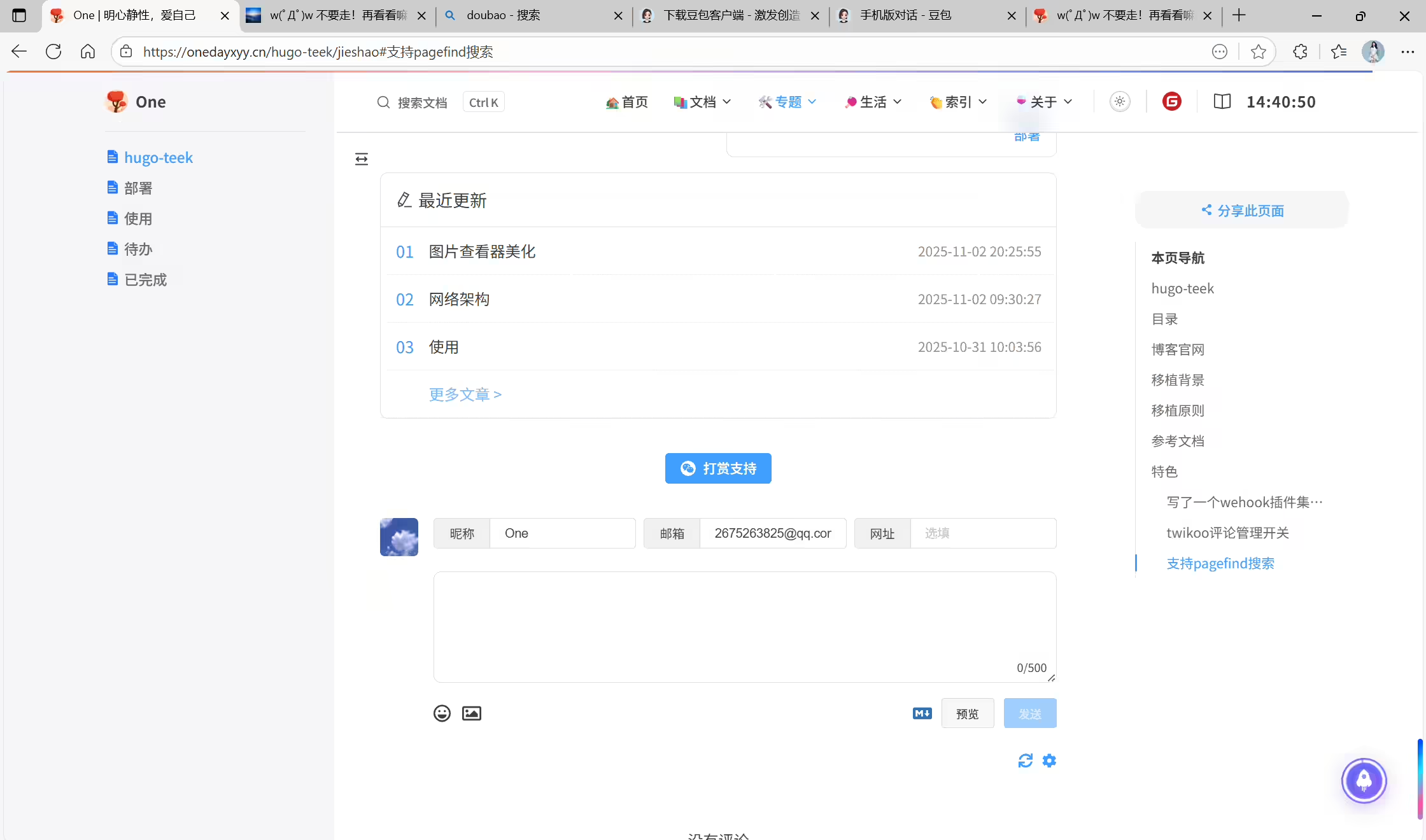
(5)验证
结束。
精选 · 友链 · 更多

One的公众号
爱折腾博客的小白
