
快捷菜单
常用功能一站直达
更多功能请点顶栏「快捷菜单」

[[toc]]
[toc]
次问题由 《时光》和《白木》大佬一起解决,感谢2位大佬。💖💖💖
Teek-one开箱即用版仓库:https://cnb.cool/onedayxyy/vitepress-theme-teek-one-public
问题:侧边栏 文件图标 和 目录图标 无法对齐问题
2025年10月11日提出。
One风格:

时光风格:

存在问题:


待前端大佬解决问题:

具体问题描述:
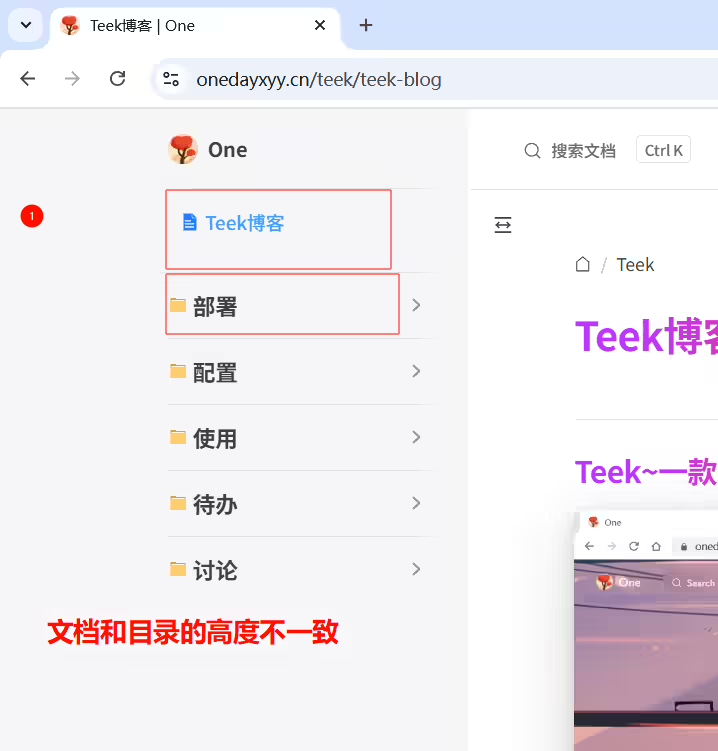

(1)编辑docs\.vitepress\theme\style\sidebar.scss文件,添加如下代码:
1/*为独立文档兜底缩进,与一级文件夹平齐*/
2.VPSidebarItem.level-0 .items {
3    padding-left: 0px !important;
4}
5
6/*为独立文档  让高度和目录高度保持一致*/
7.VPSidebarItem.level-0 {
8  padding-bottom: 10px !important;
9}
次文件完整代码:
  1// 导入包含混合器定义的文件
  2@use "./var";
  3
  4/* 侧边栏缩放效果 */
  5.group:has([role="button"]) .VPSidebarItem.level-0 .items {
  6    padding-left: 15px !important;
  7    border-left: 1px solid var(--vp-c-divider);
  8    border-radius: 2px;
  9    transition: all 0.25s ease;
 10}
 11
 12/* 侧边栏项基本样式 */
 13#VPSidebarNav .VPSidebarItem > .item {
 14    align-items: center;
 15    border-radius: 4px;
 16    transition: all 0.2s ease;
 17}
 18
 19#VPSidebarNav .VPSidebarItem > .item:hover {
 20    transform: translateX(4px);
 21}
 22
 23/* 侧边栏项激活状态 */
 24#VPSidebarNav .VPSidebarItem.is-active > .item {
 25    color: var(--vp-c-brand);
 26}
 27
 28/* 侧边栏项图标基本样式 */
 29#VPSidebarNav .VPSidebarItem > .item::before {
 30    content: "";
 31    width: 16px;
 32    height: 16px;
 33    display: inline-block;
 34    vertical-align: middle;
 35    background-size: cover;
 36    margin-right: 6px;
 37    flex-shrink: 0;
 38    transition: transform 0.2s ease;
 39}
 40
 41#VPSidebarNav .VPSidebarItem > .item:hover::before {
 42    transform: scale(1.1);
 43}
 44
 45/* 文档项图标 - 折叠状态 */
 46#VPSidebarNav .VPSidebarItem:not(.is-link).collapsed > .item::before {
 47    background-image: url("/svg/document.svg");
 48}
 49
 50/* 文档项图标 - 展开状态 */
 51#VPSidebarNav .VPSidebarItem:not(.is-link) > .item::before {
 52    background-image: url("/svg/document-open.svg");
 53}
 54
 55/* 链接项图标 */
 56#VPSidebarNav .VPSidebarItem.is-link > .item::before {
 57    background-image: url("/svg/file.svg");
 58}
 59
 60/* 深色模式支持 */
 61.dark #VPSidebarNav .VPSidebarItem > .item::before {
 62    filter: brightness(0.8);
 63}
 64
 65.dark #VPSidebarNav .VPSidebarItem.is-active > .item::before {
 66    filter: brightness(1) hue-rotate(180deg);
 67}
 68
 69// 侧边栏二级菜单激活左侧|激活样式
 70// #VPSidebarNav .VPSidebarItem .items {
 71//     overflow: hidden;
 72// }
 73
 74//使用混合器为侧边栏一级标题应用渐变文本
 75// .VPSidebarItem.level-0 .text {
 76//     // @include var.text-gradient;
 77//     color: var(--vp-c-brand-1) !important;
 78// }
 79
 80// 一级文件夹hover渐变效果
 81.VPSidebarItem.level-0 .item:hover .text {
 82    @include var.text-gradient;
 83    opacity: 0.9;
 84}
 85
 86// 或者为激活状态的侧边栏项应用渐变
 87.VPSidebarItem.level-0.is-active .text {
 88    @include var.text-gradient;
 89}
 90
 91
 92
 93/*为独立文档兜底缩进,与一级文件夹平齐*/
 94.VPSidebarItem.level-0 .items {
 95    padding-left: 0px !important;
 96}
 97
 98/*为独立文档  让高度和目录高度保持一致*/
 99.VPSidebarItem.level-0 {
100  padding-bottom: 10px !important;
101}
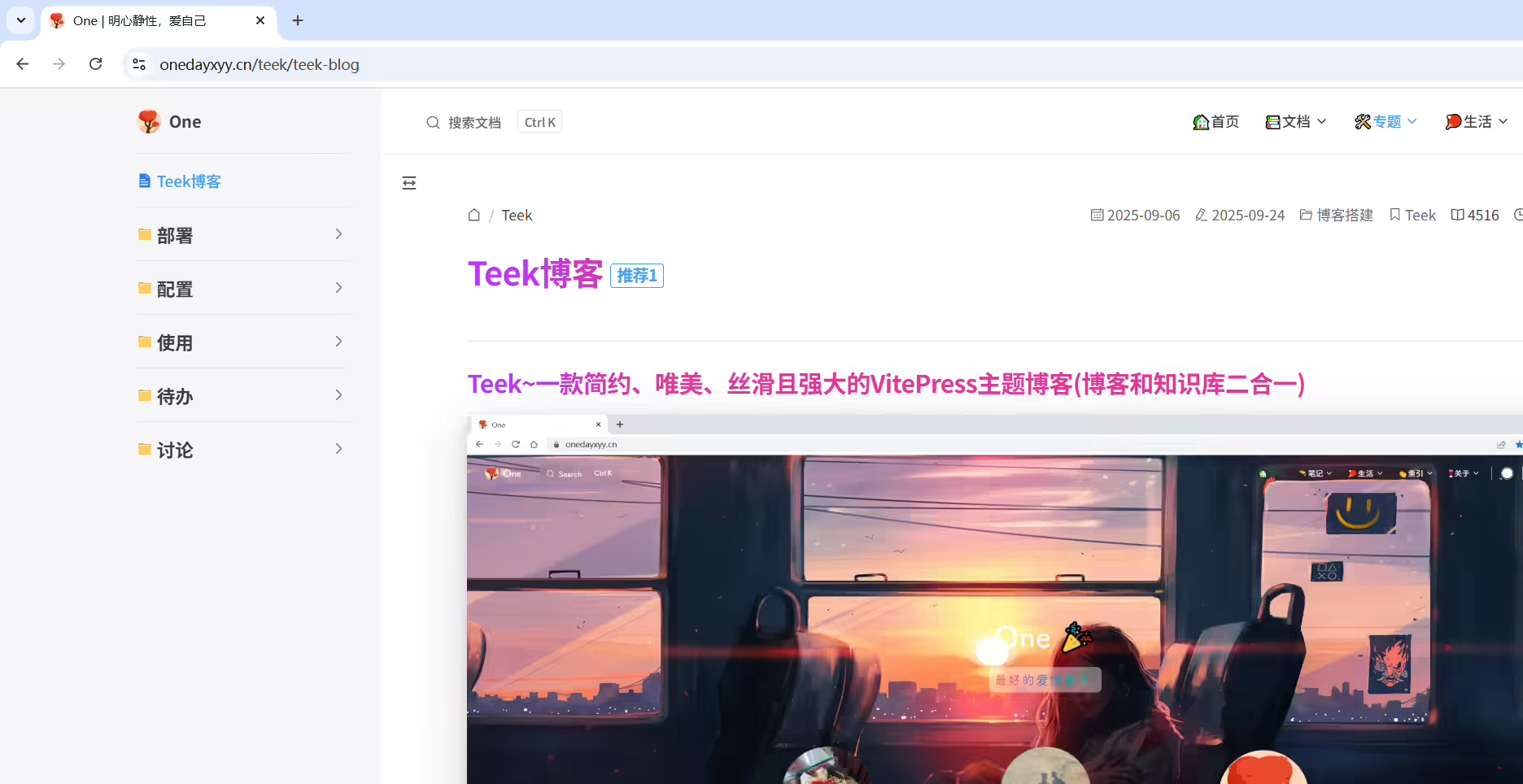
(2)验证
运行项目,观察效果:(可以看到,原来问题已解决😜)
结束。
精选 · 友链 · 更多

One的公众号
爱折腾博客的小白
