
快捷菜单
常用功能一站直达
更多功能请点顶栏「快捷菜单」
具备python环境,且具备impi软件环境;(windows版ipmi记得要把其路径添加到环境变量里去)
1os.system("ipmitool -I lanplus -H "+ ip + " -U 服务器带外账号 -P 服务器带外密码 power status") 1os.system("ipmitool -I lanplus -H "+ ip + " -U admin -P 123456 power reset") #重启
2os.system("ipmitool -I lanplus -H "+ ip + " -U admin -P 123456 power on") #开机
3os.system("ipmitool -I lanplus -H "+ ip + " -U admin -P 123456 power off") #关机1ipmitool -I lanplus -H 服务器带外ip -U admin -P ********* chassis statusip.txt
1/服务器带外ip/
2/服务器带外ip/
ipmi_powerStatus.py
1import os
2import time
3for i in open(r'ip.txt'):
4    ip=i.split("/")[1]
5    print(ip)
6    os.system("ipmitool -I lanplus -H "+ ip + " -U 服务器带外账号 -P 服务器带外密码 power status")
7    time.sleep(1)
8time.sleep(100)ip.txt
https://onedayxyy.cn/scripts/ipmi/ipmi_power_status/v2-add-single-command-2023.3.28/ip.txt
1/服务器带外ip/
2/服务器带外ip/
ipmi_powerStatus.py
1import os
2import time
3for i in open(r'ip.txt'):
4    ip=i.split("/")[1]
5    print(ip)
6    os.system("ipmitool -I lanplus -H "+ ip + " -U admin -P 服务器带外密码 power status")
7    # ipmitool -I lanplus -H 10.10.10.10  -U admin -P "服务器带外密码" power status
8    time.sleep(1)
9time.sleep(100)测试成功。
脚本位置:
D:\BaiduSyncdisk\脚本\01-ipmi脚本\查看机器电源状态\v3-2025.7.4-输出控制台同时保存到csv-测试成功

脚本详情:
ip.txt
1/192.168.1.1/
2/192.168.1.2/
ipmi.py
 1import os
 2import time
 3import csv
 4from datetime import datetime
 5
 6# 配置文件路径
 7IP_FILE = 'ip.txt'
 8OUTPUT_CSV = f'ipmi_results_{datetime.now().strftime("%Y%m%d_%H%M%S")}.csv'
 9
10# IPMI 认证信息(建议改为从配置文件或环境变量读取敏感信息)
11IPMI_USER = "admin"
12IPMI_PASS = "123456"
13
14def check_power_status(ip):
15    """执行IPMI电源状态检查并返回结果"""
16    cmd = f'ipmitool -I lanplus -H {ip} -U {IPMI_USER} -P {IPMI_PASS} power status'
17    try:
18        result = os.popen(cmd).read().strip()
19        return result if result else "No response"
20    except Exception as e:
21        return f"Error: {str(e)}"
22
23def main():
24    # 创建CSV文件并写入表头
25    with open(OUTPUT_CSV, 'w', newline='') as csvfile:
26        writer = csv.writer(csvfile)
27        writer.writerow(['IP Address', 'Power Status', 'Timestamp'])
28
29        # 处理每个IP
30        with open(IP_FILE) as f:
31            for line in f:
32                if not line.strip():  # 跳过空行
33                    continue
34
35                ip = line.strip().split("/")[1]
36                print(f"\nChecking IP: {ip}")  # 控制台输出
37
38                # 获取电源状态
39                status = check_power_status(ip)
40                timestamp = datetime.now().strftime("%Y-%m-%d %H:%M:%S")
41
42                # 控制台打印结果
43                print(f"  Status: {status}")
44                print(f"  Timestamp: {timestamp}")
45
46                # 写入CSV文件
47                writer.writerow([ip, status, timestamp])
48
49                time.sleep(1)  # 防止IPMI服务阻塞
50
51    print(f"\n[SUCCESS] 所有检测完成!结果已保存到: {OUTPUT_CSV}")
52
53if __name__ == "__main__":
54 main()D:\BaiduSyncdisk\python-desktop\02.Python脚本\01-ipmi脚本\查看机器电源状态\v4-2026.10.12-输出控制台同时保存到csv-代码更加完整-cursor实现-亲测有效-工作在用
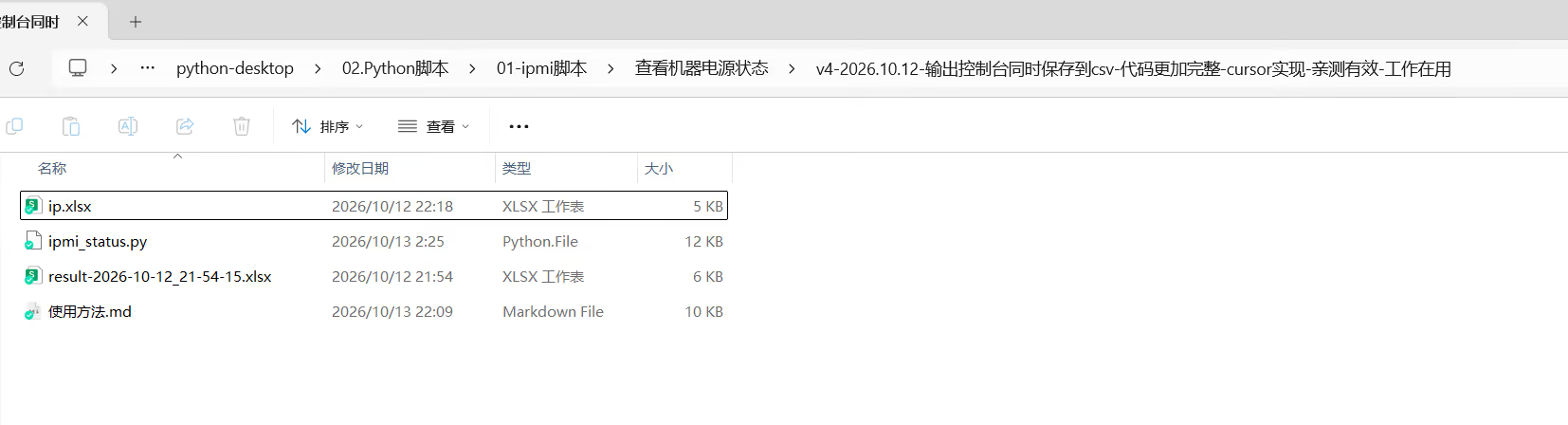
ipmi_status.py内容 1# -*- coding: utf-8 -*-
2"""
3批量带外执行 IPMI 命令:
4- 从 ip.xlsx (Sheet1) 读取 带外ip / 用户名 / 密码
5- 结果写入 result-YYYY-MM-DD_HH-MM-SS.xlsx
6- ping 不通或认证失败时跳过,整行标红
7"""
8
9from __future__ import annotations
10
11import numbers
12import os
13import platform
14import re
15import shutil
16import subprocess
17import sys
18import time
19from datetime import datetime
20from pathlib import Path
21
22try:
23 from openpyxl import Workbook, load_workbook
24 from openpyxl.styles import Alignment, Font, PatternFill
25except ImportError:
26 print("缺少依赖 openpyxl,请先执行: pip install openpyxl")
27 sys.exit(1)
28
29# ======================== 配置区 ========================
30IP_XLSX = Path(__file__).resolve().parent / "ip.xlsx"
31SHEET_NAME = "Sheet1"
32
33# 可修改为其它 ipmitool 子命令,例如: "chassis status" / "fru print" / "sdr elist"
34IPMI_SUBCOMMAND = "power status"
35
36# 超时(秒)——保持较短,避免卡住
37PING_TIMEOUT_SEC = 1
38IPMI_TIMEOUT_SEC = 8
39# ipmitool 局域网重试:-N 间隔秒, -R 重试次数(尽量短)
40IPMI_RETRY_INTERVAL = 1
41IPMI_RETRY_COUNT = 1
42
43# 主机间间隔,减轻 BMC 压力
44HOST_SLEEP_SEC = 0.3
45
46# 结果文件被占用时,最多再尝试换名保存的次数
47SAVE_RETRY_MAX = 20
48
49RED_FILL = PatternFill(start_color="FF6B6B", end_color="FF6B6B", fill_type="solid")
50HEADER_FONT = Font(bold=True)
51# =======================================================
52
53
54def result_filename(suffix: str = "") -> Path:
55 """对应 shell: result-$(date +%F_%T).xlsx ;Windows 文件名不能含 ':',用 '-' 代替。"""
56 stamp = datetime.now().strftime("%Y-%m-%d_%H-%M-%S")
57 name = f"result-{stamp}{suffix}.xlsx"
58 return Path(__file__).resolve().parent / name
59
60
61def ping_ok(ip: str) -> bool:
62 """快速探测主机是否可达。"""
63 system = platform.system().lower()
64 if system == "windows":
65 # -n 次数, -w 超时毫秒
66 cmd = ["ping", "-n", "1", "-w", str(int(PING_TIMEOUT_SEC * 1000)), ip]
67 else:
68 # -c 次数, -W 超时秒
69 cmd = ["ping", "-c", "1", "-W", str(max(1, int(PING_TIMEOUT_SEC))), ip]
70
71 try:
72 proc = subprocess.run(
73 cmd,
74 stdout=subprocess.DEVNULL,
75 stderr=subprocess.DEVNULL,
76 timeout=PING_TIMEOUT_SEC + 2,
77 )
78 return proc.returncode == 0
79 except (subprocess.TimeoutExpired, OSError):
80 return False
81
82
83def is_auth_or_session_error(text: str) -> bool:
84 """根据 ipmitool 回显判断是否为认证/会话类错误(避免裸匹配 session)。"""
85 if not text:
86 return False
87 patterns = [
88 r"unable to establish\s+(ipmi|lan|rmcp)",
89 r"unable to establish.*session",
90 r"rakp\s*[0-9]?",
91 r"rakp.*hmac",
92 r"authentication\s+(failure|failed|error|invalid)",
93 r"invalid\s+password",
94 r"password\s+invalid",
95 r"unauthorized",
96 r"access\s+denied",
97 r"insufficient\s+privilege",
98 r"privilege\s+level",
99 r"command response could not be provided",
100 r"error:\s*unable to",
101 ]
102 lower = text.lower()
103 return any(re.search(p, lower) for p in patterns)
104
105
106def build_ipmitool_cmd(ip: str, user: str) -> list[str]:
107 """
108 解析 ipmitool 可执行文件。
109 Windows 上 .cmd/.bat 需经 cmd /c 启动,否则 subprocess 会 FileNotFoundError。
110 """
111 exe = shutil.which("ipmitool")
112 if not exe:
113 raise FileNotFoundError("ipmitool not found in PATH")
114
115 args = [
116 "-I", "lanplus",
117 "-H", ip,
118 "-U", user,
119 "-E",
120 "-N", str(IPMI_RETRY_INTERVAL),
121 "-R", str(IPMI_RETRY_COUNT),
122 *IPMI_SUBCOMMAND.split(),
123 ]
124 if platform.system().lower() == "windows" and exe.lower().endswith((".cmd", ".bat")):
125 return ["cmd", "/c", exe, *args]
126 return [exe, *args]
127
128
129def run_ipmi(ip: str, user: str, password: str) -> tuple[bool, str, bool]:
130 """
131 执行 IPMI 命令。
132 使用 -E + 环境变量传密,避免密码出现在进程命令行中。
133 返回: (是否成功, 详情文本, 是否应整行标红跳过)
134 """
135 env = os.environ.copy()
136 env["IPMI_PASSWORD"] = password
137
138 try:
139 cmd = build_ipmitool_cmd(ip, user)
140 proc = subprocess.run(
141 cmd,
142 capture_output=True,
143 text=True,
144 timeout=IPMI_TIMEOUT_SEC,
145 encoding="utf-8",
146 errors="replace",
147 env=env,
148 )
149 except subprocess.TimeoutExpired:
150 return False, f"{ip} IPMI 执行超时(>{IPMI_TIMEOUT_SEC}s)", True
151 except FileNotFoundError:
152 return False, "未找到 ipmitool,请确认已安装并加入 PATH", True
153 except OSError as exc:
154 return False, f"执行 ipmitool 失败: {exc}", True
155
156 stdout = (proc.stdout or "").strip()
157 stderr = (proc.stderr or "").strip()
158 combined = "\n".join(x for x in (stdout, stderr) if x).strip()
159 success = proc.returncode == 0
160
161 # 认证/会话错误:视为跳过并标红
162 if (not success) and is_auth_or_session_error(combined):
163 detail = combined if combined else f"{ip} 用户名或口令错误 / 无法建立 IPMI 会话"
164 return False, detail, True
165
166 if combined:
167 detail = combined
168 else:
169 detail = f"{ip} 执行成功!!!" if success else f"{ip} 执行失败。。。"
170
171 # 无回显的失败也标红,便于排查连通性问题
172 mark_red = (not success) and not combined
173 return success, detail, mark_red
174
175
176def cell_str(value) -> str:
177 """
178 单元格转字符串。
179 Excel 常把纯数字密码存成 float(如 123456.0),需还原为 "123456"。
180 """
181 if value is None:
182 return ""
183 if isinstance(value, bool):
184 return str(value).strip()
185 if isinstance(value, numbers.Integral):
186 return str(int(value))
187 if isinstance(value, numbers.Real):
188 num = float(value)
189 if num.is_integer():
190 return str(int(num))
191 text = format(num, "f").rstrip("0").rstrip(".")
192 return text
193 return str(value).strip()
194
195
196def load_targets(xlsx_path: Path) -> list[dict]:
197 """从 Sheet1 读取 A/B/C 列(第 2 行起)。"""
198 if not xlsx_path.exists():
199 raise FileNotFoundError(f"找不到输入文件: {xlsx_path}")
200
201 wb = load_workbook(xlsx_path, read_only=True, data_only=True)
202 if SHEET_NAME not in wb.sheetnames:
203 wb.close()
204 raise ValueError(f"工作簿中不存在工作表: {SHEET_NAME}")
205
206 ws = wb[SHEET_NAME]
207 rows = []
208 for idx, row in enumerate(ws.iter_rows(min_row=2, max_col=3, values_only=True), start=2):
209 ip = cell_str(row[0] if len(row) > 0 else None)
210 user = cell_str(row[1] if len(row) > 1 else None)
211 password = cell_str(row[2] if len(row) > 2 else None)
212 if not ip:
213 continue
214 rows.append({"row": idx, "ip": ip, "user": user, "password": password})
215 wb.close()
216 return rows
217
218
219def apply_row_red(ws, row_idx: int) -> None:
220 for col in range(1, 4):
221 ws.cell(row=row_idx, column=col).fill = RED_FILL
222
223
224def build_workbook(results: list[dict]) -> Workbook:
225 wb = Workbook()
226 ws = wb.active
227 ws.title = SHEET_NAME
228
229 ws["A1"] = "带外ip"
230 ws["B1"] = "执行结果摘要"
231 ws["C1"] = "执行结果详情"
232 for col in range(1, 4):
233 ws.cell(row=1, column=col).font = HEADER_FONT
234
235 for i, item in enumerate(results, start=2):
236 ws.cell(row=i, column=1, value=item["ip"])
237 ws.cell(row=i, column=2, value=item["summary"])
238 cell_c = ws.cell(row=i, column=3, value=item["detail"])
239 cell_c.alignment = Alignment(wrap_text=True, vertical="top")
240 if item.get("mark_red"):
241 apply_row_red(ws, i)
242
243 ws.column_dimensions["A"].width = 18
244 ws.column_dimensions["B"].width = 14
245 ws.column_dimensions["C"].width = 80
246 return wb
247
248
249def write_results(out_path: Path, results: list[dict]) -> Path:
250 """
251 保存结果。若目标文件被占用(PermissionError),自动换名重试。
252 返回实际写入的路径。
253 """
254 if not results:
255 raise ValueError("没有可写入的结果")
256
257 candidates = [out_path]
258 for i in range(1, SAVE_RETRY_MAX + 1):
259 candidates.append(result_filename(suffix=f"-retry{i}"))
260
261 last_err = None
262 for path in candidates:
263 wb = build_workbook(results)
264 try:
265 wb.save(path)
266 return path
267 except PermissionError as exc:
268 last_err = exc
269 print(f"[WARN] 无法写入 {path.name}(可能被 Excel 打开),尝试其它文件名...")
270 finally:
271 wb.close()
272
273 raise PermissionError(
274 f"结果文件多次保存失败(可能均被占用): {out_path.name};最后错误: {last_err}"
275 )
276
277
278def main() -> None:
279 print(f"读取目标列表: {IP_XLSX}")
280 try:
281 targets = load_targets(IP_XLSX)
282 except (FileNotFoundError, ValueError) as exc:
283 print(f"[ERROR] {exc}")
284 sys.exit(1)
285
286 if not targets:
287 print("[ERROR] Sheet1 中未读取到有效的带外 IP(请检查 A2~An)")
288 sys.exit(1)
289
290 out_path = result_filename()
291 results = []
292 total = len(targets)
293 saved_path = None
294
295 print(f"共 {total} 台,IPMI 子命令: {IPMI_SUBCOMMAND}")
296 print(f"结果将写入: {out_path.name}(每台完成后增量保存)")
297 print("-" * 60)
298
299 try:
300 for n, item in enumerate(targets, start=1):
301 ip = item["ip"]
302 user = item["user"]
303 password = item["password"]
304 print(f"[{n}/{total}] {ip} ...", flush=True)
305
306 try:
307 if not user or not password:
308 detail = f"{ip} 缺少带外用户名或密码,已跳过"
309 print(f" -> 失败: {detail}")
310 results.append(
311 {"ip": ip, "summary": "失败", "detail": detail, "mark_red": True}
312 )
313 elif not ping_ok(ip):
314 detail = f"{ip} 无法 ping 通,已跳过"
315 print(f" -> 失败: {detail}")
316 results.append(
317 {"ip": ip, "summary": "失败", "detail": detail, "mark_red": True}
318 )
319 else:
320 success, detail, mark_red = run_ipmi(ip, user, password)
321 summary = "成功" if success else "失败"
322 print(
323 f" -> {summary}: {detail[:200]}{'...' if len(detail) > 200 else ''}"
324 )
325 results.append(
326 {
327 "ip": ip,
328 "summary": summary,
329 "detail": detail,
330 "mark_red": mark_red,
331 }
332 )
333 except Exception as exc: # 单台异常不影响后续主机
334 detail = f"{ip} 处理异常: {exc}"
335 print(f" -> 失败: {detail}")
336 results.append(
337 {"ip": ip, "summary": "失败", "detail": detail, "mark_red": True}
338 )
339
340 # 每台完成后立刻落盘,避免中途崩溃丢结果
341 try:
342 saved_path = write_results(out_path, results)
343 out_path = saved_path
344 except PermissionError as exc:
345 print(f"[WARN] 增量保存失败: {exc}")
346
347 if n < total and HOST_SLEEP_SEC > 0:
348 time.sleep(HOST_SLEEP_SEC)
349 finally:
350 # 无论正常结束还是意外中断,尽可能再保存一次
351 if results:
352 try:
353 saved_path = write_results(out_path, results)
354 except Exception as exc:
355 print(f"[ERROR] 最终保存失败: {exc}")
356 if saved_path is None:
357 sys.exit(1)
358
359 ok = sum(1 for r in results if r["summary"] == "成功")
360 fail = len(results) - ok
361 print("-" * 60)
362 print(f"[DONE] 成功 {ok} / 失败 {fail} / 合计 {len(results)}")
363 print(f"[DONE] 结果已保存: {saved_path or out_path}")
364
365
366if __name__ == "__main__":
367 main()ip.xlsx内容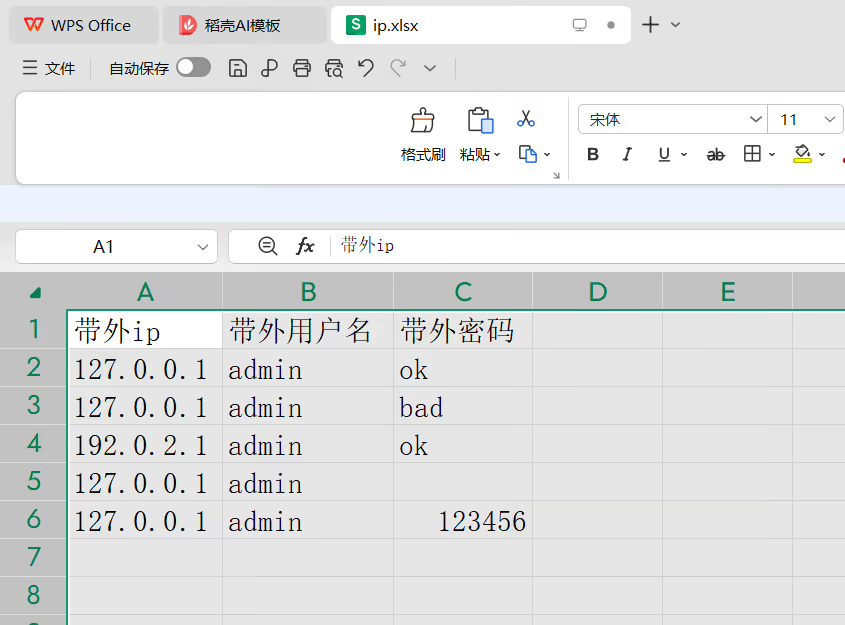
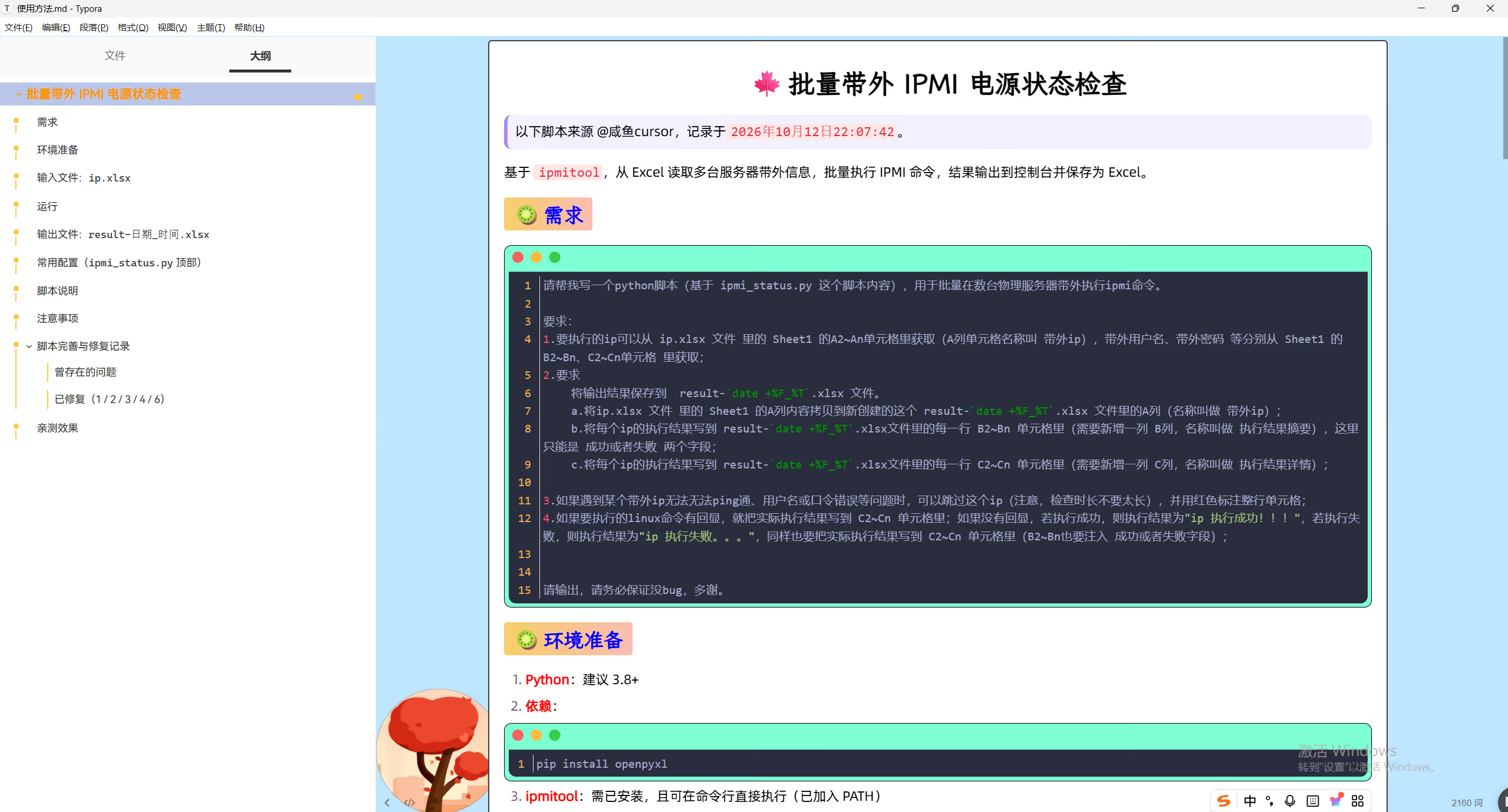
ip.txt
https://onedayxyy.cn/scripts/ipmi/ipmi_pxe/v1-2023.11.23/ip.txt
1/服务器带外地址/ipmi_pxe.py
https://onedayxyy.cn/scripts/ipmi/ipmi_pxe/v1-2023.11.23/ipmi_pxe.py
1import os
2import time
3for i in open(r'ip.txt'):
4    ip=i.split("/")[1]
5    print(ip)
6    os.system("ipmitool -I lanplus -H "+ ip + " -U admin -P 123456 chassis bootdev pxe") #从PXE启动
7    time.sleep(1)
8    os.system("ipmitool -I lanplus -H "+ ip + " -U admin -P 123456  power reset") #重启
9time.sleep(100) 1[root@docusaurus-wiki shell_pxe]# cat ip.txt
2/物理机带外ip/
3/物理机带外ip/[root@docusaurus-wiki shell_pxe]# cat ipmi_pxe_shell.sh
4#!/bin/bash
5for i in `cat /root/ipmi_ip.txt`
6do
7 impitool -H "$i" -I lanplus -U root -P 123456 chassis bootdev pxe && impitool -H "$i" -I lanplus -U root -P 123456 power reset &> /dev/null
8 if [ $? -ne 0 ]; then
9 echo $i Error
10 else
11 echo &i OK
12done[root@docusaurus-wiki shell_pxe]# https://onedayxyy.cn/scripts/ipmi/ipmi_pxe/shell_pxe/

ip.txt
https://onedayxyy.cn/scripts/ipmi/ipmi_modify_daiwai_password/v1-2023.11.23/ip.txt
1/服务器带外地址/ipmi_password.py
https://onedayxyy.cn/scripts/ipmi/ipmi_modify_daiwai_password/v1-2023.11.23/ipmi_password.py
1import os
2import time
3for i in open(r'ip.txt'):
4    ip=i.split("/")[1]
5    print(ip)
6    os.system("ipmitool -H  "+ ip + " -I lanplus -U admin -P 123456 user set password <user id> 新密码")
7    time.sleep(1)
8time.sleep(100)脚本位置:
https://onedayxyy.cn/scripts/ipmi/ipmi_modify_daiwai_password/v2-2024.4.5/
1[root@docusaurus-wiki v2-2024.4.5]#ll
2total 16
3-rw-rw-rw- 1 root root  1418 Nov 17  2021 changePassword.py
4-rw-rw-rw- 1 root root 10268 Apr  5 14:32 shanghai.xlsx
5[root@docusaurus-wiki v2-2024.4.5]#
changePassword.py
 1import os
 2import xlrd
 3
 4
 5def read_File():
 6    result = []
 7    data = xlrd.open_workbook('shanghai.xlsx')
 8    table = data.sheets()[0]
 9    rowNum = table.nrows
10    for j in range(1,rowNum):
11        cj = table.cell_value(j, 0)
12        addr = table.cell_value(j, 2)
13        userName = table.cell_value(j, 3)
14        passWord = table.cell_value(j, 4)
15        newPassWord = table.cell_value(j, 5)
16        result.append([cj, addr, userName, passWord, newPassWord])
17    return result
18
19def change_Password():
20    data = read_File()
21    for j in data:
22        if j[0] =='浪潮':
23            res =os.popen('ipmitool -I lanplus -H '+j[1]+' -U ' +j[2]+' -P '+j[3]+' user set password 1 '+j[4]).read()
24            print(type(res))
25            if 'successful' in res:
26                print(j[1] + ' change Password successful')
27            else:
28                print(j[1] + ' change Password fail')
29        elif j[0] =='烽火' or j[0] == '曙光' or j[0] =='华为':
30            res =os.popen('ipmitool -I lanplus -H '+j[1]+' -U ' +j[2]+' -P '+j[3]+' user set password 2 '+j[4]).read()
31            if 'successful' in res:
32                print(j[1] + ' change Password successful')
33            else:
34                print(j[1] + ' change Password fail')
35        else:
36            print(j[1]+ f' 配置失败{j[0]}设备不在支持范围内')
37
38if __name__ == '__main__':
39    change_Password()
shanghai.xlsx
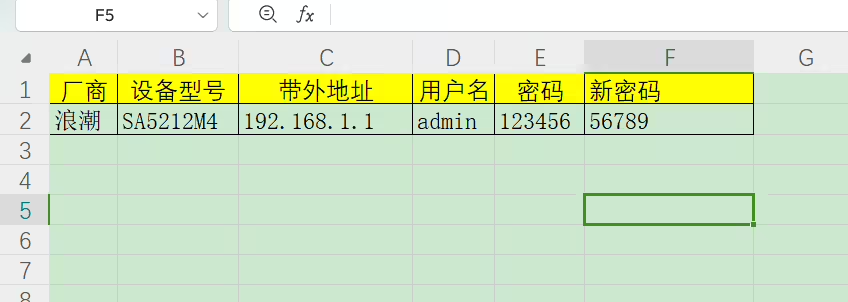
https://onedayxyy.cn/scripts/dell_Server_Modify_NtpServer/

ip.txt
1服务器带外地址DELLradamNtp.py
 1import os
 2import time
 3import paramiko
 4
 5for i in open(r'ip.txt'):
 6        ip=i.replace('\n','')
 7        print(ip)
 8        ssh = paramiko.SSHClient()
 9        ssh.set_missing_host_key_policy(paramiko.AutoAddPolicy())
10        ssh.connect(hostname=ip, port=22, username='root',password='123456')
11        stdin,stdout,stderr = ssh.exec_command("racadm set iDRAC.ntPConfigGroup.NTP1 192.168.1.1")
12        stdin,stdout,stderr = ssh.exec_command("racadm set iDRAC.ntPConfigGroup.NTP2 192.168.1.2")
13        #stdin,stdout,stderr = ssh.exec_command("testtrap -i 1")
14        #stdin,stdout,stderr = ssh.exec_command("testtrap -i 2")
15        ssh.close()
16        print("ok")
17time.sleep(100)R730
c6320
 1racadm>>racadm set iDRAC.ntPConfigGroup.NTP2 192.168.1.1
 2[Key=iDRAC.Embedded.1#NTPConfigGroup.1]
 3Object value modified successfully
 4racadm>>
 5racadm>>
 6racadm>>racadm set iDRAC.ntPConfigGroup.NTP1 192.168.1.2
 7[Key=iDRAC.Embedded.1#NTPConfigGroup.1]
 8Object value modified successfully
 9racadm>>
10racadm>>
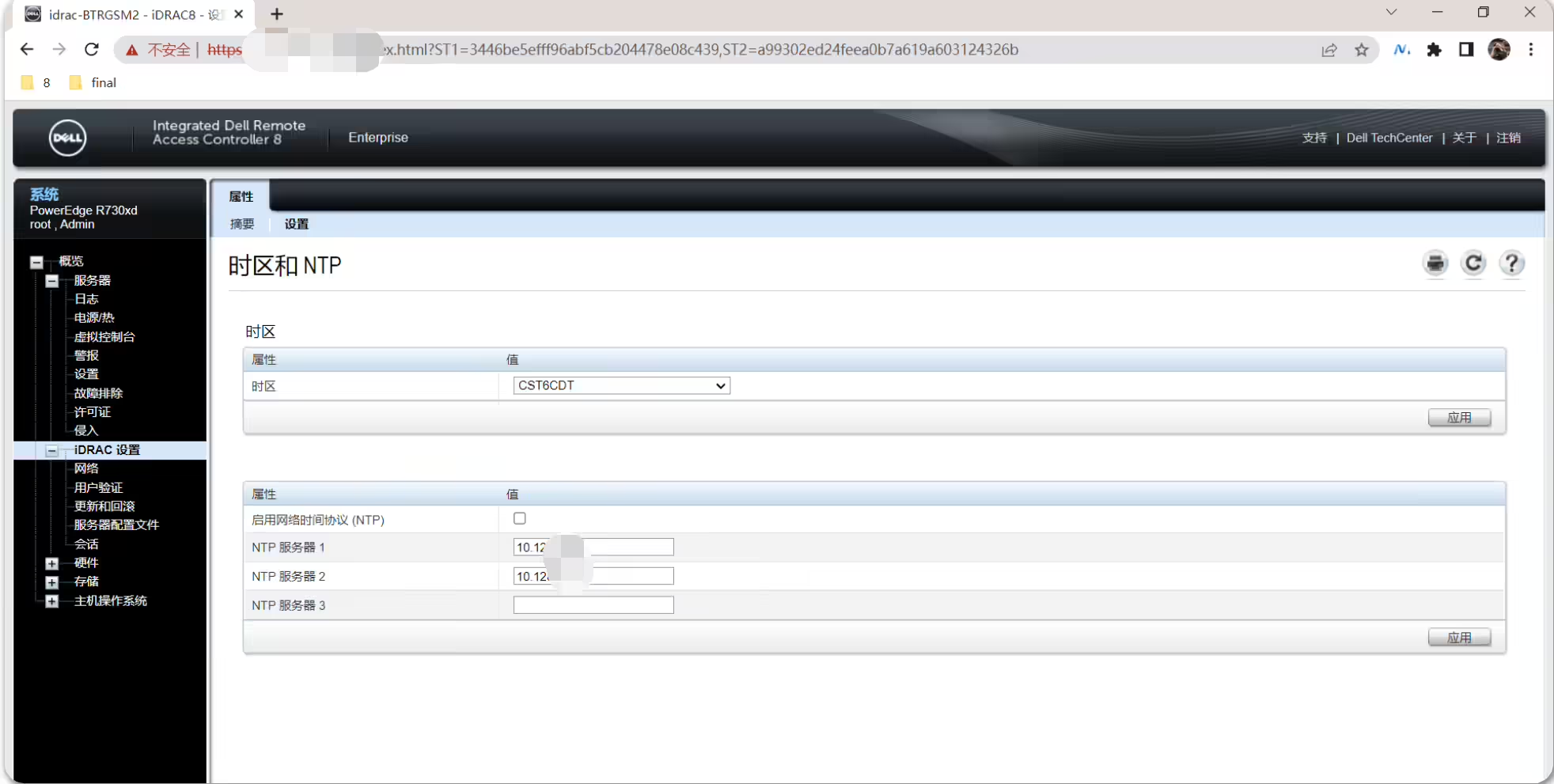
进测试:是可以生效的。
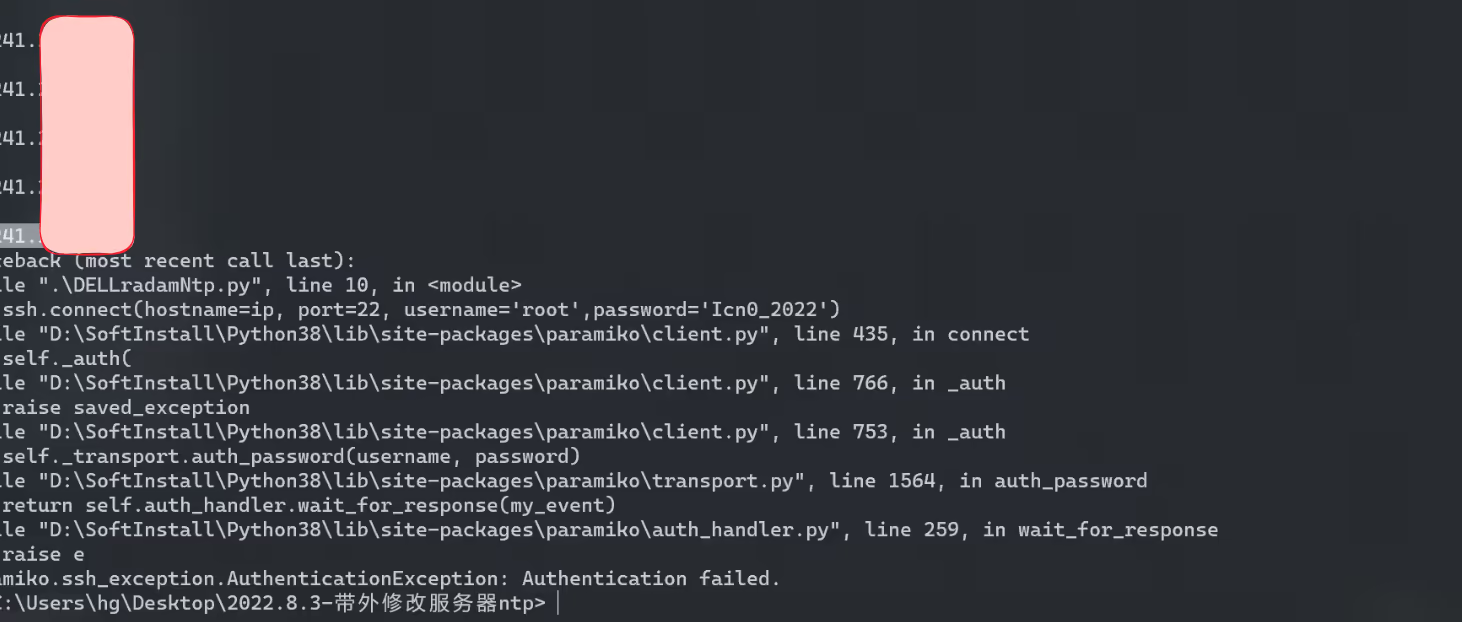
脚本需优化:认证失败的话,脚本就退出了。。。
结束。
精选 · 友链 · 更多

One的公众号
爱折腾博客的小白
