
快捷菜单
常用功能一站直达
更多功能请点顶栏「快捷菜单」
 1帮我 写个 简单 的思考 卡片风格 html (打算给自己博客 加一个思考 模块):
 2
 3卡片 里包含一小段感悟文字,日期,作者。
 4希望卡片的风格好看一点,可以使不同的颜色。
 5一个页面保持4个小卡片。
 6小卡片的hove效果也需要丝滑一些。
 7
 8
 9这个 卡片 主要记录下 自己对生活的一些感悟 小段文字。
10
11请帮我输出具体的代码。我为您设计了一个优雅的思考卡片模块,适合添加到个人博客中记录生活感悟。这个设计采用了四种不同色调的卡片,每个卡片都有独特的悬停效果,整体布局简洁大方。
具体代码:
thought-cards.html文件:
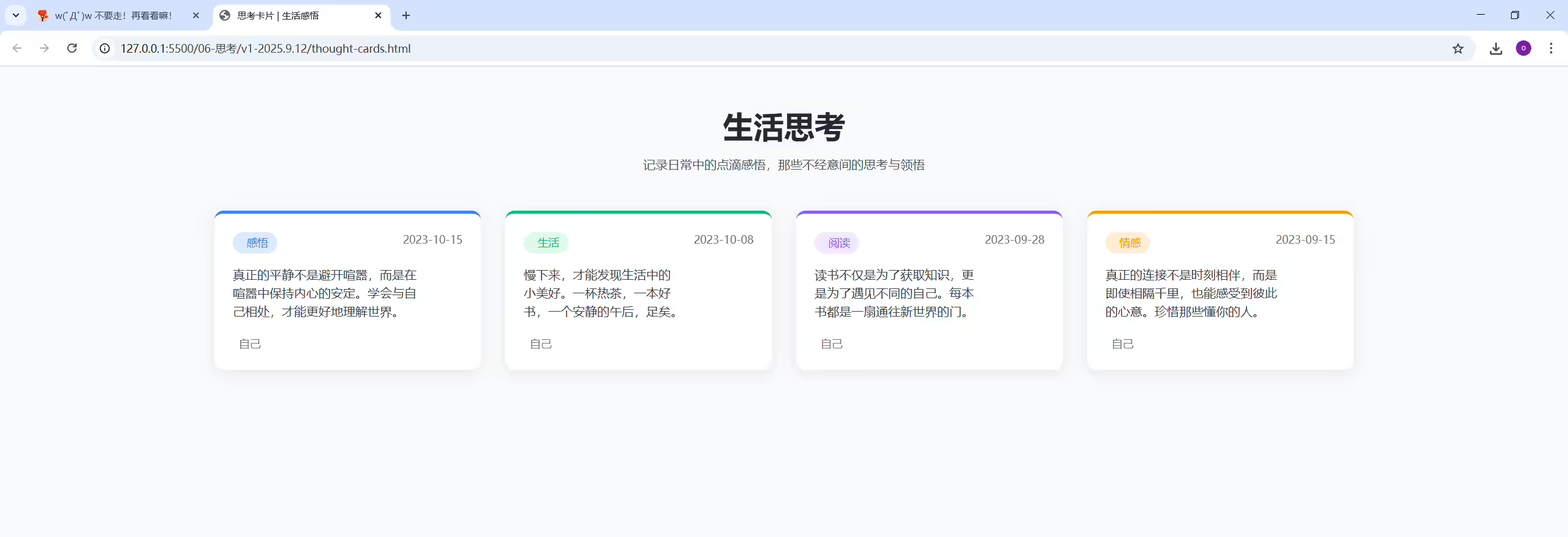
这个思考卡片模块具有以下特点:
您可以根据自己的博客风格,调整颜色方案、卡片尺寸或文字样式。添加新卡片时,只需复制现有卡片代码并修改内容即可。
1补加需求:
2以上这个思考模块,请帮我生成一个 vue3版本的组件,不要使用Tailwind CSS,样式直接使用普通css写在组件内。我将为您创建一个不依赖 Tailwind CSS 的 Vue3 思考卡片组件,所有样式将使用普通 CSS 编写并包含在组件内部,保持原有的设计风格和功能。
具体代码:
thought-cards.html文件:
<!DOCTYPE html>
<html lang="zh-CN">
<head>
    <meta charset="UTF-8">
    <meta name="viewport" content="width=device-width, initial-scale=1.0">
    <title>思考卡片 | 生活感悟</title>
    <!-- 引入Tailwind CSS -->
    <script src="https://cdn.tailwindcss.com"></script>
    <!-- 引入Font Awesome -->
    <link href="https://cdn.jsdelivr.net/npm/font-awesome@4.7.0/css/font-awesome.min.css" rel="stylesheet">

    <!-- 配置Tailwind自定义颜色 -->
    <script>
        tailwind.config = {
            theme: {
                extend: {
                    colors: {
                        thoughtBlue: '#3B82F6',
                        thoughtGreen: '#10B981',
                        thoughtPurple: '#8B5CF6',
                        thoughtOrange: '#F59E0B',
                    },
                }
            }
        }
    </script>

    <!-- 自定义工具类 -->
    <style type="text/tailwindcss">
        @layer utilities {
            .card-shadow {
                box-shadow: 0 4px 20px rgba(0, 0, 0, 0.08);
            }
            .card-hover {
                transition: all 0.3s ease;
            }
            .text-balance {
                text-wrap: balance;
            }
        }
    </style>
</head>
<body class="bg-gray-50 min-h-screen py-12">
    <div class="container mx-auto px-4 md:px-6">
        <!-- 模块标题 -->
        <div class="text-center mb-12">
            <h2 class="text-[clamp(1.8rem,4vw,2.5rem)] font-bold text-gray-800 mb-2">生活思考</h2>
            <p class="text-gray-600 max-w-2xl mx-auto">记录日常中的点滴感悟,那些不经意间的思考与领悟</p>
        </div>

        <!-- 思考卡片网格 - 保持4个卡片 -->
        <div class="grid grid-cols-1 md:grid-cols-2 lg:grid-cols-4 gap-6 md:gap-8">
            <!-- 卡片1 - 蓝色调 -->
            <div class="bg-white rounded-xl p-6 card-shadow card-hover hover:shadow-lg hover:-translate-y-1 border-t-4 border-thoughtBlue">
                <div class="flex justify-between items-start mb-4">
                    <span class="inline-flex items-center px-3 py-1 rounded-full text-sm font-medium bg-blue-100 text-thoughtBlue">
                        <i class="fa fa-lightbulb-o mr-1.5"></i>感悟
                    </span>
                    <span class="text-gray-500 text-sm">2023-10-15</span>
                </div>
                <p class="text-gray-700 mb-5 text-balance">真正的平静不是避开喧嚣,而是在喧嚣中保持内心的安定。学会与自己相处,才能更好地理解世界。</p>
                <div class="flex items-center text-gray-500 text-sm">
                    <i class="fa fa-user-circle-o mr-2"></i>
                    <span>自己</span>
                </div>
            </div>

            <!-- 卡片2 - 绿色调 -->
            <div class="bg-white rounded-xl p-6 card-shadow card-hover hover:shadow-lg hover:-translate-y-1 border-t-4 border-thoughtGreen">
                <div class="flex justify-between items-start mb-4">
                    <span class="inline-flex items-center px-3 py-1 rounded-full text-sm font-medium bg-green-100 text-thoughtGreen">
                        <i class="fa fa-leaf mr-1.5"></i>生活
                    </span>
                    <span class="text-gray-500 text-sm">2023-10-08</span>
                </div>
                <p class="text-gray-700 mb-5 text-balance">慢下来,才能发现生活中的小美好。一杯热茶,一本好书,一个安静的午后,足矣。</p>
                <div class="flex items-center text-gray-500 text-sm">
                    <i class="fa fa-user-circle-o mr-2"></i>
                    <span>自己</span>
                </div>
            </div>

            <!-- 卡片3 - 紫色调 -->
            <div class="bg-white rounded-xl p-6 card-shadow card-hover hover:shadow-lg hover:-translate-y-1 border-t-4 border-thoughtPurple">
                <div class="flex justify-between items-start mb-4">
                    <span class="inline-flex items-center px-3 py-1 rounded-full text-sm font-medium bg-purple-100 text-thoughtPurple">
                        <i class="fa fa-book mr-1.5"></i>阅读
                    </span>
                    <span class="text-gray-500 text-sm">2023-09-28</span>
                </div>
                <p class="text-gray-700 mb-5 text-balance">读书不仅是为了获取知识,更是为了遇见不同的自己。每本书都是一扇通往新世界的门。</p>
                <div class="flex items-center text-gray-500 text-sm">
                    <i class="fa fa-user-circle-o mr-2"></i>
                    <span>自己</span>
                </div>
            </div>

            <!-- 卡片4 - 橙色调 -->
            <div class="bg-white rounded-xl p-6 card-shadow card-hover hover:shadow-lg hover:-translate-y-1 border-t-4 border-thoughtOrange">
                <div class="flex justify-between items-start mb-4">
                    <span class="inline-flex items-center px-3 py-1 rounded-full text-sm font-medium bg-orange-100 text-thoughtOrange">
                        <i class="fa fa-heart mr-1.5"></i>情感
                    </span>
                    <span class="text-gray-500 text-sm">2023-09-15</span>
                </div>
                <p class="text-gray-700 mb-5 text-balance">真正的连接不是时刻相伴,而是即使相隔千里,也能感受到彼此的心意。珍惜那些懂你的人。</p>
                <div class="flex items-center text-gray-500 text-sm">
                    <i class="fa fa-user-circle-o mr-2"></i>
                    <span>自己</span>
                </div>
            </div>
        </div>
    </div>

    <script>
        // 卡片悬停动画效果
        document.addEventListener('DOMContentLoaded', () => {
            const cards = document.querySelectorAll('.card-hover');

            cards.forEach(card => {
                card.addEventListener('mouseenter', () => {
                    card.style.transform = 'translateY(-5px)';
                    card.style.boxShadow = '0 10px 25px rgba(0, 0, 0, 0.1)';
                });

                card.addEventListener('mouseleave', () => {
                    card.style.transform = 'translateY(0)';
                    card.style.boxShadow = '0 4px 20px rgba(0, 0, 0, 0.08)';
                });
            });
        });
    </script>
</body>
</html>
这个 Vue3 思考卡片组件使用原生 CSS 实现了所有样式,不依赖任何 CSS 框架,包含两个文件:
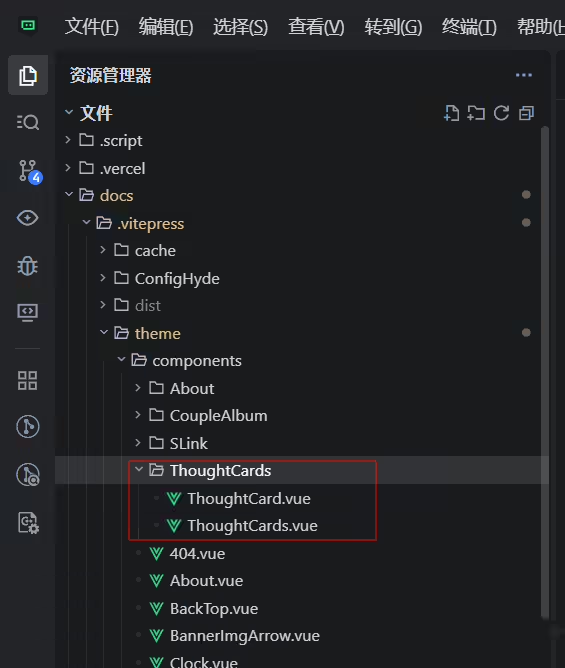
ThoughtCards.vue - 主容器组件,负责整体布局和数据管理ThoughtCard.vue - 单个卡片组件,负责渲染每张思考卡片组件特点:
使用方法:
ThoughtCards组件并使用ThoughtCards.vue中的thoughts数组<style>部分您可以根据自己的博客风格,轻松调整颜色、字体大小、间距等样式属性。
亲自部署到teek里:
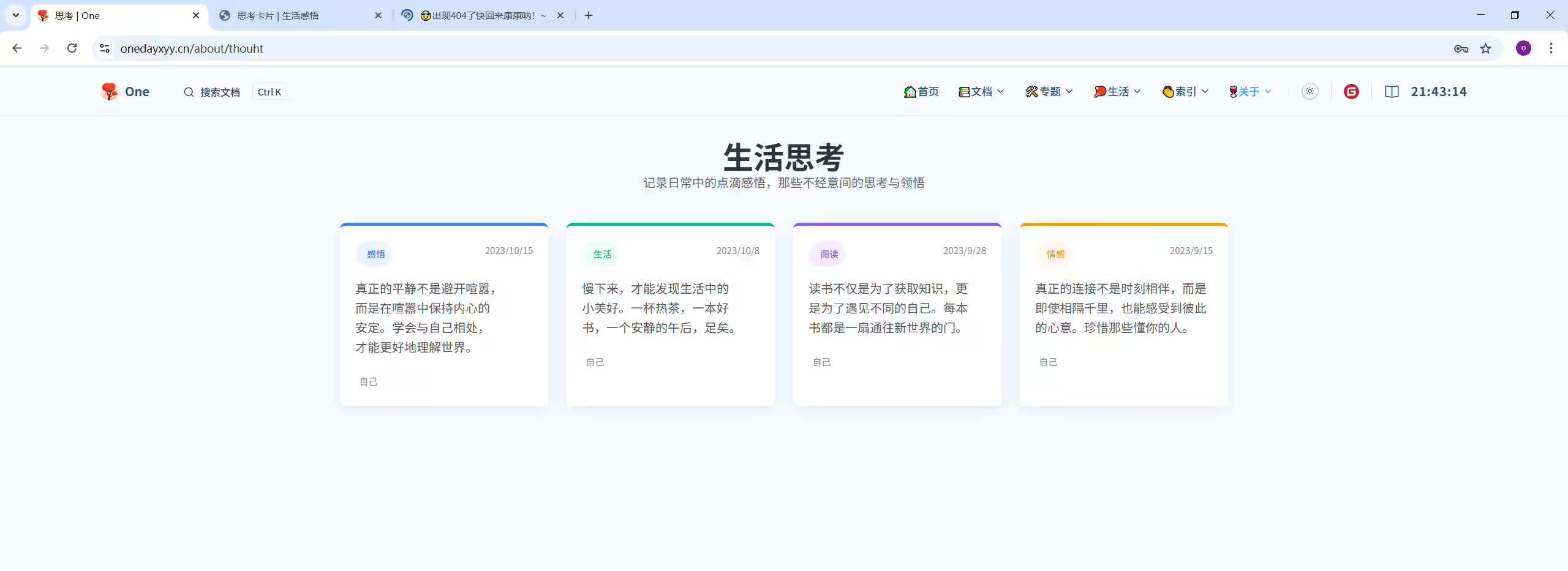
(1)创建如下对应文件(具体内容见上文)
(2)注册并使用
编辑docs\90.关于\60.思考.md文件
 1---
 2title: 思考
 3date: 2025-01-04 11:19:48
 4permalink: /about/thouht
 5layout: page
 6categories:
 7  - 更多
 8tags:
 9  - 关于我
10author:
11  name: One
12  link: https://wiki.onedayxyy.cn/
13sidebar: false
14article: false
15comment: false
16articleTopTip: false
17articleBottomTip: false
18copyright: false
19---
20
21<script setup>
22import ThoughtCards from "../.vitepress/theme/components/ThoughtCards/ThoughtCards.vue";
23</script>
24
25<ThoughtCards />
(3)验证
结束。
精选 · 友链 · 更多

One的公众号
爱折腾博客的小白
