快捷菜单
常用功能一站直达
更多功能请点顶栏「快捷菜单」
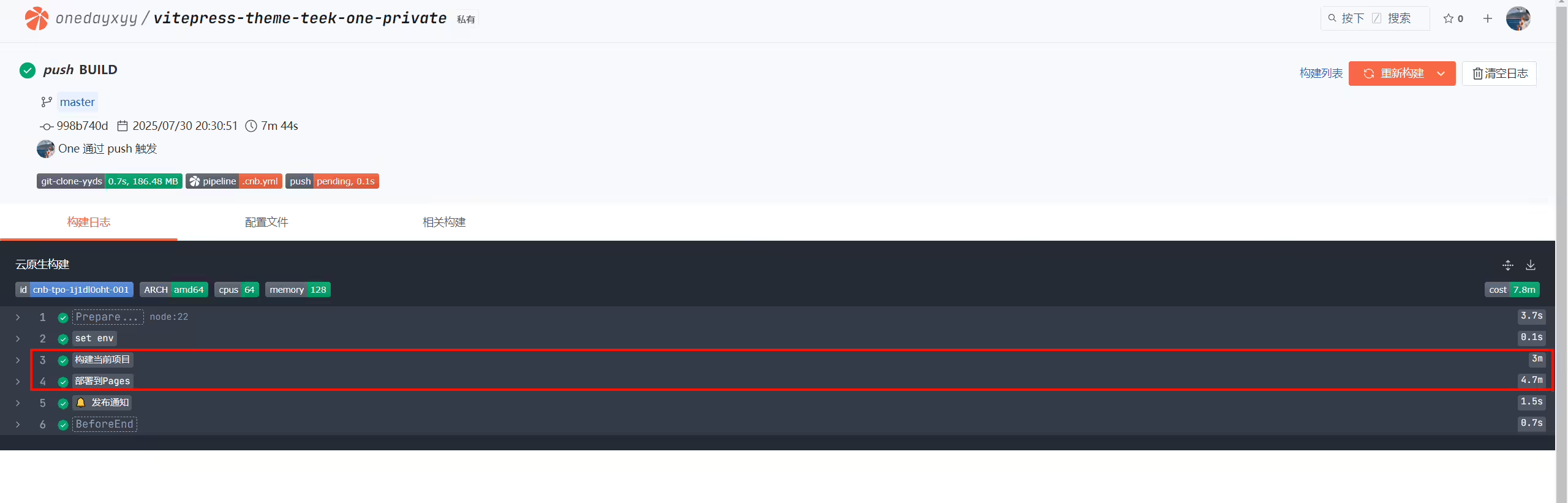
 1master:
 2  push:
 3    - runner:
 4        cpus: 64
 5      services:
 6        - docker
 7        - git-clone-yyds
 8      imports:
 9        - https://cnb.cool/onedayxyy/secret/-/blob/main/envs.yml
10      docker:
11        image: docker.cnb.cool/znb/images/node:18
12        volumes:
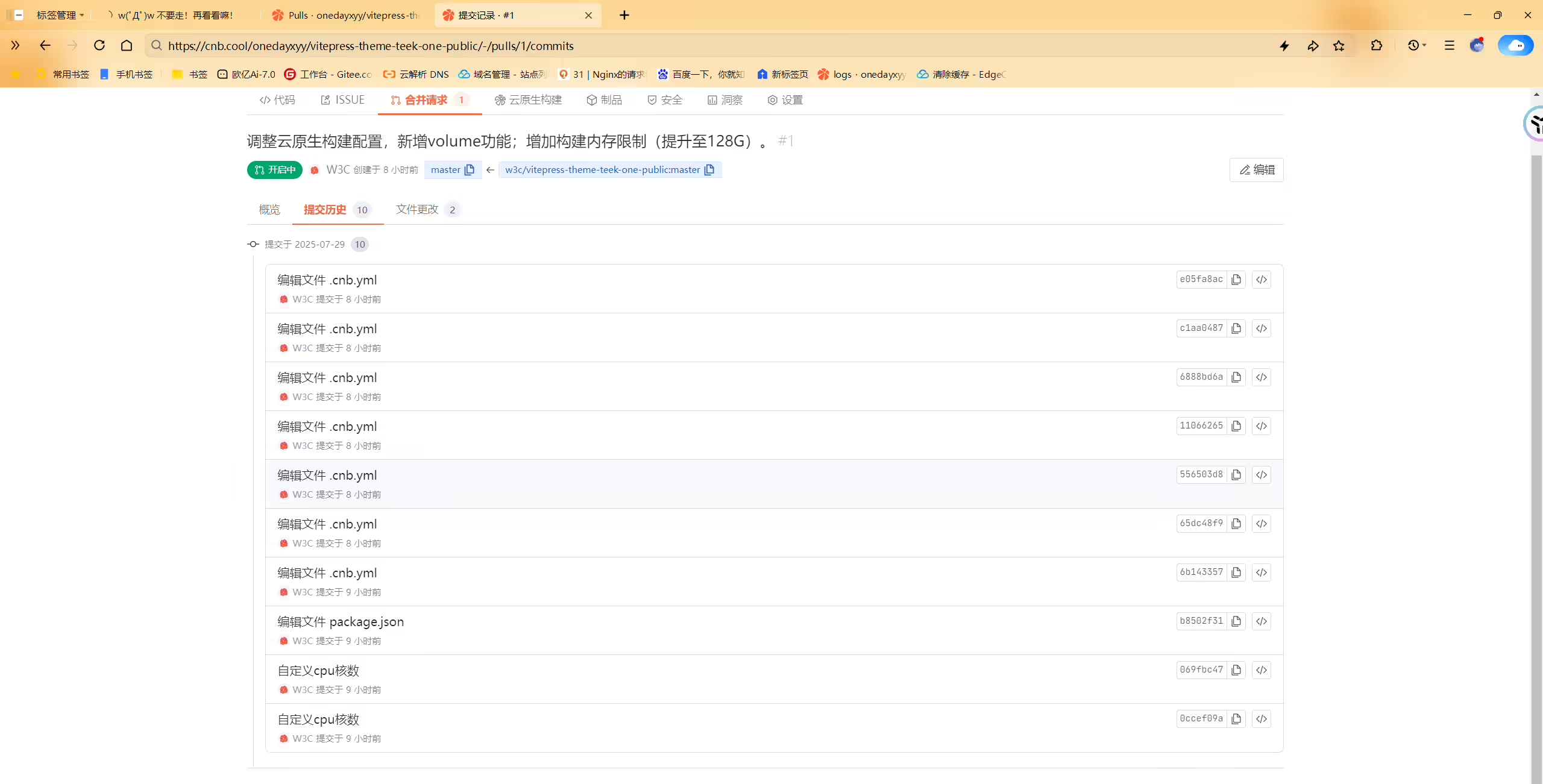
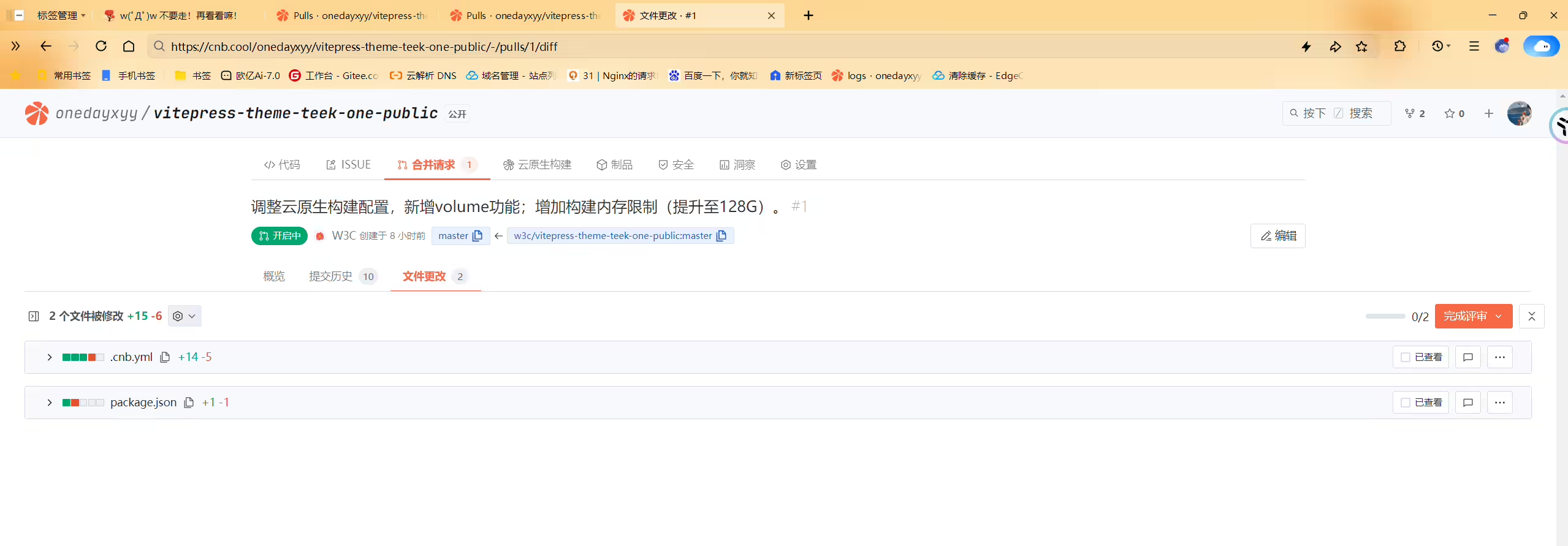
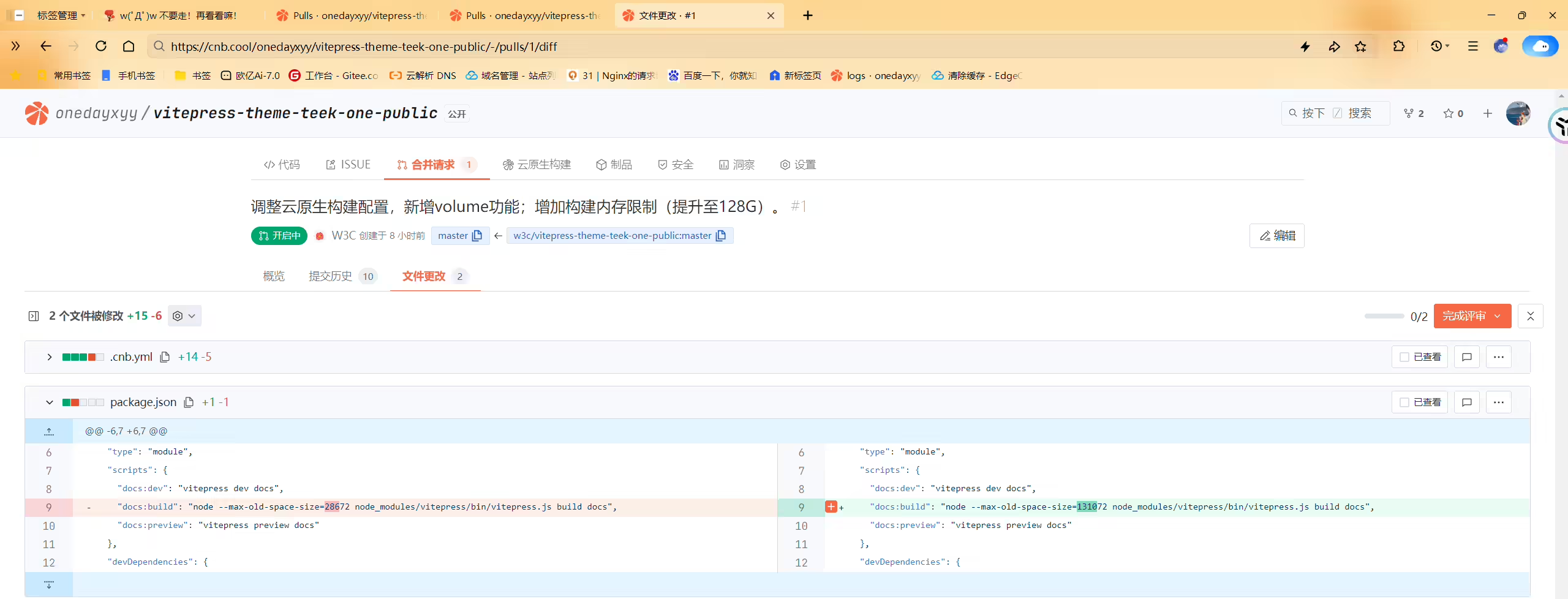
13 - /data/.cache:copy-on-write #声明式的构建缓存 1master:
2 push:
3 # 增加 Docker 的 volumes 功能
4 "volume-cache":
5 name: 云原生构建
6 imports: https://cnb.cool/onedayxyy/secret/-/blob/main/envs.yml
7 runner:
8 # 自定义cpu核数 以支持构建更多文档(cpu最大64 内存会随cpuX2 128G内存)
9 cpus: 64
10 # 以下时gpu集群 这条和上面的只能选一个,gup集群cup固定32 内存最大96
11 # tags: cnb:arch:amd64:gpu
12 docker:
13 image: node:22
14 volumes:
15 - node_modules:copy-on-write 1master:
2 push:
3 - runner:
4 cpus: 64
5 services:
6 - docker
7 - git-clone-yyds
8 imports:
9 - https://cnb.cool/onedayxyy/secret/-/blob/main/envs.yml
10 docker:
11 image: docker.cnb.cool/znb/images/node:18
12 volumes:
13 - /data/.cache:copy-on-write #声明式的构建缓存
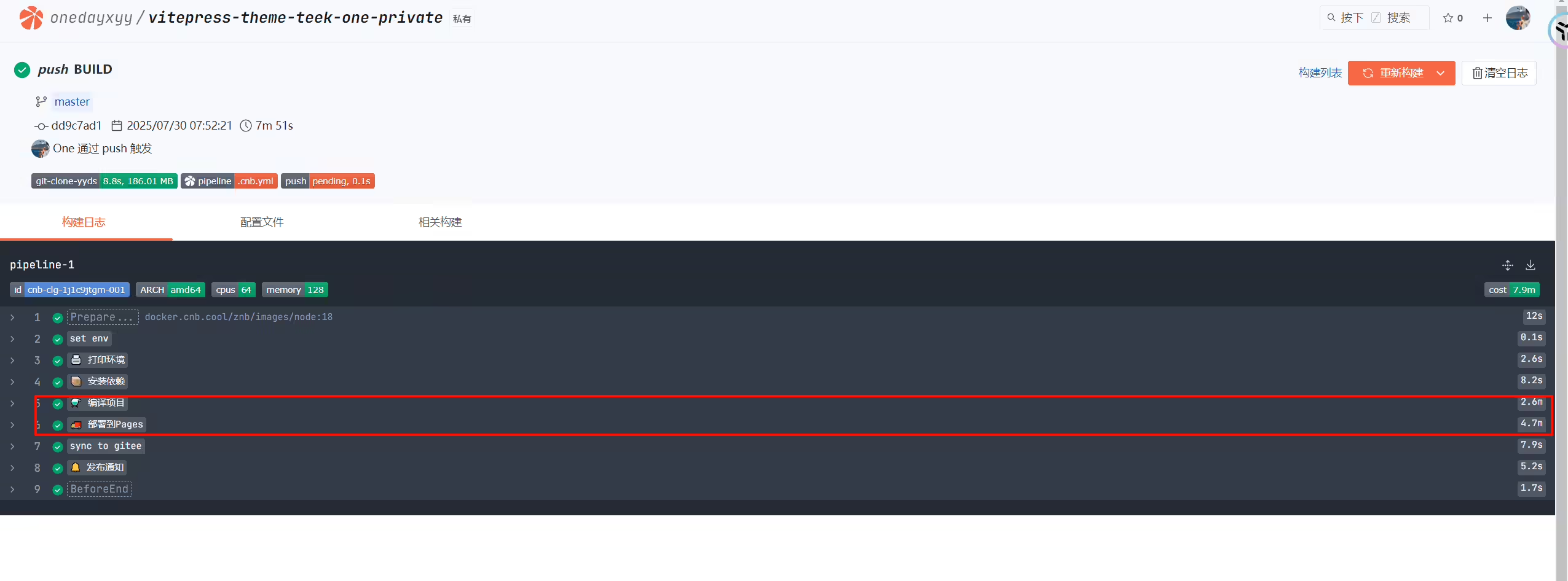
14 stages:
15 - name: set env
16 script: echo -n $(date "+%Y-%m-%d %H:%M")
17 exports:
18 info: CUSTOM_ENV_DATE_INFO
19 - name: 🖨️ 打印环境
20 if: |
21 [ "$CNB_COMMIT_MESSAGE_TITLE" = "BUILD" ]
22 script: |
23 node -v && npm -v && yarn -v && pnpm -v
24 - name: 📦️ 安装依赖
25 if: |
26 [ "$CNB_COMMIT_MESSAGE_TITLE" = "BUILD" ]
27 script: |
28 pnpm install
29
30 - name: ⚗️ 编译项目
31 if: |
32 [ "$CNB_COMMIT_MESSAGE_TITLE" = "BUILD" ]
33 script: |
34 pnpm docs:build # VitePress 专用命令
35 - name: 🚚 部署到Pages
36 if: |
37 [ "$CNB_COMMIT_MESSAGE_TITLE" = "BUILD" ]
38 image: node:22
39 script: npx edgeone pages deploy ./docs/.vitepress/dist --name vitepress-theme-teek-one-private --token $EDGEONE_PAGES_API_TOKEN
40
41 # - name: 🚚 发布制品 (把Teek静态文件从云服务器)
42 # if: |
43 # [ "$CNB_COMMIT_MESSAGE_TITLE" = "BUILD" ]
44 # image: tencentcom/rsync
45 # settings:
46 # user: ${SSH_USER}
47 # key: ${SSH_KEY}
48 # port: 22
49 # hosts:
50 # - ${ECS_IP}
51 # source: docs/.vitepress/dist/
52 # target: /root/rsync/rsync-vitepress/dist/
53 # delete: true
54 # prescript:
55 # - echo "prescript"
56 # - ls -l /root/rsync/rsync-vitepress/dist/
57 # script:
58 # - echo "after script"
59 # - ls -l /root/rsync/rsync-vitepress/dist/
60 # - date
61 # # - bash /root/website_music.sh
62 # - aliyun cdn RefreshObjectCaches --ObjectType File --ObjectPath "onedayxyy.cn/" #刷新阿里云cdn缓存
63
64
65
66 # - name: 🧘♂️ 刷新缓存
67 # image: docker.cnb.cool/znb/cdn-refresh
68 # settings:
69 # ak: "${TENCENT_OPSRE_AK}"
70 # sk: "${TENCENT_OPSRE_SK}"
71 # kind: "tencenteo"
72 # rtype: "path"
73 # domain: "onedayxyy.cn"
74 # urls:
75 # - "https://onedayxyy.cn/"
76
77 #同步仓库到gitee
78 - name: sync to gitee
79 image: tencentcom/git-sync
80 settings:
81 branch: master
82 auth_type: https
83 username: ${GIT_USERNAME}
84 password: ${GIT_ACCESS_TOKEN}
85 target_url: https://gitee.com/onlyonexl/vitepress-theme-teek-one-private.git
86 # git_email: 'github-actions[bot]@users.noreply.github.com'
87
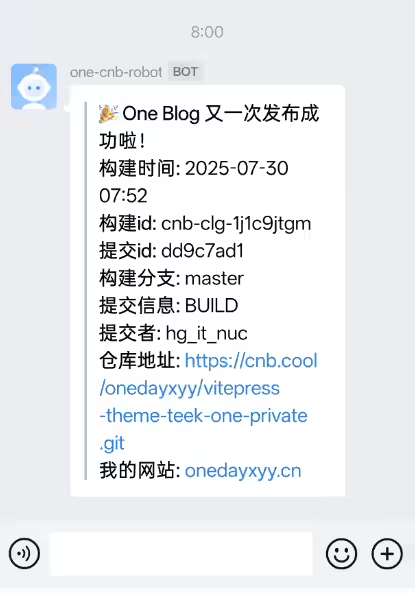
88 - name: 🔔 发布通知
89 image: tencentcom/wecom-message
90 settings:
91 robot: ${WECOM_BOT}
92 msgType: markdown
93 content: |
94 > **🎉 One Blog 又一次发布成功啦!**
95 > **构建时间:** $CUSTOM_ENV_DATE_INFO
96 > **构建id:** $CNB_BUILD_ID
97 > **提交id:** $CNB_COMMIT_SHORT
98 > **构建分支:** $CNB_BRANCH
99 > **提交信息:** $CNB_COMMIT_MESSAGE_TITLE
100 > **提交者:** $CNB_COMMITTER
101 > **仓库地址:** [$CNB_REPO_URL_HTTPS]($CNB_REPO_URL_HTTPS)
102 > **我的网站:** [onedayxyy.cn](https://onedayxyy.cn/) 1# .cnb.yml
2$:
3 # vscode 事件:专供页面中启动远程开发用
4 vscode:
5 - runner:
6 # 自定义CPU核心数,最大支持64核
7 cpus: 64
8 docker:
9 # 自定义开发环境
10 build:
11 # 指定构建镜像的 Dockerfile 文件
12 dockerfile: .ide/Dockerfile
13 services:
14 # 声明使用 vscode 服务
15 - vscode
16 # 声明在容器中支持 docker 命令
17 - docker
18 imports:
19 - https://cnb.cool/onedayxyy/secret/-/blob/main/envs.yml
20 stages:
21 - name: 环境启动时执行以下命令
22 script:
23 # 安装pnpm并使用pnpm安装依赖
24 - npm install -g pnpm
25 - pnpm i
26
27# 云原生构建流程和自动部署
28master:
29 push:
30 # 增加 Docker 的 volumes 功能
31 "volume-cache":
32 name: 云原生构建
33 imports: https://cnb.cool/onedayxyy/secret/-/blob/main/envs.yml
34 runner:
35 # 自定义cpu核数 以支持构建更多文档(cpu最大64 内存会随cpuX2 128G内存)
36 cpus: 64
37 # 以下时gpu集群 这条和上面的只能选一个,gup集群cup固定32 内存最大96
38 # tags: cnb:arch:amd64:gpu
39 docker:
40 image: node:22
41 volumes:
42 - node_modules:copy-on-write
43 stages:
44 - name: set env
45 script: echo -n $(date "+%Y-%m-%d %H:%M")
46 exports:
47 info: CUSTOM_ENV_DATE_INFO
48 - name: 构建当前项目
49 script: npm install -g pnpm && pnpm i && pnpm run docs:build
50 - name: 部署到Pages
51 script: npx edgeone pages deploy ./docs/.vitepress/dist --name vitepress-theme-teek-one-private --token $EDGEONE_PAGES_API_TOKEN
52
53 # - name: 🧘♂️ 刷新缓存
54 # image: docker.cnb.cool/znb/cdn-refresh
55 # settings:
56 # ak: "${TENCENT_OPSRE_AK}"
57 # sk: "${TENCENT_OPSRE_SK}"
58 # kind: "tencenteo"
59 # rtype: "path"
60 # domain: "onedayxyy.cn"
61 # urls:
62 # - "https://wiki.onedayxyy.cn/"
63
64 # #同步仓库到gitee
65 # - name: sync to gitee
66 # image: tencentcom/git-sync
67 # settings:
68 # branch: master
69 # auth_type: https
70 # username: ${GIT_USERNAME}
71 # password: ${GIT_ACCESS_TOKEN}
72 # target_url: https://gitee.com/onlyonexl/vitepress-theme-teek-one-public.git
73 # git_email: 'github-actions[bot]@users.noreply.github.com'
74
75 - name: 🔔 发布通知
76 image: tencentcom/wecom-message
77 settings:
78 robot: ${WECOM_BOT}
79 msgType: markdown
80 content: |
81 > **🎉 One Blog 又一次发布成功啦!**
82 > **构建时间:** $CUSTOM_ENV_DATE_INFO
83 > **构建id:** $CNB_BUILD_ID
84 > **提交id:** $CNB_COMMIT_SHORT
85 > **构建分支:** $CNB_BRANCH
86 > **提交信息:** $CNB_COMMIT_MESSAGE_TITLE
87 > **提交者:** $CNB_COMMITTER
88 > **仓库地址:** [$CNB_REPO_URL_HTTPS]($CNB_REPO_URL_HTTPS)
89 > **我的网站:** [onedayxyy.cn](https://onedayxyy.cn/) 上午:
晚上: