
快捷菜单
常用功能一站直达
更多功能请点顶栏「快捷菜单」
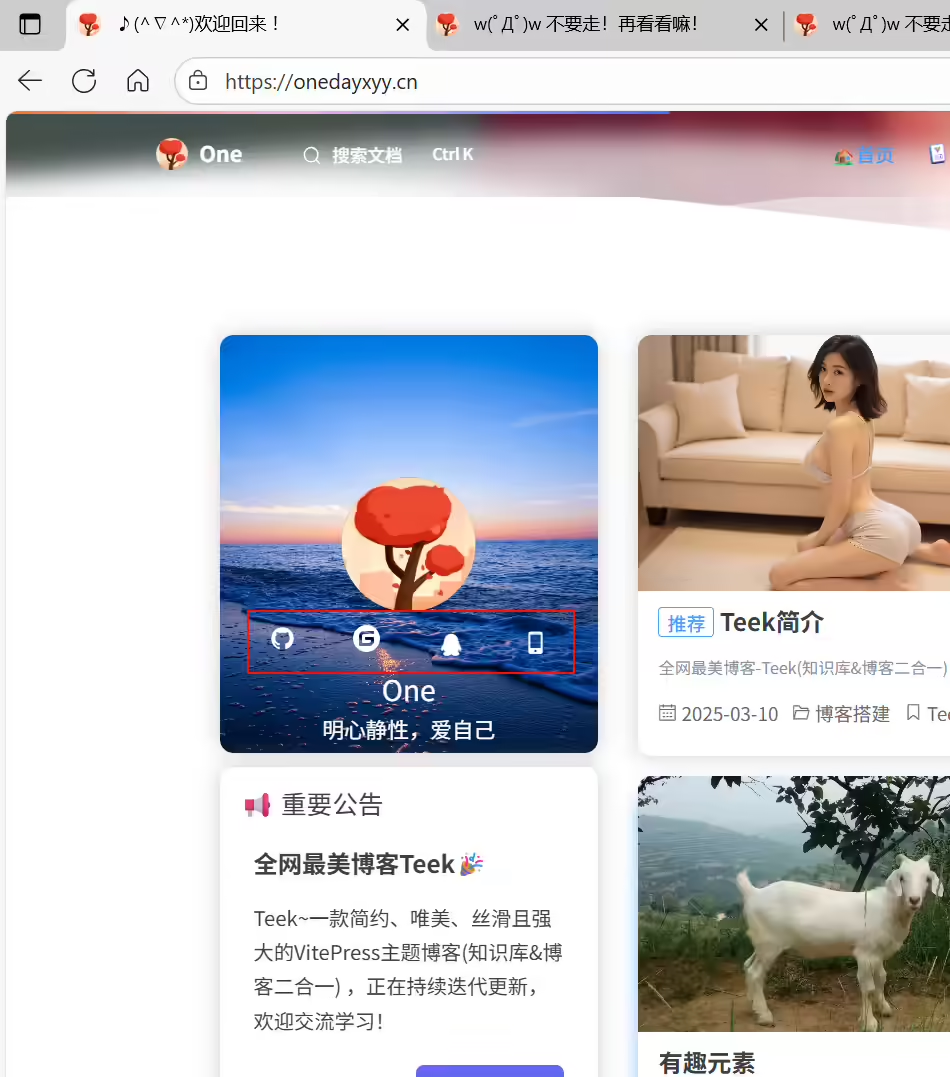
编辑docs\.vitepress\ConfigHyde\SocialDate.ts文件:
 1// 卡片栏社交信息
 2import { Social } from "vitepress-theme-teek/config";
 3
 4export const SocialDate: Social[] = [
 5  {
 6    icon: "mdi:github",
 7    name: "GitHub",
 8    link: "https://cnb.cool/onedayxyy",
 9  },
10  {
11    icon: "simple-icons:gitee",
12    name: "Gitee",
13    link: "https://cnb.cool/onedayxyy/vitepress-theme-teek-one-public",
14  },
15  {
16    icon: "icon-qq",
17    iconType: "iconfont",
18    name: "QQ",
19    // link: "http://wpa.qq.com/msgrd?v=3&uin=2675263825&site=qq&menu=yes",
20    link: "https://img.onedayxyy.cn/images/Teekwebsite/teek-hg-qq.avif",
21  },
22  {
23    icon: "icon-mobile",
24    iconType: "iconfont",
25    name: "微信",
26    // link: "https://onedayxyy.cn/?contact=true",
27    link: "https://img.onedayxyy.cn/images/image-20230107215114763-1694437284994-1-1697348761221-1-1697407921190-1-1697636582091-3-1698965093137-1.avif",
28  },
29];
效果:
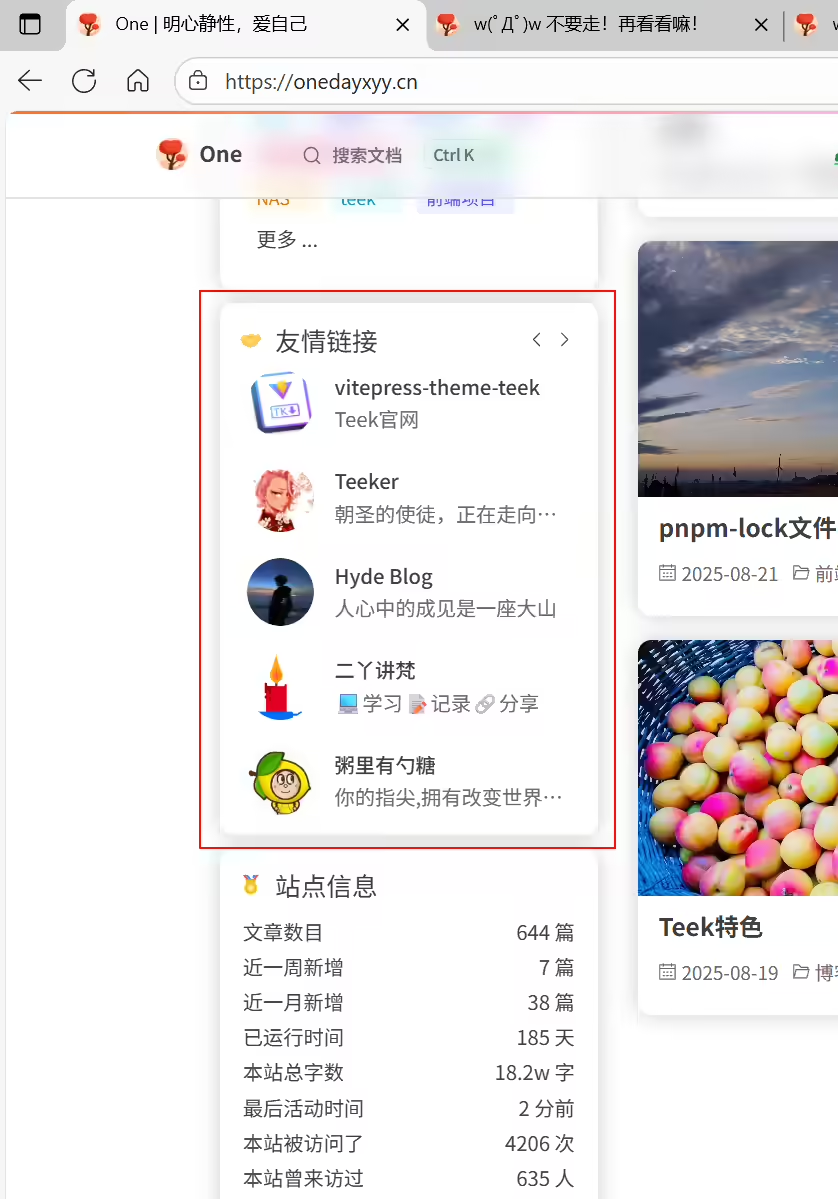
编辑docs\.vitepress\ConfigHyde\FriendLink.ts文件:
 1// FriendLink用于在首页展示一些友链
 2export const FriendLink = {
 3  enabled: true, // 是否启用友情链接卡片
 4  limit: 5, // 一页显示的数量
 5  // autoScroll: true, // 是否自动滚动
 6  // scrollSpeed: 2500, // 滚动间隔时间,单位:毫秒。autoScroll 为 true 时生效
 7
 8  autoPage: true, // 是否自动翻页
 9  pageSpeed: 4000, // 翻页间隔时间,单位:毫秒。autoPage 为 true 时生效
10  titleClick: (router) => router.go("/websites"), // 查看更多友链
11
12  // 友情链接数据列表
13  list: [
14    {
15      avatar: "/teek-logo-large.avif",
16      name: "vitepress-theme-teek",
17      desc: "Teek官网",
18      link: "https://vp.teek.top/",
19    },
20    {
21      name: "Teeker",
22      desc: "朝圣的使徒,正在走向编程的至高殿堂!",
23      link: "http://notes.teek.top/",
24      avatar: "https://testingcf.jsdelivr.net/gh/Kele-Bingtang/static/user/avatar2.avif",
25    },
26    {
27      avatar: "https://img.onedayxyy.cn/images/Teekwebsite/hyde.avif",
28      name: "Hyde Blog",
29      desc: "人心中的成见是一座大山",
30      link: "https://teek.seasir.top/",
31    },
32    {
33      avatar: "https://wiki.eryajf.net/img/logo.avif",
34      name: "二丫讲梵",
35      desc: "💻学习📝记录🔗分享",
36      link: "https://wiki.eryajf.net/",
37    },
38    {
39      avatar: "https://img.onedayxyy.cn/images/Teekwebsite/sugarat.top-logo.avif",
40      name: "粥里有勺糖",
41      desc: "你的指尖,拥有改变世界的力量",
42      link: "https://sugarat.top/",
43    },
44    {
45      avatar: "https://img.onedayxyy.cn/images/POETIZE-logo.avif",
46      name: "POETIZE",
47      desc: "最美博客",
48      link: "https://poetize.cn/",
49    },
50    {
51      avatar: "https://img.onedayxyy.cn/images/image-20250220073534772.avif",
52      name: "宇阳",
53      desc: "记录所学知识,缩短和大神的差距!",
54      link: "https://liuyuyang.net",
55    },
56    {
57      avatar: "https://img.onedayxyy.cn/images/Teekwebsite/blog.grtsinry43.com.avif",
58      name: "Grtsinry43’s Blog",
59      desc: "总之岁月漫长,然而值得等待 ",
60      link: "https://blog.grtsinry43.com/",
61    },
62    {
63      avatar: "https://img.onedayxyy.cn/images/Teekwebsite/blog.zhheo.com.avif",
64      name: "张洪Heo",
65      desc: "分享设计与科技生活",
66      link: "https://blog.zhheo.com/",
67    },
68    {
69      name: "王嘉祥",
70      desc: "唱响科普和人生兴事,分享科技与美好生活(rust写的zola主题,移植于张洪heo)",
71      link: "https://blog.jiaxiang.wang/",
72      avatar: "https://img.onedayxyy.cn/images/Teekwebsite/blog.jiaxiang.wang.avif",
73    },
74  ],
75  // autoScroll: true,
76};
效果:
编辑
D:\vitepress-theme-teek-one-private\docs\.vitepress\ConfigHyde\FooterInfo.ts文件:
1// 底部信息配置
2import { version } from "vitepress-theme-teek/es/version"; // 导入版本号
3
4export const FooterInfo = {
5 topMessage: [
6 `<span><img alt="VitePress" src="https://liuyuyang.net/_next/image?url=%2F_next%2Fstatic%2Fmedia%2Fanimals.65eaf6e3.avif&w=750&q=75"><span/>`,
7
8 `<a target="_blank" href="https://vitepress.dev/" title="本站框架基于 VitePress_v1.6.3" ><img alt="VitePress" src="https://img.shields.io/badge/Frame-VitePress-4868C2?logo=vitepress&logoColor=fff" ></a>
9
10 <a target="_blank" href="http://creativecommons.org/licenses/by-nc-sa/4.0/" title="本站内容采用 CC BY-NC-SA 4.0 国际许可协议进行许可"><img alt="Copyright" src="https://img.shields.io/badge/Copyright-BY--NC--SA%204.0-d42328?logo=coursera&logoColor=fff"></a>
11
12 <a target="_blank" href="https://twikoo.js.org/" title="本站评论系统使用 Twikoo" ><img alt="Twikoo" src="https://img.shields.io/badge/Comments-Twikoo-0072F9"></a>
13
14 <a target="_blank" href="https://www.algolia.com/" title="本站搜索服务使用 Algolia"><img alt="Algolia" src="https://img.shields.io/badge/Search-Algolia-3095FA?logo=Algolia"></a>
15
16 <a target="_blank" href="https://www.ucloud.cn/" title="本站部署服务使用 ucloud"><img alt="ucloud" src="https://img.shields.io/badge/Ucloud-Server?logo=alibabacloud&label=Server&color=%23FF6A00"></a>
17
18 <a target="_blank" href="https://edgeone.ai/zh" title="本站部署服务使用 EdgeOne"><img alt="EdgeOne" src="https://img.shields.io/badge/EdgeOne-CDN?logo=alibabacloud&label=CDN&color=%23FF6A00"></a>
19
20 <a target="_blank" href="https://51.la/" title="本站统计服务使用 51.LA"><img alt="51.LA" src="https://img.shields.io/badge/51.LA-000000?logo=51.LA&label=Count&color=%23FF6A00"></a>
21
22
23 <a target="_blank" href="https://nginx.org/" title="本站Nginx反向代理服务 Nginx"><img alt="Nginx" src="https://img.shields.io/badge/Nginx-Proxy?logo=Nginx&label=Proxy"></a>`,
24 ],
25 theme: {
26 name: `Theme By Teek@${version}-2025.8.24`,
27 },
28 bottomMessage: [
29 `<script id="LA-DATA-WIDGET" crossorigin="anonymous" charset="UTF-8" src="https://v6-widget.51.la/v6/3LmZHLhDZIDpMaT0/quote.js?theme=#1690FF,#333333,#999999,#007BFF,#FFFFFF,#1690FF,12&f=12&display=0,0,1,1,1,1,1,1"></script>`,
30 // `<span id="runtime"></span>(●'◡'●)`,
31 "初闻不知曲中意,再听已是曲中人",
32 ],
33 copyright: {
34 createYear: 2021,
35 suffix: "One Blog",
36 },
37 icpRecord: {
38 name: "陇ICP备2023002645号",
39 link: "http://beian.miit.gov.cn/",
40 },
41 // 网络安全备案信息配置
42 securityRecord: {
43 name: "甘公网安备62102702000211号",
44 link: "https://beian.mps.gov.cn/",
45 },
46 customHtml: ``, // 搭配 ./theme/composables/useRuntime.ts
47};效果:

(1)首页壁纸配置
编辑docs\.vitepress\ConfigHyde\Wallaper.ts文件:
 1// 首页壁纸
 2export const Wallpaper = [
 3  "https://img.onedayxyy.cn/images/TeekBg/1.avif",
 4  "https://img.onedayxyy.cn/images/TeekBg/2.avif",
 5  "https://img.onedayxyy.cn/images/TeekBg/3.avif",
 6  "https://img.onedayxyy.cn/images/TeekBg/4.avif",
 7  "https://img.onedayxyy.cn/images/TeekBg/5.avif",
 8  "https://img.onedayxyy.cn/images/TeekBg/6.avif",
 9  "https://img.onedayxyy.cn/images/TeekBg/7.avif",
10  "https://img.onedayxyy.cn/images/TeekBg/8.avif",
11  "https://img.onedayxyy.cn/images/TeekBg/9.avif",
12  "https://img.onedayxyy.cn/images/TeekBg/10.avif",
13  "https://img.onedayxyy.cn/images/TeekBg/11.avif",
14  "https://img.onedayxyy.cn/images/TeekBg/12.avif",
15  "https://img.onedayxyy.cn/images/TeekBg/13.avif",
16  "https://img.onedayxyy.cn/images/TeekBg/14.avif",
17  "https://img.onedayxyy.cn/images/TeekBg/15.avif",
18  "https://img.onedayxyy.cn/images/TeekBg/16.avif",
19  "https://img.onedayxyy.cn/images/TeekBg/17.avif",
20  "https://img.onedayxyy.cn/images/TeekBg/18.avif",
21  "https://img.onedayxyy.cn/images/TeekBg/19.avif",
22];
效果:

把这里的图片替换为你自己图片地址,可以使用图床地址,或者把图片放本地路径:
例如:
/img/bg/1.avif这里相对目录指的是docs\public目录下。
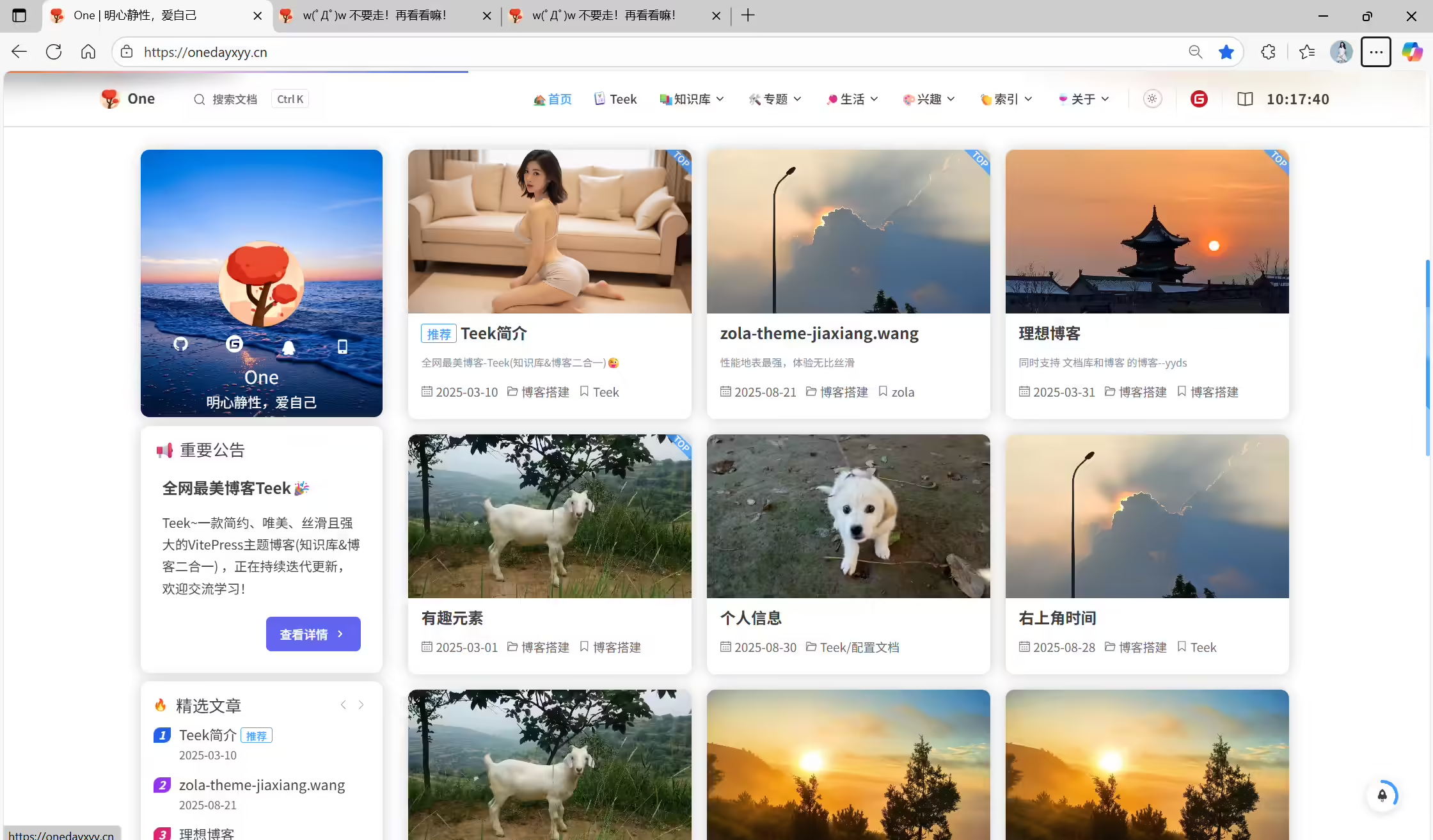
(2)文章封面配置
编辑docs\.vitepress\ConfigHyde\Cover.ts文件:
 1// 首页壁纸
 2export const Cover = [
 3  "https://img.onedayxyy.cn/images/TeekCover/1.avif",
 4  "https://img.onedayxyy.cn/images/TeekCover/2.avif",
 5  "https://img.onedayxyy.cn/images/TeekCover/3.avif",
 6  "https://img.onedayxyy.cn/images/TeekCover/4.avif",
 7  "https://img.onedayxyy.cn/images/TeekCover/5.avif",
 8  "https://img.onedayxyy.cn/images/TeekCover/6.avif",
 9  "https://img.onedayxyy.cn/images/TeekCover/7.avif",
10  "https://img.onedayxyy.cn/images/TeekCover/8.avif",
11  "https://img.onedayxyy.cn/images/TeekCover/9.avif",
12  "https://img.onedayxyy.cn/images/TeekCover/10.avif",
13  "https://img.onedayxyy.cn/images/TeekCover/11.avif",
14  "https://img.onedayxyy.cn/images/TeekCover/12.avif",
15  "https://img.onedayxyy.cn/images/TeekCover/13.avif",
16  "https://img.onedayxyy.cn/images/TeekCover/14.avif",
17  "https://img.onedayxyy.cn/images/TeekCover/15.avif",
18  "https://img.onedayxyy.cn/images/TeekCover/16.avif",
19  "https://img.onedayxyy.cn/images/TeekCover/17.avif",
20  "https://img.onedayxyy.cn/images/TeekCover/18.avif",
21  "https://img.onedayxyy.cn/images/TeekCover/19.avif",
22];
效果:
把这里的图片替换为你自己图片地址,可以使用图床地址,或者把图片放本地路径:
例如:
/img/bg/1.avif这里相对目录指的是docs\public目录下。
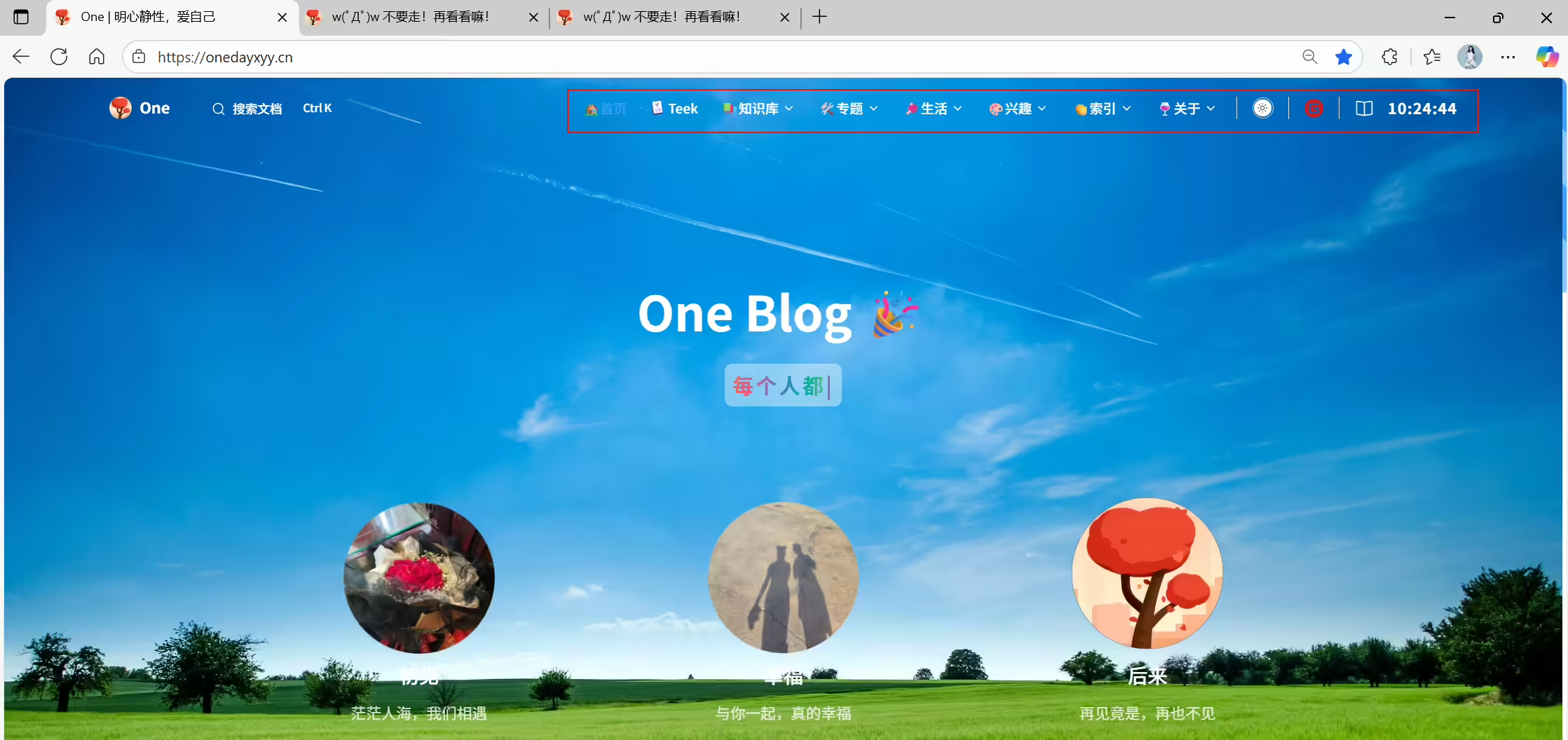
如果你想自定义自己的导航看,请看如下配置:
编辑docs\.vitepress\ConfigHyde\Nav.ts文件:
  1// nav导航栏配置
  2import { TeekIcon, VdoingIcon, SSLIcon, BlogIcon } from "./icon/NavIcon";
  3export const Nav = [
  4    { text: "🏡首页", link: "/" },
  5    {
  6      text: `
  7        <div style="display: flex; align-items: center; gap: 4px;">
  8          <img src="/img/nav/teek.svg" alt="" style="width: 16px; height: 16px;">
  9          <span>Teek</span>
 10        </div>
 11        `,
 12      link: '/teek/teek-one',
 13    },
 14
 15
 16
 17
 18    // 笔记
 19    {
 20      text: '📚知识库',
 21      items: [
 22        {
 23          text: `
 24            <div style="display: flex; align-items: center; gap: 4px;">
 25              <img src="/img/nav/linux.svg" alt="" style="width: 16px; height: 16px;">
 26              <span>运维</span>
 27            </div>
 28            `,
 29          link: '/linux/linux-index',
 30        },
 31        {
 32          text: `
 33            <div style="display: flex; align-items: center; gap: 4px;">
 34              <img src="/img/nav/前端.svg" alt="" style="width: 16px; height: 16px;">
 35              <span>前端</span>
 36            </div>
 37            `,
 38          link: '/qianduan/qianduan-index',
 39        },
 40                {
 41          text: `
 42            <div style="display: flex; align-items: center; gap: 4px;">
 43              <img src="/img/nav/编程.svg" alt="" style="width: 16px; height: 16px;">
 44              <span>编程</span>
 45            </div>
 46            `,
 47          link: '/code/code-index',
 48        },
 49        {
 50          text: `
 51            <div style="display: flex; align-items: center; gap: 4px;">
 52              <img src="/img/nav/黑客.svg" alt="" style="width: 16px; height: 16px;">
 53              <span>黑客</span>
 54            </div>
 55            `,
 56          link: '/hacker/hacker-index',
 57        },
 58      ],
 59    },
 60
 61    // 专题
 62    {
 63      text: '🛠️专题',
 64      items: [
 65        {
 66          text: `
 67            <div style="display: flex; align-items: center; gap: 4px;">
 68              <img src="/img/nav/博客.svg" alt="" style="width: 16px; height: 16px;">
 69              <span>博客搭建</span>
 70            </div>
 71            `,
 72          link: '/zhuanti/blog',
 73        },
 74        {
 75          text: `
 76            <div style="display: flex; align-items: center; gap: 4px;">
 77              <img src="/img/nav/前端demo.svg" alt="" style="width: 16px; height: 16px;">
 78              <span>前端demo</span>
 79            </div>
 80            `,
 81          link: '/zhuanti/qianduan-demo',
 82        },
 83        {
 84          text: `
 85            <div style="display: flex; align-items: center; gap: 4px;">
 86              <img src="/img/nav/Git.svg" alt="" style="width: 16px; height: 16px;">
 87              <span>Git</span>
 88            </div>
 89            `,
 90          link: '/zhuanti/git',
 91        },
 92        {
 93          text: `
 94            <div style="display: flex; align-items: center; gap: 4px;">
 95              <img src="/img/nav/面试.svg" alt="" style="width: 16px; height: 16px;">
 96              <span>面试</span>
 97            </div>
 98            `,
 99          link: '/zhuanti/mianshi',
100        },
101        {
102          text: `
103            <div style="display: flex; align-items: center; gap: 4px;">
104              <img src="/img/nav/NAS.svg" alt="" style="width: 16px; height: 16px;">
105              <span>NAS</span>
106            </div>
107            `,
108          link: '/zhuanti/NAS',
109        },
110        {
111          text: `
112            <div style="display: flex; align-items: center; gap: 4px;">
113              <img src="/img/nav/脚本.svg" alt="" style="width: 16px; height: 16px;">
114              <span>脚本</span>
115            </div>
116            `,
117          link: '/zhuanti/jiaoben',
118        },
119        {
120          text: `
121            <div style="display: flex; align-items: center; gap: 4px;">
122              <img src="/img/nav/工具.svg" alt="" style="width: 16px; height: 16px;">
123              <span>工具</span>
124            </div>
125            `,
126          link: '/tools/tools',
127        },
128        {
129          text: `
130            <div style="display: flex; align-items: center; gap: 4px;">
131              <img src="/img/nav/开源项目.svg" alt="" style="width: 16px; height: 16px;">
132              <span>开源项目</span>
133            </div>
134            `,
135          link: '/zhuanti/opensource',
136        },
137      ],
138    },
139
140
141
142
143
144
145
146    // 生活
147    {
148      text: '🏓生活',
149      items: [
150        {
151          // 分组标题1
152          text: '娱乐',
153          items: [
154            {
155              text: `
156                <div style="display: flex; align-items: center; gap: 4px;">
157                  <img src="/img/nav/相册.svg" alt="" style="width: 16px; height: 16px;">
158                  <span>相册</span>
159                </div>
160                `,
161              link: '/yule/photo',
162            },
163            {
164              text: `
165                <div style="display: flex; align-items: center; gap: 4px;">
166                  <img src="/img/nav/电影.svg" alt="" style="width: 16px; height: 16px;">
167                  <span>电影</span>
168                </div>
169                `,
170              link: '/yule/movie',
171            },
172            {
173              text: `
174                <div style="display: flex; align-items: center; gap: 4px;">
175                  <img src="/img/nav/音乐.svg" alt="" style="width: 16px; height: 16px;">
176                  <span>音乐</span>
177                </div>
178                `,
179              link: '/yule/music',
180            },
181          ],
182        },
183        {
184          // 分组标题2
185          text: '小屋',
186          items: [
187            {
188              text: `
189                <div style="display: flex; align-items: center; gap: 4px;">
190                  <img src="/img/nav/精神小屋.svg" alt="" style="width: 16px; height: 16px;">
191                  <span>精神小屋</span>
192                </div>
193                `,
194              link: '/love/inner',
195            },
196            {
197              text: `
198                <div style="display: flex; align-items: center; gap: 4px;">
199                  <img src="/img/nav/时间管理.svg" alt="" style="width: 16px; height: 16px;">
200                  <span>时间管理</span>
201                </div>
202                `,
203              link: '/love/time-plan',
204            },
205            {
206              text: `
207                <div style="display: flex; align-items: center; gap: 4px;">
208                  <img src="/img/nav/文案.svg" alt="" style="width: 16px; height: 16px;">
209                  <span>情感文案</span>
210                </div>
211                `,
212              link: '/love/wenan',
213            },
214            // { text: "💖情侣空间", link: "https://fxj.onedayxyy.cn/" },
215          ],
216        },
217      ],
218    },
219
220
221    // 兴趣
222    {
223      text: '🎨兴趣',
224      items: [
225        {
226          text: `
227            <div style="display: flex; align-items: center; gap: 4px;">
228              <img src="/img/nav/旅行.svg" alt="" style="width: 16px; height: 16px;">
229              <span>旅行</span>
230            </div>
231            `,
232          link: '/xingqu/travel',
233        },
234        {
235          text: `
236            <div style="display: flex; align-items: center; gap: 4px;">
237              <img src="/img/nav/读书.svg" alt="" style="width: 16px; height: 16px;">
238              <span>读书</span>
239            </div>
240            `,
241          link: '/xingqu/reading',
242        },
243      ],
244    },
245
246
247    // 索引
248    {
249      text: '👏索引',
250      items: [
251        { text: '📃分类页', link: '/categories' },
252        { text: '🔖标签页', link: '/tags' },
253        {
254          text: `
255            <div style="display: flex; align-items: center; gap: 4px;">
256              <img src="/img/nav/归档.svg" alt="" style="width: 16px; height: 16px;">
257              <span>归档页</span>
258            </div>
259            `,
260          link: '/archives',
261        },
262        {
263          text: `
264            <div style="display: flex; align-items: center; gap: 4px;">
265              <img src="/img/nav/清单.svg" alt="" style="width: 16px; height: 16px;">
266              <span>清单页</span>
267            </div>
268            `,
269          link: '/articleOverview',
270        },
271        {
272          text: `
273            <div style="display: flex; align-items: center; gap: 4px;">
274              <img src="/img/nav/登录.svg" alt="" style="width: 16px; height: 16px;">
275              <span>登录页</span>
276            </div>
277            `,
278          link: '/login',
279        },
280        {
281          text: `
282            <div style="display: flex; align-items: center; gap: 4px;">
283              <img src="/img/nav/风险提示.svg" alt="" style="width: 16px; height: 16px;">
284              <span>风险链接提示页</span>
285            </div>
286            `,
287          link: '/risk-link?target=https://onedayxyy.cn/',
288        },
289      ],
290    },
291
292    // 关于
293    {
294      text: '🍷关于',
295      items: [
296        { text: '👋关于我', link: '/about/me' },
297        { text: '🎉关于本站', link: '/about/website' },
298        { text: '🌐网站导航', link: '/about/websites' },
299        { text: "👂留言区", link: "/about/liuyanqu" },
300        { text: "💡思考", link: "/about/thinking" },
301        {
302          text: `
303            <div style="display: flex; align-items: center; gap: 4px;">
304              <img src="/img/nav/时间轴.svg" alt="" style="width: 16px; height: 16px;">
305              <span>时间轴</span>
306            </div>
307            `,
308          link: 'https://one.onedayxyy.cn/',
309        },
310        {
311          text: `
312            <div style="display: flex; align-items: center; gap: 4px;">
313              <img src="/img/nav/网站统计.svg" alt="" style="width: 16px; height: 16px;">
314              <span>网站统计</span>
315            </div>
316            `,
317          link: 'https://umami.onedayxyy.cn/share/DzS4g85V8JkxsNRk/onedayxyy.cn',
318        },
319        {
320          text: `
321            <div style="display: flex; align-items: center; gap: 4px;">
322              <img src="/img/nav/站点监控.svg" alt="" style="width: 16px; height: 16px;">
323              <span>站点监控</span>
324            </div>
325            `,
326          link: 'https://status.onedayxyy.cn/status/monitor',
327        },
328
329      ],
330    },
331  ]
效果:
注意:
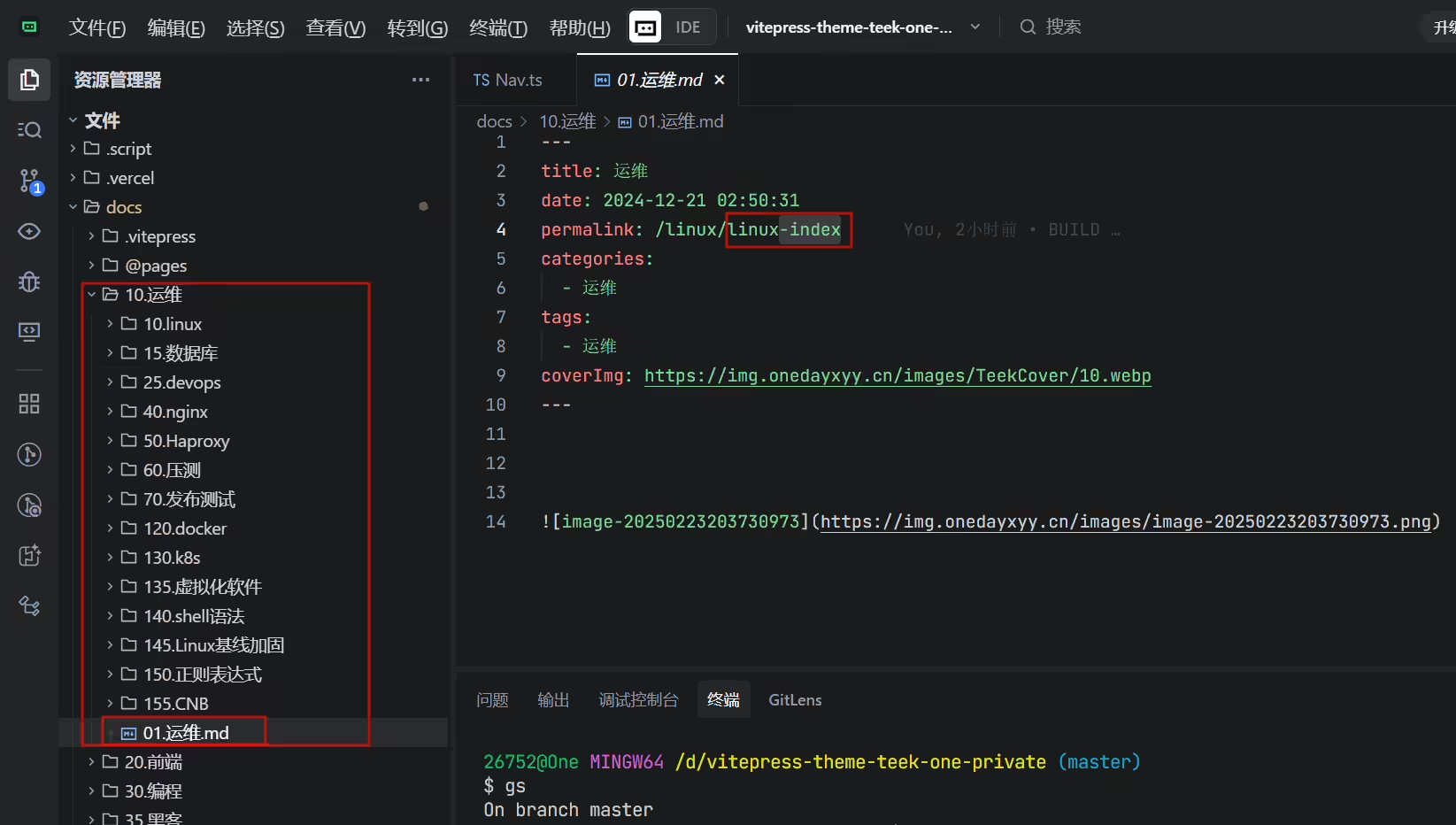
此时我的docs下目录数据结构如下

另外,需要注意的是:
docs下的每一个目录成为一级目录,每个一级目录下必须得有个md,后续nav里的对应链接就可以填这个Md的url:
示例如下:


编辑docs\.vitepress\ConfigHyde\SocialLinks.ts文件:
 1import { gitee, email, WhatsApp, telegram } from "../theme/icon/icons";
 2
 3export const SocialLinks = [
 4  {
 5    icon: { svg: gitee },
 6    link: "https://cnb.cool/onedayxyy/vitepress-theme-teek-one-public",
 7  },
 8  // {
 9  //   icon: { svg: email },
10  //   link: "mailto:2675263825@qq.com",
11  // },
12  // {
13  //   icon: { svg: WhatsApp },
14  //   link: "https://api.whatsapp.com/send/?phone=13527063419&text=Hello",
15  // },
16  // {
17  //   icon: { svg: telegram },
18  //   link: "https://t.me/seasir_Bot",
19  // },
20  // {
21  //   icon: "github",
22  //   link: "https://github.com/Kele-Bingtang/vitepress-theme-teek/tree/dev",
23  // },
24];
效果:

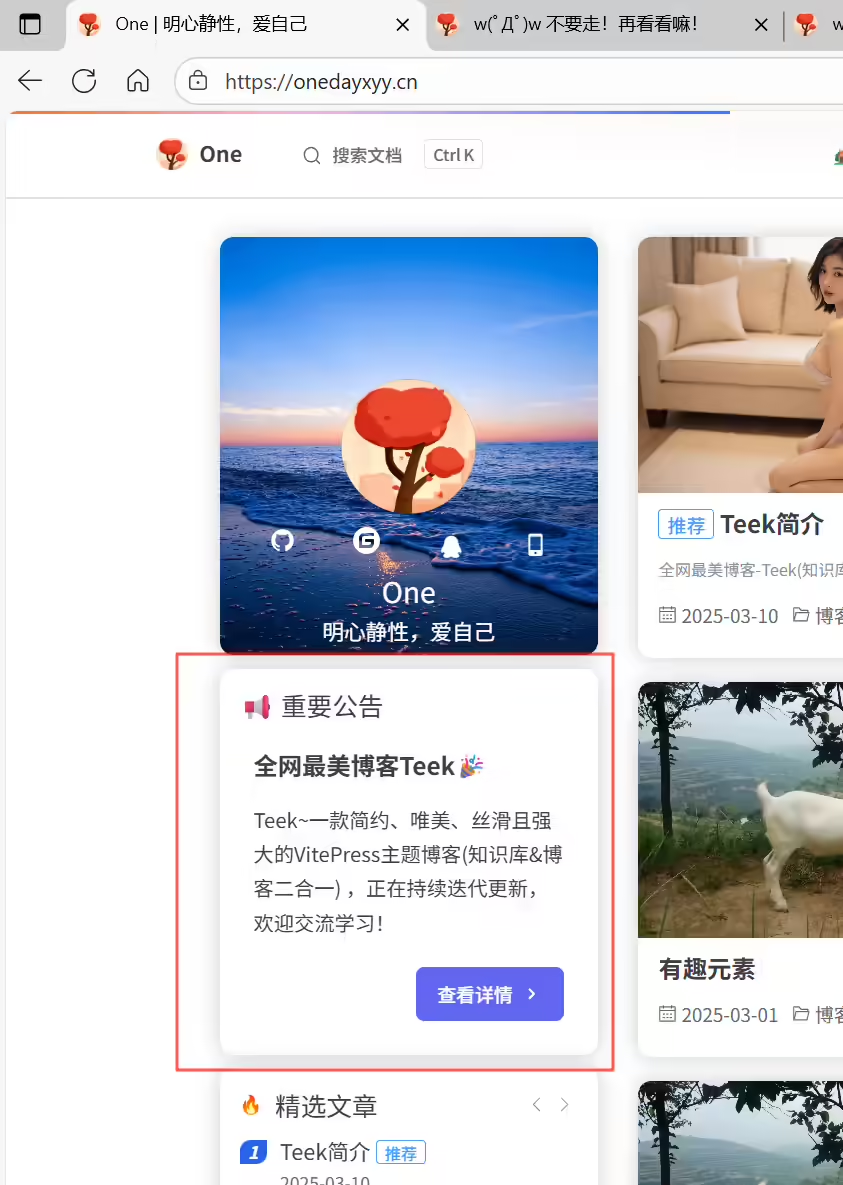
修改公告信息:
编辑docs\.vitepress\theme\components\NoticeCard.vue文件:
1// 公告内容
2const noticeContent: NoticeContent = {
3  title: '📢 重要公告',
4  subtitle: '全网最美博客Teek🎉',
5  content: 'Teek~一款简约、唯美、丝滑且强大的VitePress主题博客(知识库&博客二合一) ,正在持续迭代更新,欢迎交流学习!',
6  operationButtonName: '查看详情',
7  operationButtonPath: 'https://vp.teek.top/',
8};
效果:
编辑这2个文件就好:

更多……(待更新)
精选 · 友链 · 更多

One的公众号
爱折腾博客的小白
