
快捷菜单
常用功能一站直达
更多功能请点顶栏「快捷菜单」
这个api无法正常提供服务了。。。
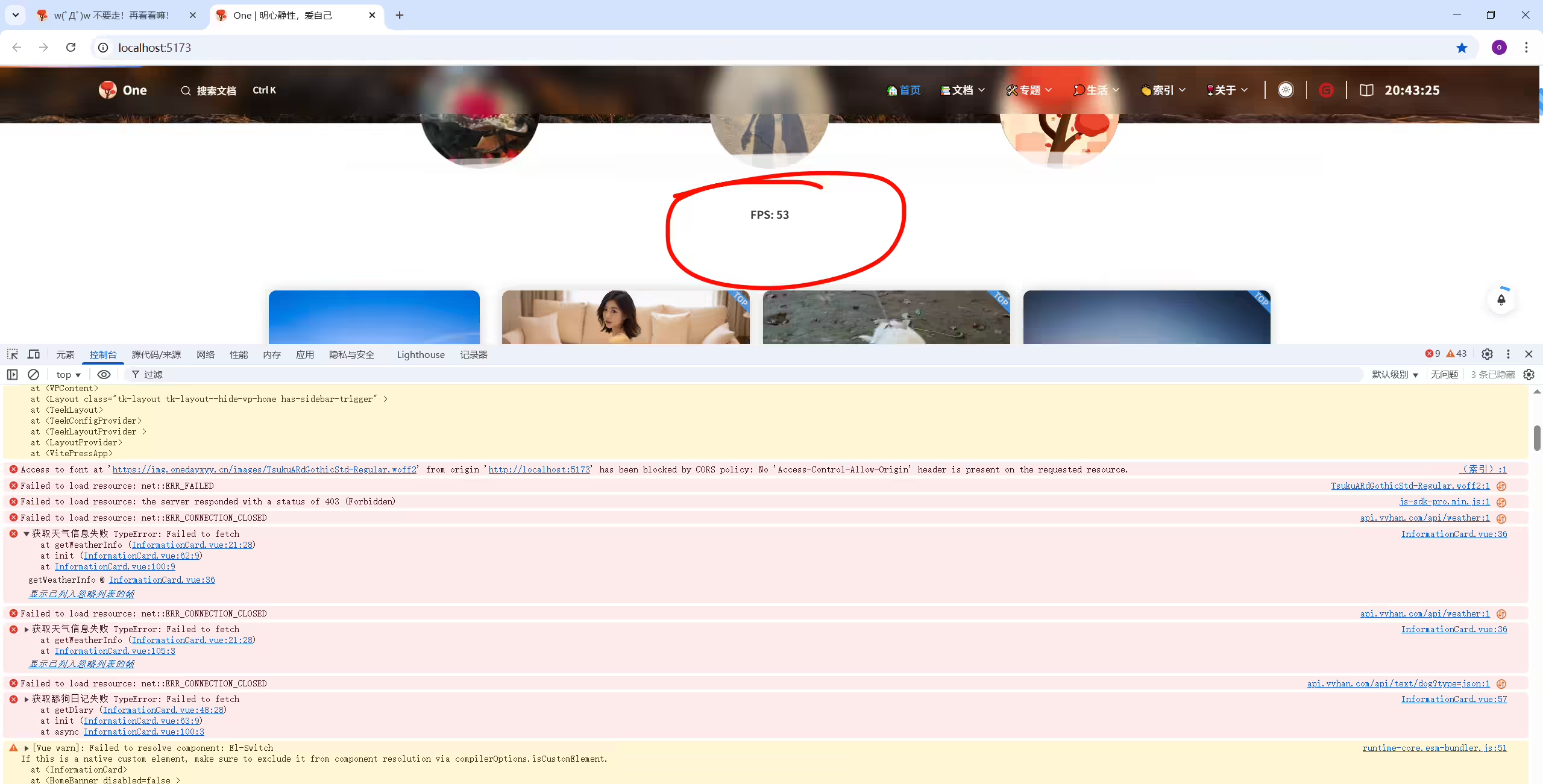
  1<script setup lang="ts">
  2import { onMounted, ref,h } from 'vue';
  3import { TkMessage } from "vitepress-theme-teek";
  4
  5// 天气数据
  6const weatherData = ref({
  7  city: '',
  8  temperature: '',
  9  type: '',
 10  date: '',
 11  week: ''
 12});
 13
 14// 获取天气信息的函数
 15const error = ref(false);
 16const loading = ref(false); // 控制加载中状态
 17// 获取天气信息的函数
 18const getWeatherInfo = async () => {
 19  loading.value = true; // 开始加载
 20  try {
 21    const response = await fetch('https://api.vvhan.com/api/weather');
 22    const data = await response.json();
 23    if (data.success) {
 24      weatherData.value = {
 25        city: data.city,
 26        temperature: `${data.data.low}-${data.data.high}`,
 27        type: data.data.type,
 28        date: data.data.date,
 29        week: data.data.week
 30      };
 31    } else {
 32      error.value = true;
 33      TkMessage.error('获取天气信息失败,请检查网络或者关闭代理'); // 显示错误提示
 34    }
 35  } catch (err) {
 36    console.error('获取天气信息失败', err);
 37  } finally {
 38    loading.value = false; // 加载结束
 39  }
 40};
 41
 42// 储存舔狗日记内容
 43const diaryContent = ref('');
 44
 45// 获取舔狗日记的函数
 46const getDiary = async () => {
 47  try {
 48    const response = await fetch('https://api.vvhan.com/api/text/dog?type=json');
 49    const data = await response.json();
 50
 51    if (data.success) {
 52      diaryContent.value = data.data.content; // 获取内容
 53    } else {
 54      console.error('获取舔狗日记失败:', data.message);
 55    }
 56  } catch (fetchError) {
 57    console.error('获取舔狗日记失败', fetchError);
 58  }
 59};
 60
 61const init = async () => {
 62  await getWeatherInfo(); // 获取天气信息
 63  await getDiary(); // 获取舔狗信息
 64};
 65
 66// 新增:控制显示选项
 67const isConfigOpen = ref(false);
 68const showFPS = ref(true);
 69const showWeather = ref(true);
 70const showDate = ref(true);
 71const showTemperature = ref(true);
 72const showWeek = ref(true);
 73// const showgetDiary = ref(true);
 74
 75// 新增:FPS计算
 76const fps = ref(0);
 77let frameCount = 0;
 78let lastTime = 0;
 79
 80const updateFPS = (time: DOMHighResTimeStamp) => {
 81  if (lastTime === 0) {
 82    lastTime = time;
 83    requestAnimationFrame(updateFPS);
 84    return;
 85  }
 86
 87  const delta = time - lastTime;
 88  frameCount += 1;
 89
 90  if (delta > 1000) {
 91    fps.value = Math.round((frameCount * 1000) / delta);
 92    frameCount = 0;
 93    lastTime = time;
 94  }
 95
 96  requestAnimationFrame(updateFPS);
 97};
 98
 99onMounted(async () => {
100  await init();
101  requestAnimationFrame(updateFPS);
102});
103
104onMounted(() => {
105  getWeatherInfo();
106});
107</script>
108
109<template>
110  <!-- 修改:欢迎卡片,包含天气信息和新功能 -->
111  <ElCard class="info-card animate__animated animate__fadeIn welcome-card mobile-card" shadow="hover">
112    <div class="welcome-content">
113      <!-- 新增:FPS显示 -->
114      <div v-if="showFPS" class="fps-display">FPS: {{ fps }}</div>
115
116      <!-- 新增:配置开关 -->
117      <El-Switch v-model="isConfigOpen" class="config-switch" active-color="#13ce66" inactive-color="#ff4949"></El-Switch>
118
119      <!-- 配置面板 -->
120      <div v-if="isConfigOpen" class="config-panel">
121        <ElCheckbox v-model="showFPS">显示 FPS</ElCheckbox>
122        <ElCheckbox v-model="showWeather">显示天气</ElCheckbox>
123        <ElCheckbox v-model="showDate">显示日期</ElCheckbox>
124        <ElCheckbox v-model="showTemperature">显示温度</ElCheckbox>
125        <ElCheckbox v-model="showWeek">显示星期</ElCheckbox>
126        <!-- <ElCheckbox v-model="showgetDiary">显示舔狗</ElCheckbox> -->
127      </div>
128
129      <!-- 欢迎信息 -->
130      <template v-else>
131        <h2 v-if="!error && weatherData.city" class="greeting">
132          欢迎来自
133          <span class="highlight">{{ weatherData.city }}</span>
134          的小伙伴!🎉🎉🎉
135        </h2>
136        <div class="info-container">
137          <div v-if="showTemperature" class="info-item">
138            <i class="el-icon-sunny"></i>
139            <span v-if="!error && weatherData.city">
140              今日温度:
141              <span class="highlight">{{ weatherData.temperature }}</span>
142            </span>
143          </div>
144          <div v-if="showWeather" class="info-item">
145            <i class="el-icon-cloudy"></i>
146            <span v-if="!error && weatherData.city">
147              天气:
148              <span class="highlight">{{ weatherData.type }}</span>
149            </span>
150          </div>
151          <div v-if="showDate" class="info-item">
152            <i class="el-icon-date"></i>
153            <span v-if="!error && weatherData.city">
154              日期:
155              <span class="highlight">{{ weatherData.date }}</span>
156            </span>
157          </div>
158          <div v-if="showWeek" class="info-item">
159            <i class="el-icon-calendar"></i>
160            <span v-if="!error && weatherData.city">
161              星期:
162              <span class="highlight">{{ weatherData.week }}</span>
163            </span>
164          </div>
165          <!-- <div v-if="showgetDiary" class="info-item">
166            <i class="el-icon-calendar"></i>
167            <h1 class="vertical-title">舔狗日记:</h1>
168            <p v-if="diaryContent" class="diary-content">{{ diaryContent }}</p>
169            <p v-else class="diary-content">加载中...</p>
170          </div> -->
171        </div>
172      </template>
173    </div>
174  </ElCard>
175</template>
176
177<style lang="scss" scoped>
178.welcome-card {
179  margin: 4px;
180  padding: 1.5rem;
181  border-radius: 12px;
182  text-align: center;
183  font-size: 1.1rem;
184  transition: all 0.3s ease;
185  background: var(--day-bg);
186  color: var(--day-text);
187  box-shadow: 0 4px 6px var(--day-shadow);
188  transform: translateY(0);
189  position: relative;
190  border: 1px solid rgba(255, 255, 255, 0); /* 完全透明的边框 */
191
192  &.night-mode {
193    background: var(--night-bg);
194    color: var(--night-text);
195    box-shadow: 0 4px 6px var(--night-shadow);
196
197    &:hover {
198      box-shadow: 0 10px 20px var(--night-shadow);
199    }
200
201    .highlight {
202      color: var(--vp-c-brand-1);
203    }
204  }
205
206  .welcome-content {
207    display: flex;
208    flex-direction: column;
209    gap: 1rem;
210  }
211
212  .greeting {
213    font-size: 1.5rem;
214    margin: 0;
215    font-weight: bold;
216  }
217
218  .highlight {
219    color: var(--vp-c-brand-1);
220  }
221
222  .info-container {
223    display: flex;
224    flex-wrap: wrap;
225    justify-content: center;
226    gap: 1rem;
227  }
228
229  .info-item {
230    display: flex;
231    align-items: center;
232    gap: 0.5rem;
233
234    i {
235      font-size: 1.2rem;
236    }
237  }
238
239  .fps-display {
240    font-size: 0.9rem;
241    font-weight: bold;
242  }
243
244  .config-switch {
245    position: absolute;
246    top: 0.5rem;
247    right: 0.5rem;
248  }
249
250  .config-panel {
251    display: flex;
252    flex-wrap: wrap; /* 自动换行 */
253    justify-content: center; /* 水平居中对齐 */
254    align-items: center; /* 垂直居中对齐 */
255  }
256
257  .config-panel .el-checkbox {
258    width: 15%; /* 每个元素占据 15% 宽度,PC保持1列 */
259    margin: 5px; /* 元素间距 */
260    display: flex;
261    justify-content: center; /* 文字与复选框居中 */
262    align-items: center;
263  }
264
265  @media (max-width: 768px) {
266    .config-panel .el-checkbox {
267      width: 40%; /* 如果屏幕更小,双列显示 */
268    }
269  }
270}
271</style>
272
273
274这个里的服务有问题,没法给自己博客提供服务,该如何处理呢?有国内的替换方案没?从你提供的代码来看,服务有问题可能是网络连接、服务器状态或 API 本身的问题等。你可以参考以下方法进行处理:
https://api.vvhan.com/api/weather和https://api.vvhan.com/api/text/dog?type=json这两个 API 可能存在问题,你可以直接在浏览器中访问这些 API 地址,看是否能正常返回数据。如果 API 不可用,你可以尝试寻找其他类似的 API 来替换。国内有不少可以提供天气信息和文本内容的 API,以下是一些博客平台和 API 的替换方案供你参考:
1如何在Vue中使用其他API获取天气信息?在 Vue(含 Vue3 + TypeScript)中使用第三方天气 API 获取数据,核心步骤是 选择合适的国内 API 服务 → 配置请求参数(如城市、API 密钥) → 通过 fetch 或 axios 发送请求 → 处理响应数据并渲染到页面。以下以 和风天气 API(国内主流、免费且文档清晰)为例,提供完整实现方案,同时兼容其他国内 API 的接入逻辑。
📌一、核心准备:选择国内天气 API 并获取密钥
首先需要选择一个稳定的国内天气 API(避免跨域和境外 API 不稳定问题),这里推荐 和风天气 API,步骤如下:
a1b2c3d4e5f6g7h8i9j0k1l2m3n4o5p6q),这是请求 API 的必填参数(用于身份验证)。https://devapi.qweather.com/v7/weather/now(获取当前温度、天气类型、风力等)https://devapi.qweather.com/v7/weather/3d(获取未来 3 天天气趋势)https://geoapi.qweather.com/v2/city/lookup(根据城市名 / IP 获取城市 ID,天气接口需传入城市 ID)📌二、完整实现:在 Vue3 + TS 中接入和风天气 API
以你的博客场景为例,实现「自动获取用户城市 + 显示实时天气」的功能,步骤如下:
步骤 1:安装依赖(可选,用 axios 或原生 fetch)
若使用 axios(推荐,支持拦截器、错误处理更便捷):
执行命令安装:
1npm install axios
2# 或 yarn add axios
若用原生 fetch:无需安装依赖,直接使用浏览器原生 API。
步骤 2:封装 API 请求逻辑(高复用性)
在项目中创建 src/api/weather.ts 文件,封装天气相关的请求函数(分离业务逻辑,便于维护):
  1// src/api/weather.ts
  2import axios from 'axios';
  3
  4// 1. 配置和风天气 API 基础信息
  5const WEATHER_API_KEY = '你的和风天气API Key'; // 替换为自己的 Key
  6const GEO_API_BASE = 'https://geoapi.qweather.com/v2/city'; // 城市搜索接口基础路径
  7const WEATHER_API_BASE = 'https://devapi.qweather.com/v7/weather'; // 天气接口基础路径
  8
  9// 2. 类型定义(TS 类型安全)
 10// 城市信息类型
 11export interface CityInfo {
 12  id: string; // 城市ID(天气接口必需)
 13  name: string; // 城市名(如“北京”)
 14  adminArea: string; // 省份(如“北京”)
 15}
 16
 17// 实时天气数据类型
 18export interface RealTimeWeather {
 19  temp: string; // 温度(如“25”)
 20  feelsLike: string; // 体感温度
 21  text: string; // 天气类型(如“晴”“多云”)
 22  windDir: string; // 风向(如“南风”)
 23  windSpeed: string; // 风速(如“3”,单位 m/s)
 24  humidity: string; // 湿度(如“50”,单位 %)
 25}
 26
 27// 3. 根据城市名获取城市ID(天气接口需要城市ID而非名称)
 28export const getCityIdByName = async (cityName: string): Promise<CityInfo | null> => {
 29  try {
 30    const response = await axios.get(`${GEO_API_BASE}/lookup`, {
 31      params: {
 32        key: WEATHER_API_KEY,
 33        location: cityName, // 城市名(如“上海”“广州”)
 34      },
 35    });
 36
 37    const { code, location } = response.data;
 38    if (code === '200' && location.length > 0) {
 39      // 返回第一个匹配的城市(避免重名城市,如“西安”和“西安区”)
 40      return {
 41        id: location[0].id,
 42        name: location[0].name,
 43        adminArea: location[0].adminArea,
 44      };
 45    }
 46    console.error('未找到城市信息');
 47    return null;
 48  } catch (error) {
 49    console.error('获取城市ID失败:', error);
 50    return null;
 51  }
 52};
 53
 54// 4. 根据城市ID获取实时天气
 55export const getRealTimeWeather = async (cityId: string): Promise<RealTimeWeather | null> => {
 56  try {
 57    const response = await axios.get(`${WEATHER_API_BASE}/now`, {
 58      params: {
 59        key: WEATHER_API_KEY,
 60        location: cityId, // 传入城市ID
 61      },
 62    });
 63
 64    const { code, now } = response.data;
 65    if (code === '200' && now) {
 66      // 格式化返回数据(只保留需要的字段)
 67      return {
 68        temp: now.temp,
 69        feelsLike: now.feelsLike,
 70        text: now.text,
 71        windDir: now.windDir,
 72        windSpeed: now.windSpeed,
 73        humidity: now.humidity,
 74      };
 75    }
 76    console.error('获取天气失败,接口返回错误:', code);
 77    return null;
 78  } catch (error) {
 79    console.error('获取实时天气失败:', error);
 80    return null;
 81  }
 82};
 83
 84// 5. (可选)自动获取用户城市(通过IP定位,需和风天气“IP定位”权限)
 85export const getCityByIp = async (): Promise<CityInfo | null> => {
 86  try {
 87    const response = await axios.get(`${GEO_API_BASE}/lookup`, {
 88      params: {
 89        key: WEATHER_API_KEY,
 90        location: 'auto_ip', // 传入 auto_ip 自动获取IP对应的城市
 91      },
 92    });
 93
 94    const { code, location } = response.data;
 95    if (code === '200' && location.length > 0) {
 96      return {
 97        id: location[0].id,
 98        name: location[0].name,
 99        adminArea: location[0].adminArea,
100      };
101    }
102    console.error('IP定位失败');
103    return null;
104  } catch (error) {
105    console.error('IP定位请求失败:', error);
106    return null;
107  }
108};
步骤 3:在 Vue 组件中使用 API
在你的天气卡片组件中(如 WeatherCard.vue),调用上述封装的 API 函数,处理加载、错误状态,并渲染数据:
  1<!-- src/components/WeatherCard.vue -->
  2<template>
  3  <ElCard class="info-card animate__animated animate__fadeIn welcome-card mobile-card" shadow="hover">
  4    <div class="welcome-content">
  5      <!-- 加载状态 -->
  6      <div v-if="loading" class="loading">加载天气中...</div>
  7
  8      <!-- 错误状态 -->
  9      <div v-else-if="error" class="error">获取天气失败,请稍后重试</div>
 10
 11      <!-- 天气数据渲染 -->
 12      <div v-else-if="cityInfo && weatherData" class="weather-container">
 13        <h2 class="greeting">
 14          欢迎来自 <span class="highlight">{{ cityInfo.name }}</span> 的小伙伴!🎉
 15        </h2>
 16        <div class="info-container">
 17          <div class="info-item">
 18            <i class="el-icon-sunny"></i>
 19            温度:<span class="highlight">{{ weatherData.temp }}°C</span>
 20            (体感 {{ weatherData.feelsLike }}°C)
 21          </div>
 22          <div class="info-item">
 23            <i class="el-icon-cloudy"></i>
 24            天气:<span class="highlight">{{ weatherData.text }}</span>
 25          </div>
 26          <div class="info-item">
 27            <i class="el-icon-wind"></i>
 28            风向:<span class="highlight">{{ weatherData.windDir }}</span>
 29            风速:{{ weatherData.windSpeed }}m/s
 30          </div>
 31          <div class="info-item">
 32            <i class="el-icon-water"></i>
 33            湿度:<span class="highlight">{{ weatherData.humidity }}%</span>
 34          </div>
 35        </div>
 36      </div>
 37    </div>
 38  </ElCard>
 39</template>
 40
 41<script setup lang="ts">
 42import { ref, onMounted } from 'vue';
 43import {
 44  getCityByIp,
 45  getRealTimeWeather,
 46  CityInfo,
 47  RealTimeWeather
 48} from '@/api/weather'; // 引入封装的API
 49
 50// 状态管理
 51const loading = ref(false); // 加载中
 52const error = ref(false); // 错误状态
 53const cityInfo = ref<CityInfo | null>(null); // 城市信息
 54const weatherData = ref<RealTimeWeather | null>(null); // 天气数据
 55
 56// 初始化:获取城市 + 天气
 57const initWeather = async () => {
 58  loading.value = true;
 59  error.value = false;
 60  try {
 61    // 1. 自动通过IP获取用户城市
 62    const city = await getCityByIp();
 63    if (!city) throw new Error('无法获取城市信息');
 64    cityInfo.value = city;
 65
 66    // 2. 根据城市ID获取实时天气
 67    const weather = await getRealTimeWeather(city.id);
 68    if (!weather) throw new Error('无法获取天气数据');
 69    weatherData.value = weather;
 70  } catch (err) {
 71    console.error('初始化天气失败:', err);
 72    error.value = true;
 73  } finally {
 74    loading.value = false;
 75  }
 76};
 77
 78// 组件挂载时初始化
 79onMounted(() => {
 80  initWeather();
 81});
 82</script>
 83
 84<style lang="scss" scoped>
 85/* 保留你原有的样式,可根据需要调整 */
 86.welcome-card {
 87  margin: 4px;
 88  padding: 1.5rem;
 89  border-radius: 12px;
 90  text-align: center;
 91  background: var(--day-bg);
 92  color: var(--day-text);
 93  box-shadow: 0 4px 6px var(--day-shadow);
 94
 95  .loading, .error {
 96    font-size: 1.1rem;
 97    padding: 1rem 0;
 98    color: var(--vp-c-text-2);
 99  }
100
101  .weather-container {
102    display: flex;
103    flex-direction: column;
104    gap: 1rem;
105  }
106
107  .greeting {
108    font-size: 1.5rem;
109    margin: 0;
110    font-weight: bold;
111  }
112
113  .highlight {
114    color: var(--vp-c-brand-1);
115  }
116
117  .info-container {
118    display: flex;
119    flex-wrap: wrap;
120    justify-content: center;
121    gap: 1.5rem;
122    margin-top: 1rem;
123  }
124
125  .info-item {
126    display: flex;
127    align-items: center;
128    gap: 0.5rem;
129    font-size: 1.1rem;
130
131    i {
132      font-size: 1.2rem;
133      color: var(--vp-c-brand-1);
134    }
135  }
136}
137</style>
三、关键问题处理(避坑指南)
国内正规 API 服务商(如和风天气)已配置 CORS 跨域支持,前端直接请求即可,无需额外处理。若遇到跨域错误:
devapi.qweather.com,非 api.qweather.com);例如 “西安”(陕西省会)和 “西安区”(牡丹江市),通过 getCityByIp 自动定位可避免,若允许用户手动输入城市,需让用户选择具体城市(如下拉列表展示匹配的所有城市)。
📌四、其他国内天气 API 替换方案
若不想使用和风天气,可替换为以下国内 API,接入逻辑与上述一致(只需修改 weather.ts 中的接口地址和参数):
| API 服务商 | 免费额度 | 核心接口特点 | 官网地址 |
|---|---|---|---|
| 心知天气 | 1000 次 / 天(基础版) | 支持全球天气、空气质量、生活指数 | https://www.seniverse.com/ |
| 高德开放平台 | 10 万次 / 天(天气查询) | 结合高德地图,城市定位更精准 | https://lbs.amap.com/api/webservice/guide/api/weatherinfo |
| 百度地图开放平台 | 3000 次 / 天(普通天气) | 支持实时 / 预报天气、灾害预警 | https://lbsyun.baidu.com/index.php?title=open/weather |
📌总结
在 Vue 中使用第三方天气 API 的核心是 “选择合规的国内 API → 封装请求逻辑 → 处理状态与渲染”。通过和风天气的示例,你可以快速实现博客的天气功能,同时根据实际需求调整城市获取方式(自动定位 / 手动输入)和数据展示内容(温度、风向、湿度等)。若需优化安全性,可增加后端代理层隐藏 API Key。
精选 · 友链 · 更多

One的公众号
爱折腾博客的小白
