
快捷菜单
常用功能一站直达
更多功能请点顶栏「快捷菜单」
手把手部署RouxZhee博客到公网教程(无坑版)
本次是v2-2026.2.7版本。
使用
eo+cos来部署自己的 RouxZhee 博客到公网。(0服务器方案,0开销方案,快如闪电的部署方式)😜

One博客 https://onedayxyy.cn/ (本人最终效果如下,大家可先尽情体验下。😜)

告警
Hugo-teek 目前正处于余温作者开发配置中心阶段,可能会频繁地进行更新。且一键web更新还未开发完成,因此,强烈建议新进群的小伙伴不要去修改博客一些自定义的信息,你需要做的就是,把hugo-teek博客部署起来,然后把自己的md文档放到hugo-teek-site\content\docs\40.专题路径。然后发布到自己博客就好。
等后续一键web更新完全开发完成后,我们就可以在配置中心配置下自己的用户信息了,后续有新版出现时,我们一键web更新就可以升级到最新版。
目前的hugo-teek做个人博客/文档库完全是没问题的,但是想更加丝滑体验这款强大的博客,大家再耐心等待下,等我们伟大的余温群主王者归来。😜
注意:🚩
(1)本次部署的环境是,我们在windows本地把hugo-teek仓库拉下来,然后把自己的md文档目录放到仓库对应hugo-teek-site\content\docs\40.专题路径,然后推送到cnb仓库,同时会触发cnb自动构建,进而发布网站。
(2)我们的hugo-teek静态dist产物是通过cnb流水线,云端构建完成后被推送到cos,再配合eo,用户就能正常访问咋们的博客了。我们只需要重点维护好自己仓库里的md文档就行。
1️⃣方案1:常规部署方式 是将hugo-teek博客源码拉取到win本地,再通过cnb流水线推送到cos,进而发布自己博客;(本文重点讲解的方式。)
2️⃣方案2:也有一种更快速的方案,就是直接fork群主hugo-teek项目到自己cnb,然后点击Hugo-Teek宇宙启动🚀,就会自动打开cnb云开发控制台,也同时会自动打开博客运行界面,通过执行sh bin/linux/start-admin.sh 脚本,也会立马运行hugo-teek的在线后台,非常方便。(前提是得先拥有自己的cnb账号即可。)
这个是在cnb云开发linux环境上运行的,让然win环境也是可以这样操作的,只是目前作者先优先win开发的,等功能彻底开发完成后,win上的功能也会修复,耐心等待吧。😉


来到腾讯创建cos存储桶地址,我们创建下存储桶:


- 所属地域 选择
广州;- 访问权限选择
私有读写;- 记得要关闭
多AZ特性;- 其余点击下一步就好。


来到获取腾讯云密钥网址:
新建自己的密钥,记得保存好,后续要用:


我们来到自己的d盘,然后拉取项目:
1cd /d/
2git clone https://cnb.cool/yuwen-gueen/hugo-teeker-theme.git
3cd hugo-teeker-theme
🟢 双击运行
进入到bin\windows目录,双击运行start.bat脚本:


🟢 访问测试
在浏览器输入http://localhost:8080/ 验证效果:

🟢 我们再将本地项目推送到自己的cnb仓库
📢📢📢
具体步骤:
(1)创建私有库(存放hugo-teek源码及md核心文档)
来到自己的CNb主页,创建一个私有仓库,名称叫做hugo-teek-private;
把上面拉取的代码,直接推送到这个私有库:
再推送之前,先把我们本地的项目名称重命名为hugo-teek-private,然后推送;
(2)我们还需要编辑下项目下.cnb.yml文件内容:(这里将用户cnb一键流水线发布博客使用。)
以下文件我们只需要更改如下一处位置即可:(其余无需配置)
.cnb.yml文件内容:
注意:

自己cnb密钥仓库内容如下:(如果没有这个仓库,需要先新建一个自己的密钥仓库)这里要填的内容就是前面我们获取的腾讯云密钥信息,填好就行。
https://cnb.cool/onedayxyy/secret/-/blob/main/envs.yml


.cnb.yml文件内容:
1master:
2 push:
3 - runner:
4 cpus: 64
5
6 imports:
7 - https://cnb.cool/onedayxyy/secret/-/blob/main/envs.yml
8
9 docker:
10 image: docker.cnb.cool/yuwen-gueen/docker-images-chrom/hugo-teek-blog:latest
11
12 stages:
13 # ------------------------------
14 # 1️⃣ 记录开始时间
15 # ------------------------------
16 - name: set env
17 script: echo -n $(date +%s)
18 exports:
19 info: CUSTOM_ENV_START_TIME
20
21 # ------------------------------
22 # 4️⃣ 构建 Hugo
23 # ------------------------------
24 - name: build
25 script: |
26 make build-docker
27
28 - name: 部署到 cos
29 image: tencentcom/coscli
30 script: |
31 coscli config set --secret_id $COS_SECRET_ID --secret_key $COS_SECRET_KEY
32 coscli config add --init-skip=true -b $COS_BUCKET -r $COS_REGION
33 coscli sync ./hugo-teek-site/public cos://$COS_BUCKET/ -r \
34 --delete --force --routines=1000 --thread-num=1000
35
36
37 - name: 🧘♂️ 刷新缓存
38 image: docker.cnb.cool/znb/cdn-refresh
39 settings:
40 ak: "${COS_SECRET_ID}"
41 sk: "${COS_SECRET_KEY}"
42 kind: "tencenteo"
43 rtype: "path"
44 domain: "onedayxyy.cn"
45 urls:
46 - "https://onedayxyy.cn/"
47
48 # ------------------------------
49 # 6️⃣ 计算耗时
50 # ------------------------------
51 - name: ⏱️ 计算耗时
52 script: |
53 end_time=$(date +%s)
54 duration=$((end_time - $CUSTOM_ENV_START_TIME))
55 minutes=$((duration / 60))
56 seconds=$((duration % 60))
57 echo -n "${minutes}分${seconds}秒"
58 exports:
59 info: CUSTOM_ENV_BUILD_TIME
60
61 # ------------------------------
62 # 7️⃣ 钉钉通知
63 # ------------------------------
64 - name: 钉钉通知
65 image: docker.cnb.cool/yuwen-gueen/docker-images-chrom/tencentcom-dingtalk-bot-msg:latest_amd64
66 settings:
67 content: "「Hugo-Teek One Blog」发布完成,耗时: ${CUSTOM_ENV_BUILD_TIME}"
68 c_type: "text"
69 secret: $SECRET
70 webhook: $WEBHOOK
71 isAtAll: false
72 debug: false
73
74include:
75 - .cnb/vscode.yml以上,我们的hugo-teek博客已经下载并部署好了,那么该如何新增自己的md文档呢?
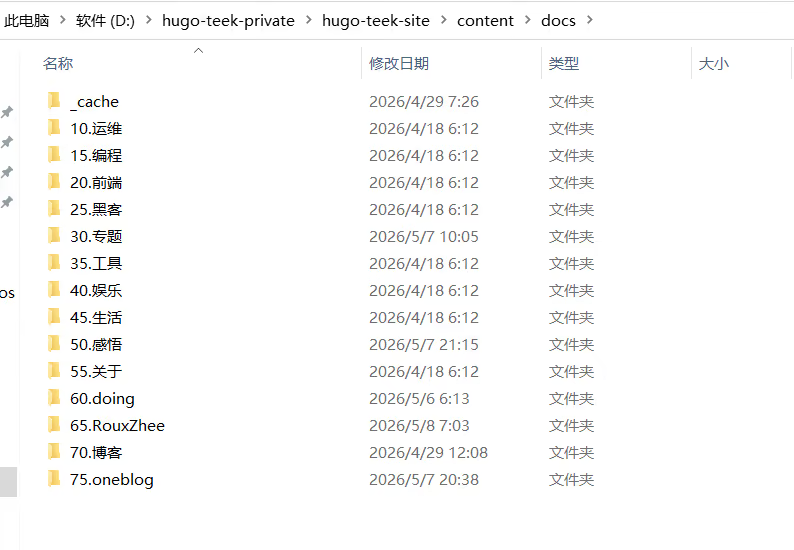
把自己的md文档放到hugo-teek-site\content\docs\40.专题路径下就好(无论是目录或者md文档都行),就这么简单。
我的截图如下:

警告
刚开始测试可以按上面简单方法验证,后续如果真正想配置为自己网站时,可按如下配置弄就好:😂😂😂
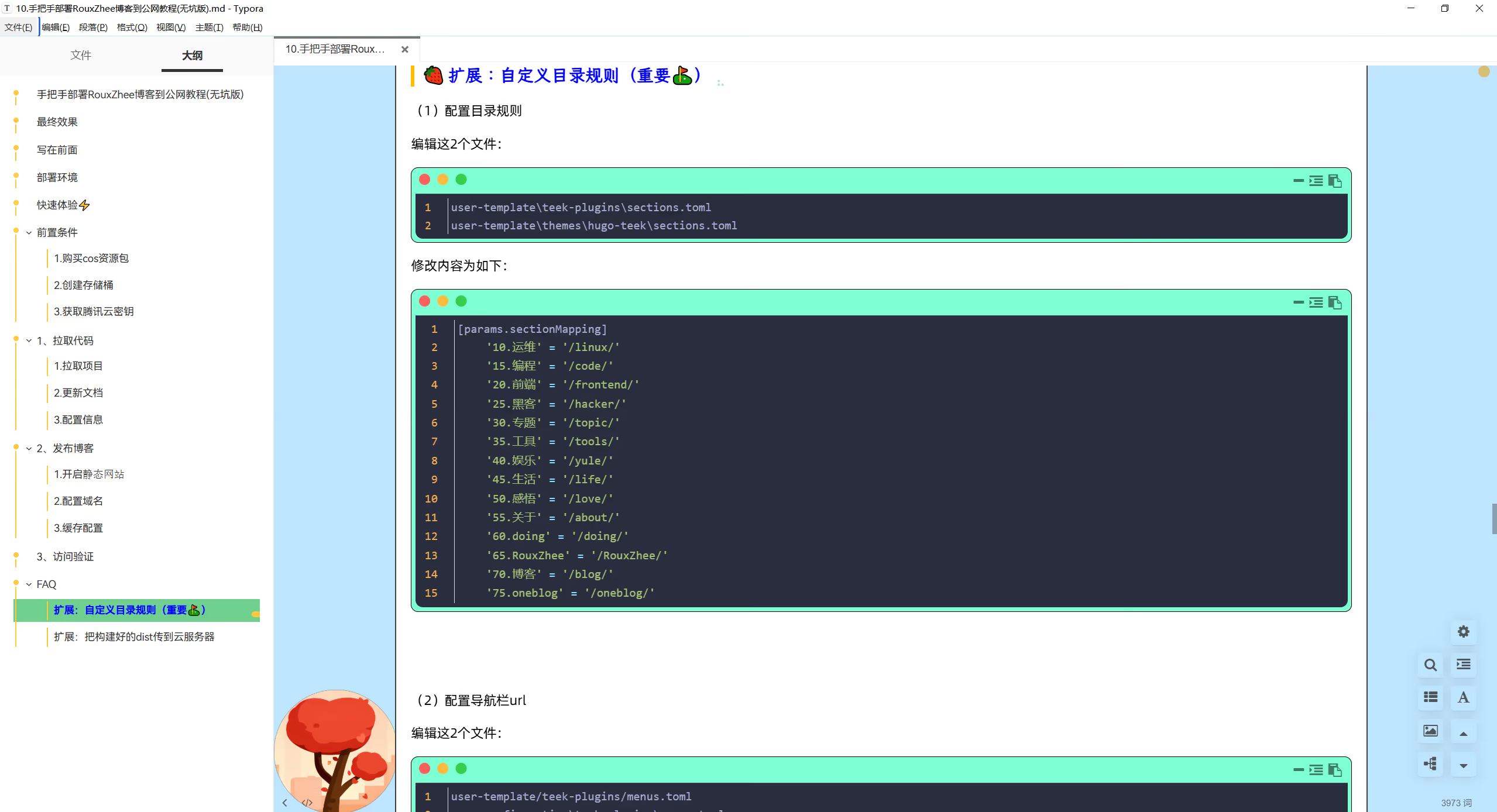
《<u>FAQ:扩展:自定义目录规则(重要⛳)</u>》部分。
待余温作者把hugo-teek的配置中心配置完成后,我们就可以本地运行图形化来配置博客选项了,非常简单。我们耐心等待吧。😉
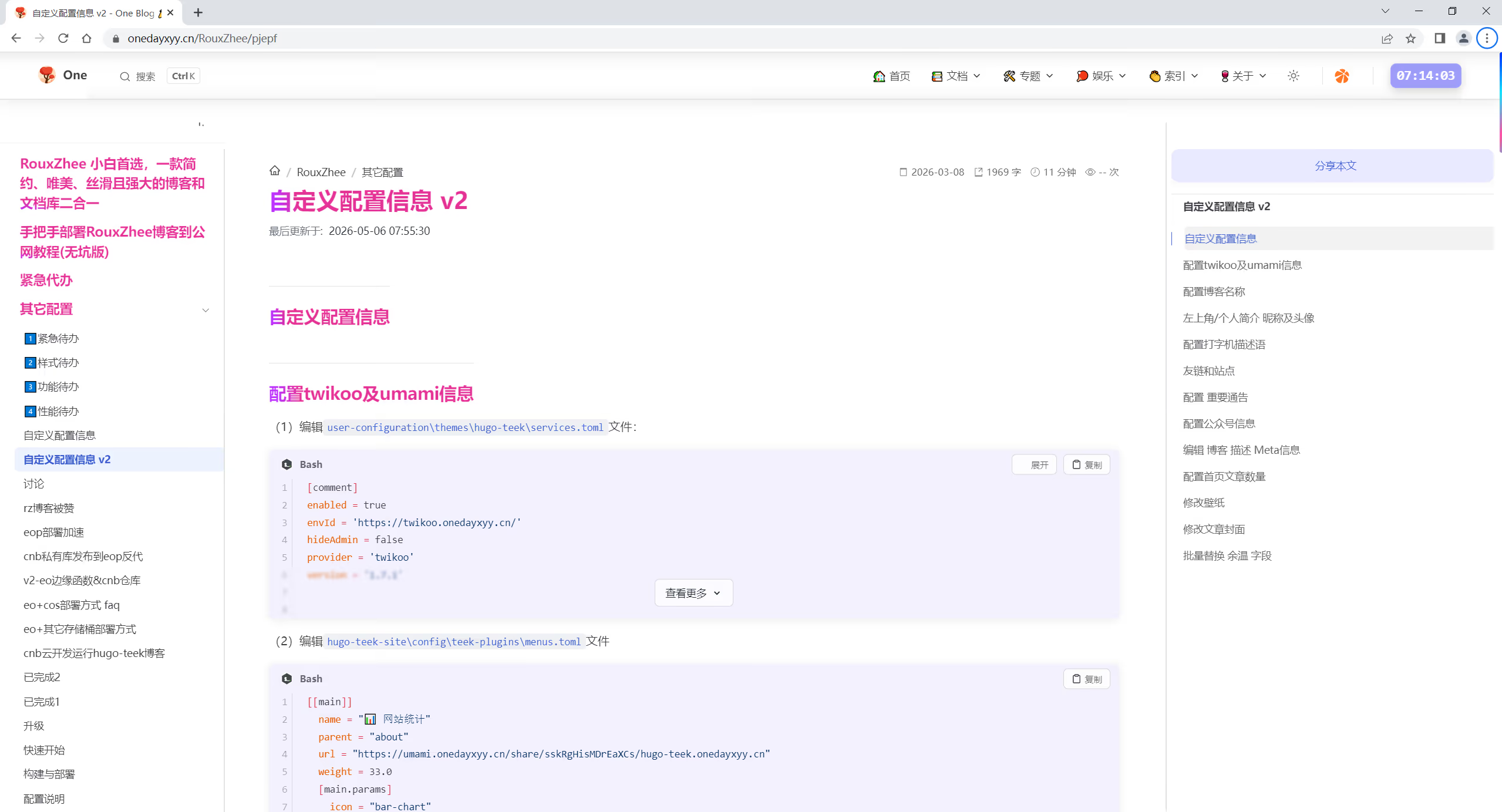
当然,如果你想现在就自定义自己的博客配置,那么可以看 《自定义配置信息 v2》文档(照着做就好。)
以上,我们的hugo-teek博客是可以在本地快乐地运行了,但是如何把这个博客部署到公网,别人也可以访问呢?请看下文。
使用
eo+cos存储桶来部署自己的hugo-teek博客到公网。(0服务器方案)😜
静态网站来到自己刚创建好的cos存储桶位置:
🔴 记得要在这个存储桶下开启
静态网站功能哦!!!

这里做好eo的域名配置:


来到eo的缓存配置,我们开启几个配置:
节点缓存TTL、浏览器缓存TTL缓存过期时间为30天;


(1)配置目录规则
编辑这2个文件:
1user-template\teek-plugins\sections.toml
2user-template\themes\hugo-teek\sections.toml
修改内容为如下:
user-template\teek-plugins\sections.toml内容:
 1# ========================================
 2# Section URL 映射配置 (Section URL Mapping)
 3# ========================================
 4# 本文件定义内容目录名称到 URL 路径的映射关系。
 5# 用于自动生成 _index.md 的 url 参数,实现 SEO 友好的 URL。
 6#
 7# 工作原理:
 8#   - 内容目录:content/docs/11.运维/
 9#   - 映射后 URL:/linux/
10#
11# 使用场景:
12#   1. 构建工具自动生成 _index.md 时使用
13#   2. Hugo 渲染时通过 params.sectionMapping 读取
14#
15# 注意事项:
16#   - 修改映射后需要重新运行构建工具
17#   - URL 路径必须以 / 开头和结尾
18# ========================================
19
20[params.sectionMapping]
21	'10.运维' = '/linux/'
22	'15.编程' = '/code/'
23	'20.前端' = '/frontend/'
24	'25.黑客' = '/hacker/'
25	'30.专题' = '/topic/'
26	'35.工具' = '/tools/'
27	'40.娱乐' = '/yule/'
28	'45.生活' = '/life/'
29	'50.感悟' = '/love/'
30	'55.关于' = '/about/'
31	'60.doing' = '/doing/'
32	'65.RouxZhee' = '/RouxZhee/'
33	'70.博客' = '/blog/'
34 '75.oneblog' = '/oneblog/'user-template\themes\hugo-teek\sections.toml内容:
 1# ========================================
 2# Section URL 映射配置 (Section URL Mapping)
 3# ========================================
 4# 本文件定义内容目录名称到 URL 路径的映射关系。
 5# 用于自动生成 _index.md 的 url 参数,实现 SEO 友好的 URL。
 6#
 7# 工作原理:
 8#   - 内容目录:content/docs/11.运维/
 9#   - 映射后 URL:/linux/
10#
11# 使用场景:
12#   1. 构建工具自动生成 _index.md 时使用
13#   2. Hugo 渲染时通过 params.sectionMapping 读取
14#
15# 注意事项:
16#   - 修改映射后需要重新运行构建工具
17#   - URL 路径必须以 / 开头和结尾
18# ========================================
19
20[params.sectionMapping]
21	'10.运维' = '/linux/'
22	'15.编程' = '/code/'
23	'20.前端' = '/frontend/'
24	'25.黑客' = '/hacker/'
25	'30.专题' = '/topic/'
26	'35.工具' = '/tools/'
27	'40.娱乐' = '/yule/'
28	'45.生活' = '/life/'
29	'50.感悟' = '/love/'
30	'55.关于' = '/about/'
31	'60.doing' = '/doing/'
32	'65.RouxZhee' = '/RouxZhee/'
33	'70.博客' = '/blog/'
34	'75.oneblog' = '/oneblog/'
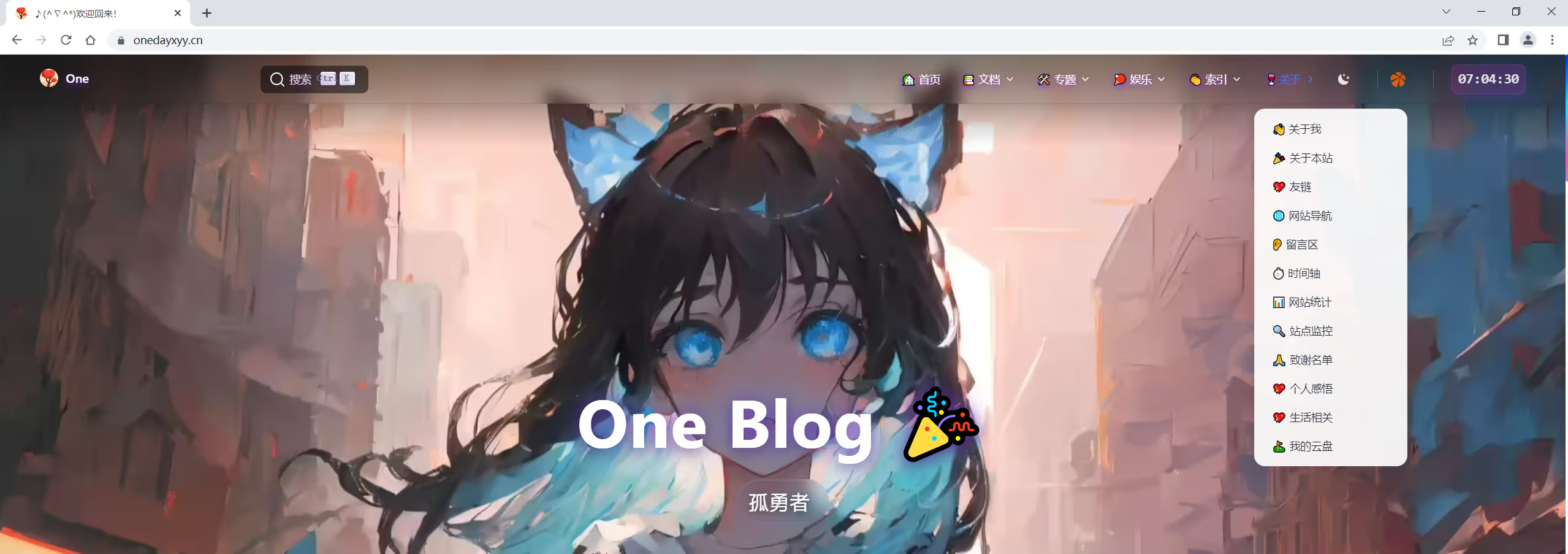
(2)配置导航栏url
编辑这2个文件:
1user-template/teek-plugins/menus.toml
2user-configuration\teek-plugins\menus.toml
修改内容为如下:
user-template/teek-plugins/menus.toml内容:
  1# ========================================
  2# 菜单配置文件 (Menu Configuration)
  3# ========================================
  4# 通用菜单配置,所有主题共用
  5# 由 Hugo Teek Admin 管理后台维护
  6# ========================================
  7
  8[[main]]
  9  name = "🏡 首页"
 10  url = "/"
 11  weight = 1.0
 12
 13[[main]]
 14  identifier = "tech"
 15  name = "📚 文档"
 16  url = "#"
 17  weight = 2.0
 18
 19[[main]]
 20  name = "🖥️ 运维"
 21  parent = "tech"
 22  url = "/linux/"
 23  weight = 3.0
 24  [main.params]
 25    icon = "monitor"
 26
 27[[main]]
 28  name = "🎨 前端"
 29  parent = "tech"
 30  url = "/frontend/"
 31  weight = 4.0
 32  [main.params]
 33    icon = "code"
 34
 35[[main]]
 36  name = "💻 编程"
 37  parent = "tech"
 38  url = "/code/"
 39  weight = 5.0
 40  [main.params]
 41    icon = "code-slash"
 42
 43[[main]]
 44  name = "🔐 黑客"
 45  parent = "tech"
 46  url = "/hacker/"
 47  weight = 6.0
 48  [main.params]
 49    icon = "shield"
 50
 51[[main]]
 52  identifier = "topics"
 53  name = "🛠️ 专题"
 54  url = "#"
 55  weight = 7.0
 56
 57
 58[[main]]
 59  name = "🎯 前端Demo"
 60  parent = "topics"
 61  url = "/topic/qianduan-demo/"
 62  weight = 9.0
 63  [main.params]
 64    icon = "layout"
 65
 66[[main]]
 67  name = "🔧 Git"
 68  parent = "topics"
 69  url = "/topic/git/"
 70  weight = 10.0
 71  [main.params]
 72    icon = "git-branch"
 73
 74[[main]]
 75  name = "💼 面试"
 76  parent = "topics"
 77  url = "/topic/mianshi/"
 78  weight = 11.0
 79  [main.params]
 80    icon = "briefcase"
 81
 82[[main]]
 83  name = "🗄️ NAS"
 84  parent = "topics"
 85  url = "/topic/eepqs/"
 86  weight = 12.0
 87  [main.params]
 88    icon = "database"
 89
 90[[main]]
 91  name = "📜 脚本"
 92  parent = "topics"
 93  url = "/doing/ztsh2/"
 94  weight = 13.0
 95  [main.params]
 96    icon = "file-code"
 97
 98[[main]]
 99  name = "🔨 工具"
100  parent = "topics"
101  url = "/tools/"
102  weight = 14.0
103  [main.params]
104    icon = "tool"
105
106[[main]]
107  name = "🌟 开源项目"
108  parent = "topics"
109  url = "/topic/opensource/"
110  weight = 15.0
111  [main.params]
112    icon = "github"
113
114[[main]]
115  name = "🌟 oneblog"
116  parent = "topics"
117  url = "/oneblog/csxq/"
118  weight = 15.0
119  [main.params]
120    icon = "github"
121
122[[main]]
123  name = "📝 博客搭建"
124  parent = "topics"
125  url = "/blog/dccpt/"
126  weight = 15.2
127  [main.params]
128    icon = "book"
129
130[[main]]
131  name = "👏 doing"
132  parent = "topics"
133  url = "/doing/index/"
134  weight = 15.3
135  # [main.params]
136  #   icon = "book"
137
138
139
140
141[[main]]
142  identifier = "fun"
143  name = "🏓 娱乐"
144  url = "#"
145  weight = 16.0
146
147[[main]]
148  name = "📷 相册"
149  parent = "fun"
150  url = "/yule/photo/"
151  weight = 17.0
152  [main.params]
153    icon = "camera"
154
155[[main]]
156  name = "🎬 电影"
157  parent = "fun"
158  url = "/yule/movie/"
159  weight = 18.0
160  [main.params]
161    icon = "film"
162
163[[main]]
164  name = "🎵 音乐"
165  parent = "fun"
166  url = "/yule/music/"
167  weight = 19.0
168  [main.params]
169    icon = "music"
170
171[[main]]
172  identifier = "index"
173  name = "👏 索引"
174  url = "#"
175  weight = 20.0
176
177[[main]]
178  name = "📃 分类页"
179  parent = "index"
180  url = "/categories/"
181  weight = 22.0
182  [main.params]
183    icon = "folder"
184
185[[main]]
186  name = "🔖 标签页"
187  parent = "index"
188  url = "/tags/"
189  weight = 21.0
190  [main.params]
191    icon = "tag"
192
193[[main]]
194  name = "📚 归档页"
195  parent = "index"
196  url = "/archives/"
197  weight = 23.0
198  [main.params]
199    icon = "archive"
200
201[[main]]
202  name = "📋 清单页"
203  parent = "index"
204  url = "/list/"
205  weight = 24.0
206  [main.params]
207    icon = "list"
208
209[[main]]
210  identifier = "about"
211  name = "🍷 关于"
212  url = "#"
213  weight = 25.0
214
215[[main]]
216  name = "👋 关于我"
217  parent = "about"
218  url = "/about/"
219  weight = 26.0
220  [main.params]
221    icon = "user"
222
223[[main]]
224  name = "🎉 关于本站"
225  parent = "about"
226  url = "/about/website/"
227  weight = 27.0
228  [main.params]
229    icon = "info"
230
231[[main]]
232  name = "💖 友链"
233  parent = "about"
234  url = "/about/friend-links/"
235  weight = 28.0
236  [main.params]
237    icon = "link"
238
239[[main]]
240  name = "🌐 网站导航"
241  parent = "about"
242  url = "/about/websites/"
243  weight = 29.0
244  [main.params]
245    icon = "compass"
246
247[[main]]
248  name = "👂 留言区"
249  parent = "about"
250  url = "/about/liuyanqu/"
251  weight = 30.0
252  [main.params]
253    icon = "message"
254
255# [[main]]
256#   name = "💡 思考"
257#   parent = "about"
258#   url = "/about/thinking/"
259#   weight = 31.0
260#   [main.params]
261#     icon = "lightbulb"
262
263[[main]]
264  name = "⏱️ 时间轴"
265  parent = "about"
266  url = "https://wiki.xxdevops.cn/"
267  weight = 32.0
268  [main.params]
269    icon = "clock"
270    external = true
271    target = "_blank"
272
273[[main]]
274  name = "📊 网站统计"
275  parent = "about"
276  url = "https://umami.xxdevops.cn/share/qccg5h22ZNjycizb/xxdevops.cn"
277  weight = 33.0
278  [main.params]
279    icon = "bar-chart"
280    external = true
281    target = "_blank"
282
283[[main]]
284  name = "🔍 站点监控"
285  parent = "about"
286  url = "https://status.xxdevops.cn/status/dashboard"
287  weight = 34.0
288  [main.params]
289    icon = "activity"
290    external = true
291    target = "_blank"
292
293[[main]]
294  name = "🙏 致谢名单"
295  parent = "about"
296  url = "/about/thanks/"
297  weight = 35.0
298  [main.params]
299    icon = "heart"
300
301[[main]]
302name = '💖 个人感悟'
303parent = 'about'
304url = '/love/mxjx/'
305weight = 40.0
306
307
308[[main]]
309name = '💖 生活相关'
310parent = 'about'
311url = '/life/efukk/'
312weight = 45.0
313
314[[main]]
315name = '⛳ 我的云盘'
316parent = 'about'
317url = 'https://openlist.onedayxyy.cn/'
318weight = 50.0user-configuration\teek-plugins\menus.toml内容:
  1[[main]]
  2name = '🏡 首页'
  3url = '/'
  4weight = 1.0
  5
  6[[main]]
  7identifier = 'tech'
  8name = '📚 文档'
  9url = '#'
 10weight = 2.0
 11
 12[[main]]
 13name = '🖥️ 运维'
 14parent = 'tech'
 15url = '/linux/'
 16weight = 3.0
 17
 18[main.params]
 19icon = 'monitor'
 20
 21[[main]]
 22name = '🎨 前端'
 23parent = 'tech'
 24url = '/frontend/'
 25weight = 4.0
 26
 27[main.params]
 28icon = 'code'
 29
 30[[main]]
 31name = '💻 编程'
 32parent = 'tech'
 33url = '/code/'
 34weight = 5.0
 35
 36[main.params]
 37icon = 'code-slash'
 38
 39[[main]]
 40name = '🔐 黑客'
 41parent = 'tech'
 42url = '/hacker/'
 43weight = 6.0
 44
 45[main.params]
 46icon = 'shield'
 47
 48[[main]]
 49identifier = 'topics'
 50name = '🛠️ 专题'
 51url = '#'
 52weight = 7.0
 53
 54[[main]]
 55name = '🎯 前端Demo'
 56parent = 'topics'
 57url = '/topic/qianduan-demo/'
 58weight = 9.0
 59
 60[main.params]
 61icon = 'layout'
 62
 63[[main]]
 64name = '🔧 Git'
 65parent = 'topics'
 66url = '/topic/git/'
 67weight = 10.0
 68
 69[main.params]
 70icon = 'git-branch'
 71
 72[[main]]
 73name = '💼 面试'
 74parent = 'topics'
 75url = '/topic/mianshi/'
 76weight = 11.0
 77
 78[main.params]
 79icon = 'briefcase'
 80
 81[[main]]
 82name = '🗄️ NAS'
 83parent = 'topics'
 84url = '/topic/eepqs/'
 85weight = 12.0
 86
 87[main.params]
 88icon = 'database'
 89
 90[[main]]
 91name = '📜 脚本'
 92parent = 'topics'
 93url = '/doing/ztsh2/'
 94weight = 13.0
 95
 96[main.params]
 97icon = 'file-code'
 98
 99[[main]]
100name = '🔨 工具'
101parent = 'topics'
102url = '/tools/'
103weight = 14.0
104
105[main.params]
106icon = 'tool'
107
108[[main]]
109name = '🌟 开源项目'
110parent = 'topics'
111url = '/topic/opensource/'
112weight = 15.0
113
114[main.params]
115icon = 'github'
116
117[[main]]
118name = '🌟 oneblog'
119parent = 'topics'
120url = '/oneblog/csxq/'
121weight = 15.0
122
123[main.params]
124icon = 'github'
125
126[[main]]
127name = '📝 博客搭建'
128parent = 'topics'
129url = '/blog/dccpt/'
130weight = 15.2
131
132[main.params]
133icon = 'book'
134
135[[main]]
136name = '👏 doing'
137parent = 'topics'
138url = '/doing/index/'
139weight = 15.3
140
141[[main]]
142identifier = 'fun'
143name = '🏓 娱乐'
144url = '#'
145weight = 16.0
146
147[[main]]
148name = '📷 相册'
149parent = 'fun'
150url = '/yule/photo/'
151weight = 17.0
152
153[main.params]
154icon = 'camera'
155
156[[main]]
157name = '🎬 电影'
158parent = 'fun'
159url = '/yule/movie/'
160weight = 18.0
161
162[main.params]
163icon = 'film'
164
165[[main]]
166name = '🎵 音乐'
167parent = 'fun'
168url = '/yule/music/'
169weight = 19.0
170
171[main.params]
172icon = 'music'
173
174[[main]]
175identifier = 'index'
176name = '👏 索引'
177url = '#'
178weight = 20.0
179
180[[main]]
181name = '📃 分类页'
182parent = 'index'
183url = '/categories/'
184weight = 22.0
185
186[main.params]
187icon = 'folder'
188
189[[main]]
190name = '🔖 标签页'
191parent = 'index'
192url = '/tags/'
193weight = 21.0
194
195[main.params]
196icon = 'tag'
197
198[[main]]
199name = '📚 归档页'
200parent = 'index'
201url = '/archives/'
202weight = 23.0
203
204[main.params]
205icon = 'archive'
206
207[[main]]
208name = '📋 清单页'
209parent = 'index'
210url = '/list/'
211weight = 24.0
212
213[main.params]
214icon = 'list'
215
216[[main]]
217identifier = 'about'
218name = '🍷 关于'
219url = '#'
220weight = 25.0
221
222[[main]]
223name = '👋 关于我'
224parent = 'about'
225url = '/about/'
226weight = 26.0
227
228[main.params]
229icon = 'user'
230
231[[main]]
232name = '🎉 关于本站'
233parent = 'about'
234url = '/about/website/'
235weight = 27.0
236
237[main.params]
238icon = 'info'
239
240[[main]]
241name = '💖 友链'
242parent = 'about'
243url = '/about/friend-links/'
244weight = 28.0
245
246[main.params]
247icon = 'link'
248
249[[main]]
250name = '🌐 网站导航'
251parent = 'about'
252url = '/about/websites/'
253weight = 29.0
254
255[main.params]
256icon = 'compass'
257
258[[main]]
259name = '👂 留言区'
260parent = 'about'
261url = '/about/liuyanqu/'
262weight = 30.0
263
264[main.params]
265icon = 'message'
266
267[[main]]
268name = '⏱️ 时间轴'
269parent = 'about'
270url = 'https://wiki.xxdevops.cn/'
271weight = 32.0
272
273[main.params]
274external = true
275icon = 'clock'
276target = '_blank'
277
278[[main]]
279name = '📊 网站统计'
280parent = 'about'
281url = 'https://umami.xxdevops.cn/share/qccg5h22ZNjycizb/xxdevops.cn'
282weight = 33.0
283
284[main.params]
285external = true
286icon = 'bar-chart'
287target = '_blank'
288
289[[main]]
290name = '🔍 站点监控'
291parent = 'about'
292url = 'https://status.xxdevops.cn/status/dashboard'
293weight = 34.0
294
295[main.params]
296external = true
297icon = 'activity'
298target = '_blank'
299
300[[main]]
301name = '🙏 致谢名单'
302parent = 'about'
303url = '/about/thanks/'
304weight = 35.0
305
306[main.params]
307icon = 'heart'
308
309[[main]]
310name = '💖 个人感悟'
311parent = 'about'
312url = '/love/mxjx/'
313weight = 40.0
314
315[[main]]
316name = '💖 生活相关'
317parent = 'about'
318url = '/life/efukk/'
319weight = 45.0
320
321[[main]]
322name = '⛳ 我的云盘'
323parent = 'about'
324url = 'https://openlist.onedayxyy.cn/'
325weight = 50.0
(3)效果
以上是通过cnb-cos部署自己的rz站点,如何把构建好的dist传到云服务器呢?
(1)生成dist内容
执行D:\hugo-teek-private\bin\windows\start.bat后,
会在hugo-teek-site\public路径下生成dist内容:
(2)把dist内容传到云服务器
自行决定传输方式;(rsync、ftp、scp等方式都行)
(3)配置好云服务器的Nginx配置。(自行百度)
结束。
