
快捷菜单
常用功能一站直达
更多功能请点顶栏「快捷菜单」

[toc]
1linux机器链接:https://pan.baidu.com/s/13nee2xk30Y8-z9TdpuZOuA?pwd=9zzp
提取码:9zzp
12023.1.5-cfgssl软件包
1[root@k8s-master1 ~]#ls -lh cfssl.tar.gz
2-rw-r--r-- 1 root root 5.6M Nov 25  2019 cfssl.tar.gz
3-rw-r--r-- 1 root root 1005 Mar 26  2021 certs.sh
4[root@k8s-master1 ~]#tar tvf cfssl.tar.gz
5-rwxr-xr-x root/root  10376657 2019-11-25 06:36 cfssl
6-rwxr-xr-x root/root   6595195 2019-11-25 06:36 cfssl-certinfo
7-rwxr-xr-x root/root   2277873 2019-11-25 06:36 cfssljson
8[root@k8s-master1 ~]#tar xf cfssl.tar.gz -C /usr/bin/ 1[root@k8s-master1 ~]#cfssl --help
2Usage:
3Available commands:
4 bundle
5 certinfo
6 ocspsign
7 selfsign
8 scan
9 print-defaults
10 sign
11 gencert
12 ocspdump
13 version
14 genkey
15 gencrl
16 ocsprefresh
17 info
18 serve
19 ocspserve
20 revoke
21Top-level flags:
22 -allow_verification_with_non_compliant_keys
23 Allow a SignatureVerifier to use keys which are technically non-compliant with RFC6962.
24 -loglevel int
25 Log level (0 = DEBUG, 5 = FATAL) (default 1)1[root@k8s-master1 ~]#mkdir https
2[root@k8s-master1 ~]#cd https/ 1[root@k8s-master1 ~]#mv certs.sh https/
2[root@k8s-master1 ~]#ls https/
3certs.sh
4
5[root@k8s-master1 ~]#cd https/
6[root@k8s-master1 https]#cat certs.sh
7cat > ca-config.json <<EOF
8{
9 "signing": {
10 "default": {
11 "expiry": "87600h"
12 },
13 "profiles": {
14 "kubernetes": {
15 "expiry": "87600h",
16 "usages": [
17 "signing",
18 "key encipherment",
19 "server auth",
20 "client auth"
21 ]
22 }
23 }
24 }
25}
26EOF
27
28cat > ca-csr.json <<EOF
29{
30 "CN": "kubernetes",
31 "key": {
32 "algo": "rsa",
33 "size": 2048
34 },
35 "names": [
36 {
37 "C": "CN",
38 "L": "Beijing",
39 "ST": "Beijing"
40 }
41 ]
42}
43EOF
44
45cfssl gencert -initca ca-csr.json | cfssljson -bare ca -
46
47
48cat > web.aliangedu.cn-csr.json <<EOF
49{
50 "CN": "web.aliangedu.cn",
51 "hosts": [],
52 "key": {
53 "algo": "rsa",
54 "size": 2048
55 },
56 "names": [
57 {
58 "C": "CN",
59 "L": "BeiJing",
60 "ST": "BeiJing"
61 }
62 ]
63}
64EOF
65
66cfssl gencert -ca=ca.pem -ca-key=ca-key.pem -config=ca-config.json -profile=kubernetes web.aliangedu.cn-csr.json | cfssljson -bare web.aliangedu.cn备注:

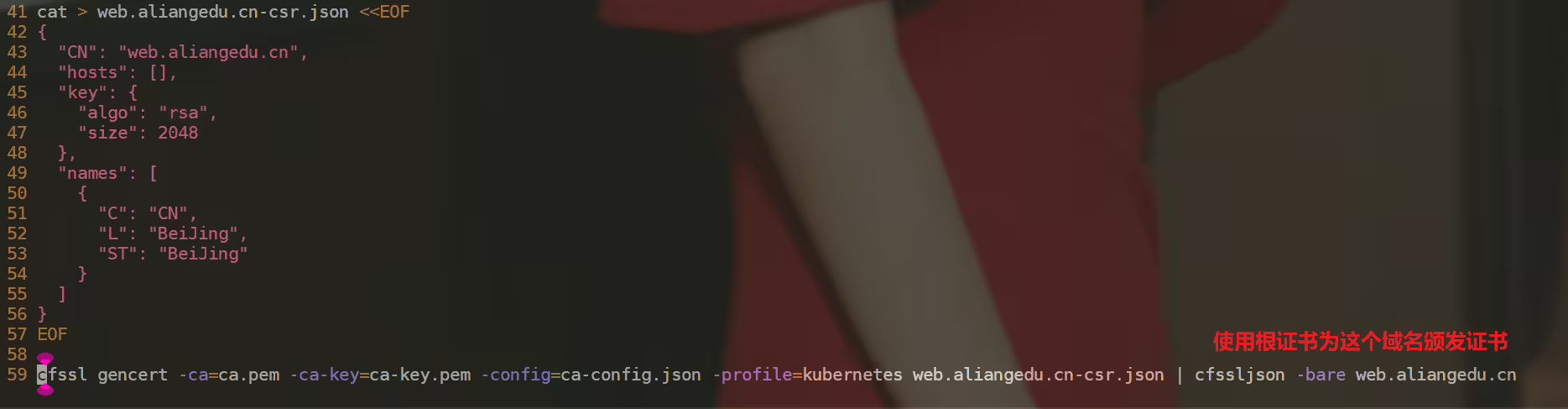
 1[root@k8s-master1 https]#sh certs.sh
 22022/11/27 09:38:30 [INFO] generating a new CA key and certificate from CSR
 32022/11/27 09:38:30 [INFO] generate received request
 42022/11/27 09:38:30 [INFO] received CSR
 52022/11/27 09:38:30 [INFO] generating key: rsa-2048
 62022/11/27 09:38:30 [INFO] encoded CSR
 72022/11/27 09:38:30 [INFO] signed certificate with serial number 42920572197673510025121729381310395494775886689
 82022/11/27 09:38:30 [INFO] generate received request
 92022/11/27 09:38:30 [INFO] received CSR
102022/11/27 09:38:30 [INFO] generating key: rsa-2048
112022/11/27 09:38:30 [INFO] encoded CSR
122022/11/27 09:38:30 [INFO] signed certificate with serial number 265650157446309871110524021899155707215940024732
132022/11/27 09:38:30 [WARNING] This certificate lacks a "hosts" field. This makes it unsuitable for
14websites. For more information see the Baseline Requirements for the Issuance and Management
15of Publicly-Trusted Certificates, v.1.1.6, from the CA/Browser Forum (https://cabforum.org);
16specifically, section 10.2.3 ("Information Requirements").
17
18[root@k8s-master1 https]#ll *
19-rw-r--r-- 1 root root  294 Nov 27 09:38 ca-config.json
20-rw-r--r-- 1 root root  960 Nov 27 09:38 ca.csr
21-rw-r--r-- 1 root root  212 Nov 27 09:38 ca-csr.json
22-rw------- 1 root root 1675 Nov 27 09:38 ca-key.pem
23-rw-r--r-- 1 root root 1273 Nov 27 09:38 ca.pem
24
25-rw-r--r-- 1 root root 1005 Mar 26  2021 certs.sh
26
27-rw-r--r-- 1 root root  968 Nov 27 09:38 web.aliangedu.cn.csr
28-rw-r--r-- 1 root root  189 Nov 27 09:38 web.aliangedu.cn-csr.json
29-rw------- 1 root root 1679 Nov 27 09:38 web.aliangedu.cn-key.pem #数字证书私钥
30-rw-r--r-- 1 root root 1318 Nov 27 09:38 web.aliangedu.cn.pem #数字证书
31[root@k8s-master1 https]#.crt,.key。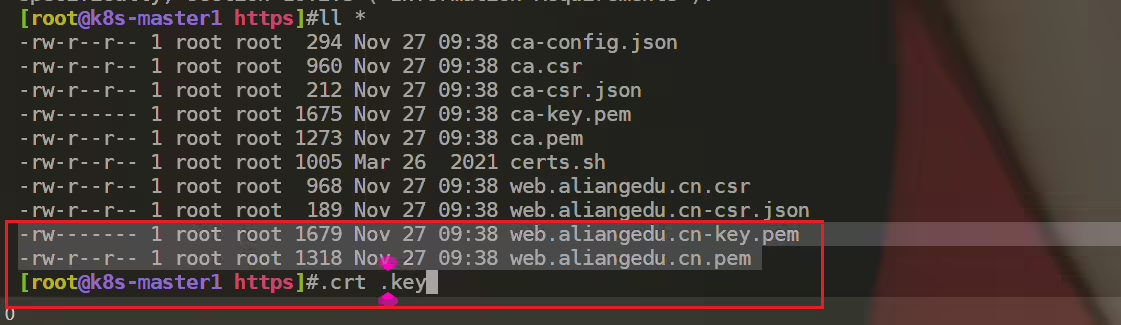
参考1:
此处为语雀内容卡片,点击链接查看:https://www.yuque.com/xyy-onlyone/zo9184/schvzu

参考2:
具体路径:
13、RBAC
2实战2:只能访问某个 namespace 的普通用户-2023.2.6(测试成功)(cfgssl)

我的博客主旨:
🍀 微信二维码
x2675263825 (舍得), qq:2675263825。

🍀 微信公众号
《云原生架构师实战》

🍀 语雀
https://www.yuque.com/xyy-onlyone
https://www.yuque.com/xyy-onlyone/exkgza?# 《语雀博客》

🍀 博客

🍀 csdn
https://blog.csdn.net/weixin_39246554?spm=1010.2135.3001.5421

🍀 知乎
https://www.zhihu.com/people/foryouone
好了,关于本次就到这里了,感谢大家阅读,最后祝大家生活快乐,每天都过的有意义哦,我们下期见!

精选 · 友链 · 更多

One的公众号
爱折腾博客的小白
