
快捷菜单
常用功能一站直达
更多功能请点顶栏「快捷菜单」
主题的内置组件可以直接在Markdown文件中以类似html标签的方式使用。
text- stringtype - string, 可选值: tip | warning | error,默认: tipvertical - string, 可选值: top | middle,默认: top你可以在标题或其他内容中使用标记:
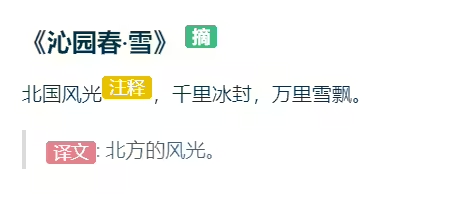
1#### 《沁园春·雪》 <Badge text="摘"/>
2北国风光<Badge text="注释" type="warning"/>,千里冰封,万里雪飘。
3
4> <Badge text="译文" type="error" vertical="middle"/>: 北方的风光。
效果:
在<code-group>中嵌套<code-block>来配合使用。在<code-block>标签添加title来指定tab标题,active指定当前tab:
 1<code-group>
 2  <code-block title="YARN" active>
 3  ```bash
 4  yarn add vuepress-theme-vdoing -D
 5  ```
 6  </code-block>
 7
 8  <code-block title="NPM">
 9  ```bash
10  npm install vuepress-theme-vdoing -D
11  ```
12  </code-block>
13</code-group>
效果:

注意
- 请在
<code-group>标签与markdown内容之间使用空行隔开,否则可能会解析不出来。- 该组件只适用于放置代码块,放其他内容在体验上并不友好。如您确实需要放置其他内容的选项卡,推荐使用vuepress-plugin-tabs (opens new window)插件。
精选 · 友链 · 更多

One的公众号
爱折腾博客的小白