
快捷菜单
常用功能一站直达
更多功能请点顶栏「快捷菜单」


ip_select-v3.py完整代码:
 1import pandas as pd
 2import time
 3from datetime import datetime  # 新增:导入datetime模块,用于生成时间戳
 4
 5def filter_ip_rows():
 6    # 配置区
 7    input_file = "test.xlsx"
 8    sheet_name = "Sheet"  # Excel 的工作表名称
 9    # 核心修改:生成带当前时间戳的输出文件名
10    time_str = datetime.now().strftime("%Y-%m-%d_%H-%M-%S")
11    output_file = f"result-{time_str}.xlsx"
12
13    print("=" * 50)
14    print("🚀 开始执行 IP 筛选脚本")
15    print(f"📂 输入文件: {input_file}")
16    print(f"📂 输出文件: {output_file}")
17    print("=" * 50)
18
19    try:
20        # -------- 步骤 1: 读取 Excel --------
21        print("\n⏳ 正在读取 Excel 文件...")
22        start_time = time.time()
23
24        df = pd.read_excel(input_file, sheet_name=sheet_name)
25
26        read_cost = time.time() - start_time
27        print(f"✅ 读取完成!耗时 {read_cost:.2f} 秒")
28        print(f"📊 原表格总行数: {len(df)}")
29
30        # -------- 步骤 2: 数据预处理 --------
31        print("\n⏳ 正在清洗数据...")
32
33        # A列 (第0列) 提取目标 IP 集合
34        col_a = df.iloc[:, 0].dropna().astype(str).str.strip()
35        unique_ips = col_a.unique()
36        ip_set = set(unique_ips)
37
38        # B列 (第1列) 提取待筛选 IP
39        col_b = df.iloc[:, 1].astype(str).str.strip()
40
41        print(f"🔍 A列唯一IP数量: {len(unique_ips)}")
42        print(f"🔍 B列待筛选IP数量: {len(col_b)}")
43
44        # -------- 步骤 3: 开始筛选 --------
45        print("\n⏳ 正在匹配 IP (这步可能耗时稍长,请稍候)...")
46        start_time = time.time()
47
48        # isin 匹配 B列中存在于A列的所有行
49        filtered_df = df[col_b.isin(ip_set)]
50
51        filter_cost = time.time() - start_time
52        print(f"✅ 匹配完成!耗时 {filter_cost:.2f} 秒")
53        print(f"✅ 筛选出匹配行数: {len(filtered_df)}")
54
55        # -------- 步骤 4: 保存结果 --------
56        if len(filtered_df) == 0:
57            print("\n⚠️  警告:未筛选到任何匹配数据!")
58        else:
59            print("\n⏳ 正在生成结果文件...")
60            start_time = time.time()
61
62            with pd.ExcelWriter(output_file, engine='openpyxl') as writer:
63                filtered_df.to_excel(writer, sheet_name='筛选结果', index=False)
64
65            save_cost = time.time() - start_time
66            print(f"✅ 结果已保存!耗时 {save_cost:.2f} 秒")
67            print(f"📁 结果文件路径: {output_file}")
68
69        print("\n" + "=" * 50)
70        print("🎉 任务全部完成!")
71        print("=" * 50)
72
73    except FileNotFoundError:
74        print(f"\n❌ 错误:请确保 {input_file} 存在于脚本同一目录下!")
75    except Exception as e:
76        print(f"\n❌ 发生未知错误: {str(e)}")
77        print("🔧 可能的原因: Excel 文件格式错误、缺少 openpyxl 库、或权限不足")
78
79if __name__ == "__main__":
80 filter_ip_rows() 1#执行
2D:\我的开源项目\script\02.python脚本\02.IP筛选Python脚本>python ip_select-v3.py
3==================================================
4🚀 开始执行 IP 筛选脚本
5📂 输入文件: test.xlsx
6📂 输出文件: result-2026-04-08_12-19-09.xlsx
7==================================================
8
9⏳ 正在读取 Excel 文件...
10✅ 读取完成!耗时 0.42 秒
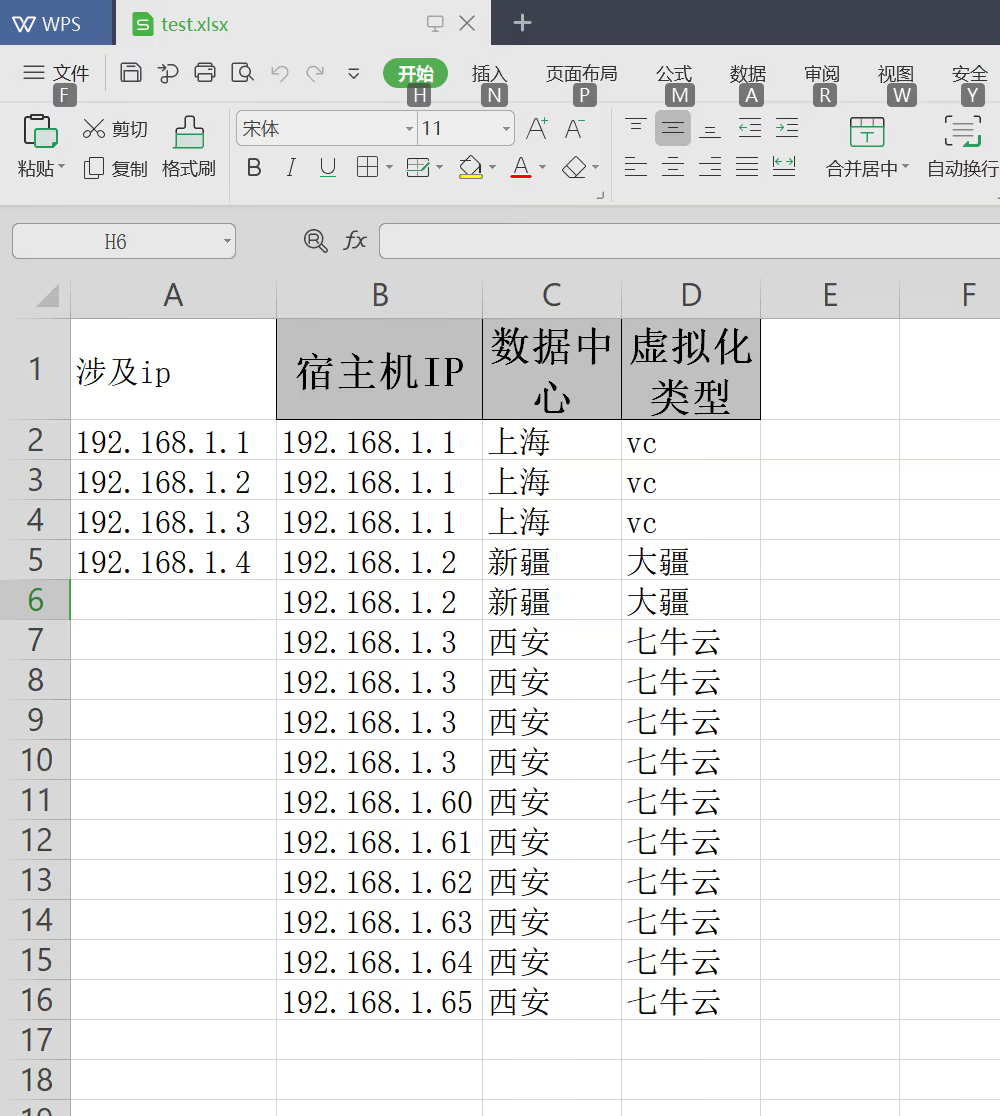
11📂 原表格总行数: 15
12
13⏳ 正在清洗数据...
14🔍 A列唯一IP数量: 4
15🔍 B列待筛选IP数量: 15
16
17⏳ 正在匹配 IP (这步可能耗时稍长,请稍候)...
18✅ 匹配完成!耗时 0.00 秒
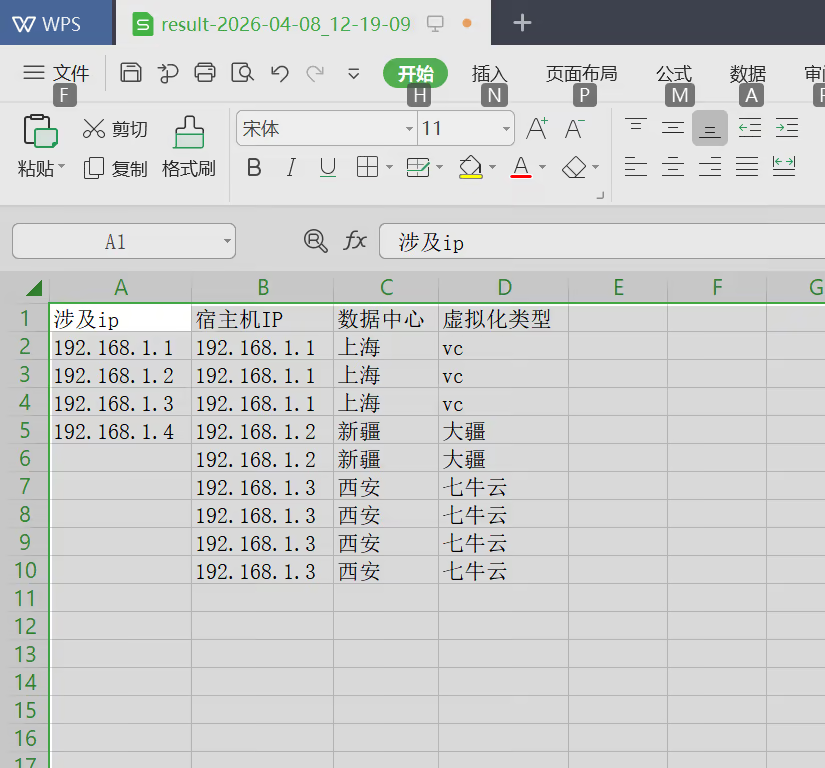
19✅ 筛选出匹配行数: 9
20
21⏳ 正在生成结果文件...
22✅ 结果已保存!耗时 0.02 秒
23📁 结果文件路径: result-2026-04-08_12-19-09.xlsx
24
25==================================================
26🎉 任务全部完成!
27==================================================
28
29D:\我的开源项目\script\02.python脚本\02.IP筛选Python脚本>
30
31
32##输出效果
33 D:\我的开源项目\script\02.python脚本\02.IP筛选Python脚本 的目录
34
352026/04/08 12:19 <DIR> .
362026/04/08 12:19 <DIR> ..
372026/04/04 09:07 1,462 ip_select-v2.py
382026/04/08 11:15 3,080 ip_select-v3.py
392026/04/08 12:19 5,169 result-2026-04-08_12-19-09.xlsx
402026/04/08 12:15 9,245 test.xlsx
41 4 个文件 18,956 字节
42 2 个目录 286,777,180,160 可用字节
43
44D:\我的开源项目\script\02.python脚本\02.IP筛选Python脚本>筛选前:
筛选后:
结束。
精选 · 友链 · 更多

One的公众号
爱折腾博客的小白